> ## Documentation Index
> Fetch the complete documentation index at: https://docs.yukoreviews.com/llms.txt
> Use this file to discover all available pages before exploring further.
> Automate review collection and follow-up actions using customizable workflows.
# Workflows
Automate your review collection and engagement effortlessly.\
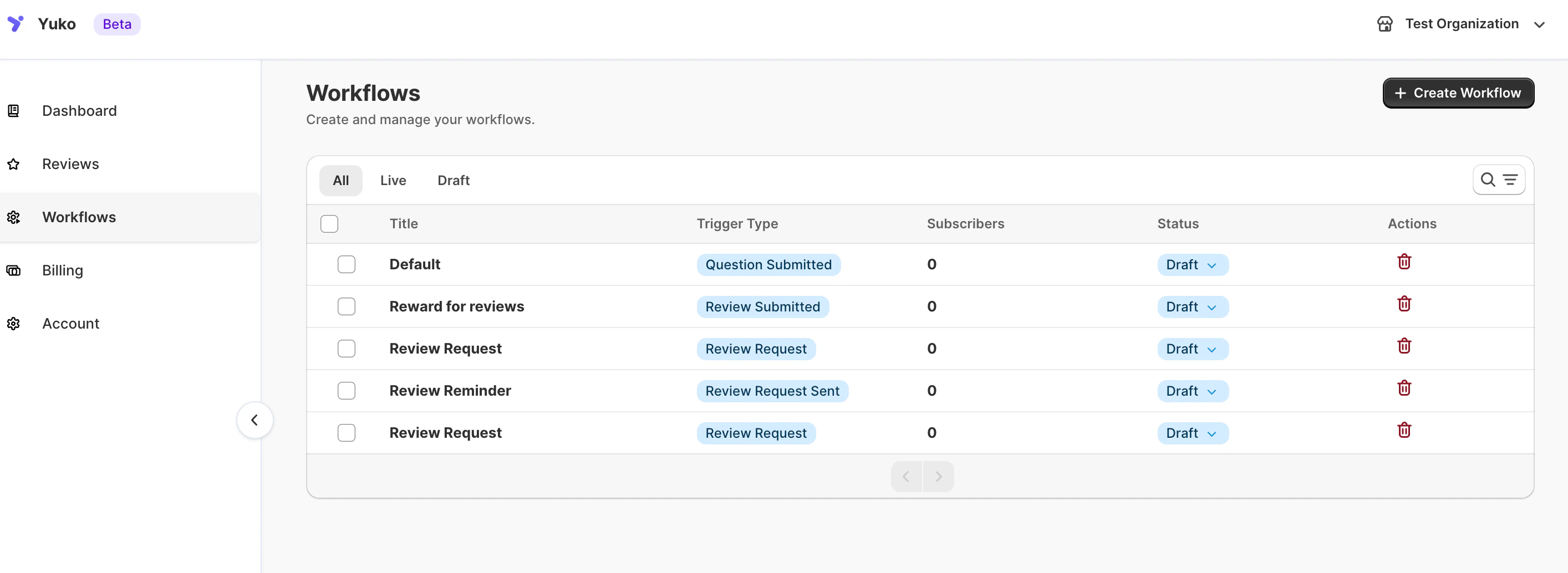
Yuko’s **Workflows** feature helps you send the right message to the right customer — at exactly the right time.\
You can create smart automation sequences for review requests, reminders, rewards, and follow-up messages, all within a single dashboard.
### **Navigation**
Yuko Dashboard → **Workflows**
 ### **Overview**
Workflows save you time by automating repetitive review and reward tasks.\
Once set up, Yuko automatically triggers emails and actions based on your store’s events — such as order completion, review submission, or photo upload.
You can:
* Request product reviews automatically after purchase
* Send reminders to customers who haven’t reviewed yet
* Reward reviewers with discounts
* Trigger follow-up emails when reviews are posted
### **Overview**
Workflows save you time by automating repetitive review and reward tasks.\
Once set up, Yuko automatically triggers emails and actions based on your store’s events — such as order completion, review submission, or photo upload.
You can:
* Request product reviews automatically after purchase
* Send reminders to customers who haven’t reviewed yet
* Reward reviewers with discounts
* Trigger follow-up emails when reviews are posted