> ## Documentation Index
> Fetch the complete documentation index at: https://docs.yukoreviews.com/llms.txt
> Use this file to discover all available pages before exploring further.
> Collect customer questions through a simple on-site form displayed on product pages.
# Questions & Answers Collection Form
### **Navigation**
Yuko Dashboard → **Reviews → Widgets → Q\&A Collection Form**
 ### **Overview**
The **Q\&A Collection Form** is what customers use to ask questions about your store.\
It appears as a simple section or button below the product description — fully customizable to match your theme and tone.
### **Form Structure Overview**
The Q\&A form is divided into six configuration sections:
### **1. Settings**
General appearance and functional controls for the form.
You can:
* Enable/disable the form
* Choose display style (inline section or button trigger)
* Configure visibility across product pages
* Adjust spacing and alignment
### **Available UI Customizations (Dialog & Container)**
| Element | Option |
| :-------------------------- | :------------------------------------------ |
| **Dialog Background Color** | Hex color picker |
| **Title Color** | Adjust heading text color |
| **Description Color** | Customize helper/intro text color |
| **Button Background Color** | Set primary button color |
| **Button Text Color** | Adjust button label color |
| **Input Border Color** | Define border color for text fields |
| **Label Color** | Customize field label colors |
| **Error Color** | Set the color for validation/error messages |
### **2. Questioner Info**
Capture essential customer details to ensure valid submissions.
Fields include:
* **First Name**
* **Last Name**
* **Email (kept private)**
You can:
* Edit field labels
* Add placeholder text
* Choose which fields are required
**Customization Options**
| Field | Configurable Items |
| :--------------------------------------------------------------------- | :--------------------------------------- |
| **Questioner Title** | e.g., *About You* |
| **Questioner Description** | e.g., *Tell us a little about yourself.* |
| **First Name Label** | e.g., *First Name* |
| **Last Name Label** | e.g., *Last Name* |
| **Email Label** | e.g., *Email (private)* |
| **First Name Placeholder** | e.g., *John* |
| **Last Name Placeholder** | e.g., *Doe* |
| **Email Placeholder** | e.g., *Enter email (private)* |
| You can also choose which fields are **required** for form submission. | |
### **3. Question Section**
Controls how customers type and submit their question.\
\
You can customize:
* Field label → e.g., **Ask a Question**
* Description → e.g., *Have a question about this product? We’re here to help!*
* Placeholder → e.g., *What would you like to know?*
* Character limits
* Validation rules
* Optional help text
### **Configurable Fields**
| Setting | Example |
| :----------------------- | :--------------------------- |
| **Question Title** | Ask a Question |
| **Question Description** | Helpful intro text |
| **Placeholder** | What would you like to know? |
### **4. Footer Config**
Configure how the footer of the form looks.
You can:
* Add disclaimer text
* Adjust spacing
* Show or hide **“Powered by Yuko”**
* Add legal notices or guidance\
\
**Footer Button Text Options**
| Button | Default Text |
| :----------------------- | :----------- |
| **Back Button Text** | Back |
| **Continue Button Text** | Continue |
| **Submit Button Text** | Submit |
### **5. Thank You**
Set the message displayed after successful submission.
You can:
* Customize confirmation text (e.g., *“Thanks! We’ll get back to you soon.”*)
* Add next-step instructions
* Include optional branding elements\
\
You can personalize:
| Setting | Example |
| :------------------------ | :------------------------------------------------------------------------- |
| **Thank You Title** | Thank You! |
| **Thank You Description** | Your question has been submitted successfully. We'll get back to you soon! |
This message reassures customers and sets expectations clearly.
### **6. Advanced CSS**
For full design control.
You can embed CSS to:
* Re-style form layout
* Adjust typography
* Modify button styles
* Support dark/light themes
* Override theme-specific limits
Ideal for developers and custom UI requirements.
***
### **Form Preview**
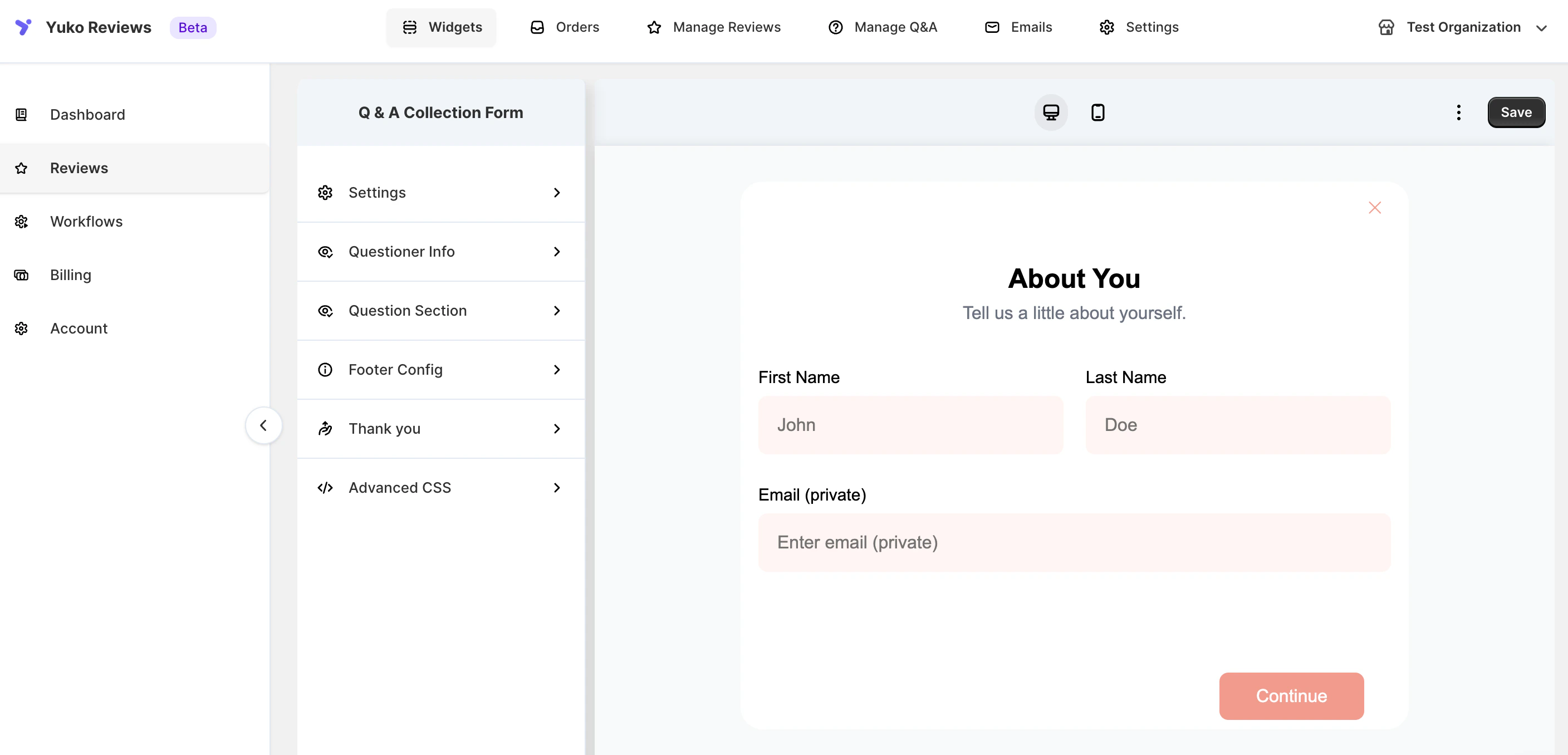
The form begins with an **“About You”** section where customers provide their details:
* **First Name**
* **Last Name**
* **Email** *(private and never published)*
This ensures authentic, identifiable questions without revealing personal information on your storefront.
***
### **Customization Options**
You can tailor the Q\&A form experience with the following options:
* Customize **labels, placeholder text, and helper descriptions**
* Match **color schemes, typography, and button styles** to your store theme
* Preview the form live using the **desktop/mobile toggle**
* Save changes to apply instantly across all product pages
### **Overview**
The **Q\&A Collection Form** is what customers use to ask questions about your store.\
It appears as a simple section or button below the product description — fully customizable to match your theme and tone.
### **Form Structure Overview**
The Q\&A form is divided into six configuration sections:
### **1. Settings**
General appearance and functional controls for the form.
You can:
* Enable/disable the form
* Choose display style (inline section or button trigger)
* Configure visibility across product pages
* Adjust spacing and alignment
### **Available UI Customizations (Dialog & Container)**
| Element | Option |
| :-------------------------- | :------------------------------------------ |
| **Dialog Background Color** | Hex color picker |
| **Title Color** | Adjust heading text color |
| **Description Color** | Customize helper/intro text color |
| **Button Background Color** | Set primary button color |
| **Button Text Color** | Adjust button label color |
| **Input Border Color** | Define border color for text fields |
| **Label Color** | Customize field label colors |
| **Error Color** | Set the color for validation/error messages |
### **2. Questioner Info**
Capture essential customer details to ensure valid submissions.
Fields include:
* **First Name**
* **Last Name**
* **Email (kept private)**
You can:
* Edit field labels
* Add placeholder text
* Choose which fields are required
**Customization Options**
| Field | Configurable Items |
| :--------------------------------------------------------------------- | :--------------------------------------- |
| **Questioner Title** | e.g., *About You* |
| **Questioner Description** | e.g., *Tell us a little about yourself.* |
| **First Name Label** | e.g., *First Name* |
| **Last Name Label** | e.g., *Last Name* |
| **Email Label** | e.g., *Email (private)* |
| **First Name Placeholder** | e.g., *John* |
| **Last Name Placeholder** | e.g., *Doe* |
| **Email Placeholder** | e.g., *Enter email (private)* |
| You can also choose which fields are **required** for form submission. | |
### **3. Question Section**
Controls how customers type and submit their question.\
\
You can customize:
* Field label → e.g., **Ask a Question**
* Description → e.g., *Have a question about this product? We’re here to help!*
* Placeholder → e.g., *What would you like to know?*
* Character limits
* Validation rules
* Optional help text
### **Configurable Fields**
| Setting | Example |
| :----------------------- | :--------------------------- |
| **Question Title** | Ask a Question |
| **Question Description** | Helpful intro text |
| **Placeholder** | What would you like to know? |
### **4. Footer Config**
Configure how the footer of the form looks.
You can:
* Add disclaimer text
* Adjust spacing
* Show or hide **“Powered by Yuko”**
* Add legal notices or guidance\
\
**Footer Button Text Options**
| Button | Default Text |
| :----------------------- | :----------- |
| **Back Button Text** | Back |
| **Continue Button Text** | Continue |
| **Submit Button Text** | Submit |
### **5. Thank You**
Set the message displayed after successful submission.
You can:
* Customize confirmation text (e.g., *“Thanks! We’ll get back to you soon.”*)
* Add next-step instructions
* Include optional branding elements\
\
You can personalize:
| Setting | Example |
| :------------------------ | :------------------------------------------------------------------------- |
| **Thank You Title** | Thank You! |
| **Thank You Description** | Your question has been submitted successfully. We'll get back to you soon! |
This message reassures customers and sets expectations clearly.
### **6. Advanced CSS**
For full design control.
You can embed CSS to:
* Re-style form layout
* Adjust typography
* Modify button styles
* Support dark/light themes
* Override theme-specific limits
Ideal for developers and custom UI requirements.
***
### **Form Preview**
The form begins with an **“About You”** section where customers provide their details:
* **First Name**
* **Last Name**
* **Email** *(private and never published)*
This ensures authentic, identifiable questions without revealing personal information on your storefront.
***
### **Customization Options**
You can tailor the Q\&A form experience with the following options:
* Customize **labels, placeholder text, and helper descriptions**
* Match **color schemes, typography, and button styles** to your store theme
* Preview the form live using the **desktop/mobile toggle**
* Save changes to apply instantly across all product pages