> ## Documentation Index
> Fetch the complete documentation index at: https://docs.yukoreviews.com/llms.txt
> Use this file to discover all available pages before exploring further.
# Review Restrictions & Limits
> Control who can submit reviews, what information they can include, and how uploads are sized.
export const DashboardPath = ({path}) =>
**In the Yuko Dashboard:** {path}
;
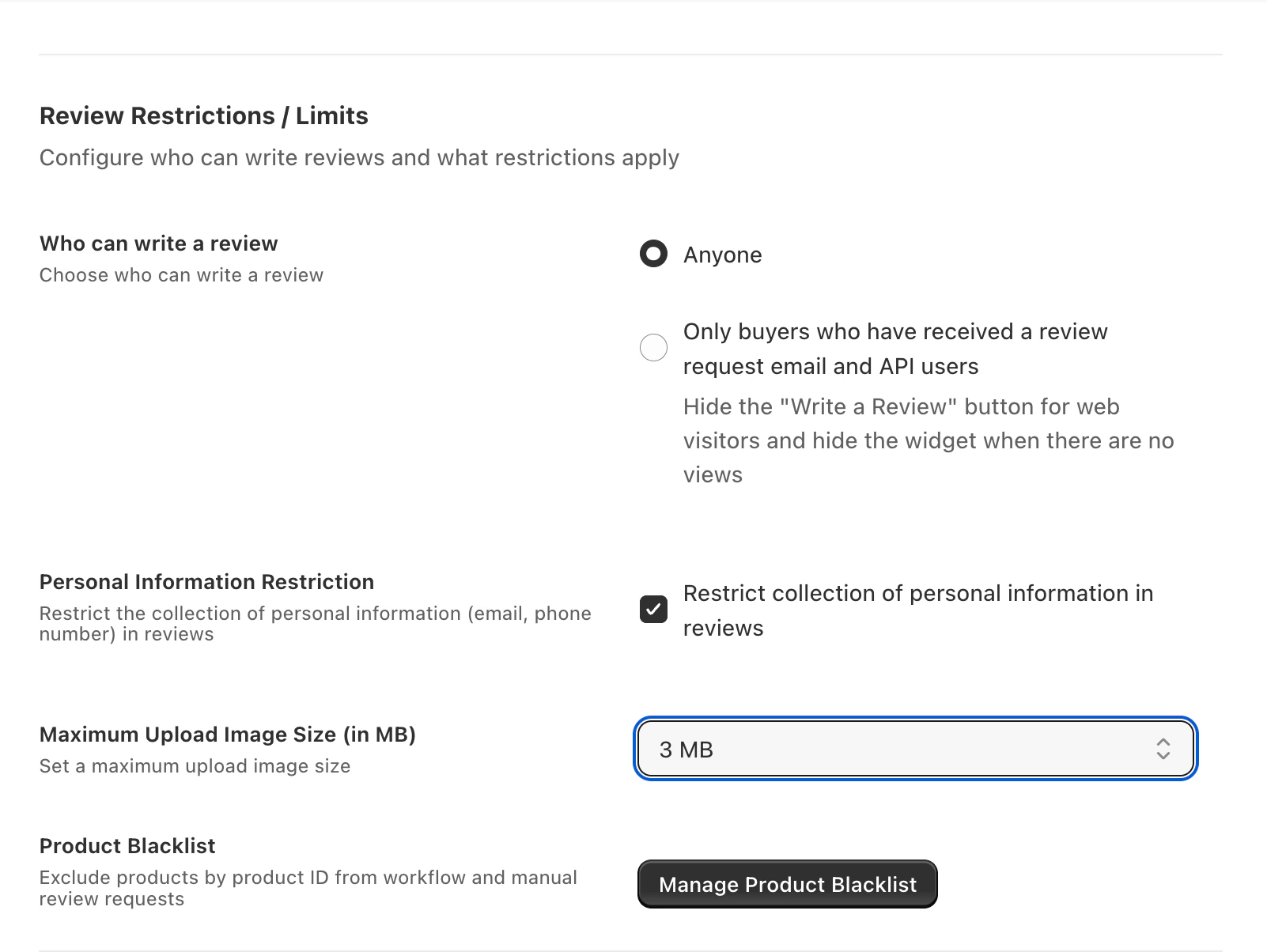
Review Restrictions & Limits control **who is allowed to submit reviews**, **what content is collected**, and **how uploads are sized**. Combined with the Email Blacklist and Product Blacklist, they form your first line of defense against fake, spammy, or low-value reviews.
 ***
## Available settings
Choose between:
* **Anyone** — any visitor can submit a review (even non-customers)
* **Only buyers who received a review request email + API users** — locks review submission to customers you explicitly invited, plus your integrations
**Recommended:** restrict to invited buyers for the highest-trust reviews. Combine with [Verified Buyer Badges](/collect-reviews/verified-buyer-badges) for maximum credibility.
When enabled, Yuko automatically masks email addresses and phone numbers found inside review text before publishing.
* Protects customers who unintentionally share private info
* Required for GDPR-compliant public review display
* Does not affect the review's rating or visibility
Sets the per-image size cap for photo reviews.
* Defaults to 5 MB per image — fine for phone photos
* Lower the limit (e.g. 2 MB) to speed up mobile uploads
* Raise it (up to 15 MB) for stores where high-res detail matters (art, crafts, jewelry)
Files larger than the limit are rejected at upload with a friendly error message — they never hit your storage quota.
***
## Related controls
These live on their own pages:
Stop Yuko from emailing specific addresses or whole domains. Useful for internal inboxes, test accounts, and unsubscribers.
Exclude specific products from review collection — gift cards, services, discontinued SKUs, samples.
***
## Recommended combination for low spam risk
1. **Restrict submissions to invited buyers** — blocks drive-by spam
2. **Enable personal information restriction** — protects customer privacy
3. **Maintain the [Email Blacklist](/managing-reviews/email-blacklist)** — block known-bad addresses and disposable email providers
4. **Keep image size reasonable** (3–5 MB) — balances quality and upload speed
This configuration mirrors how most high-volume merchants collect reviews safely.
***
## Need Help?
Talk to our team for personalized setup help
**Time:** 30 minutes
Reach our team at yukoreviews.com/support
**Response time:** Within 24 hours
Browse detailed guides for every feature
Connect Yuko with other tools
***
## Available settings
Choose between:
* **Anyone** — any visitor can submit a review (even non-customers)
* **Only buyers who received a review request email + API users** — locks review submission to customers you explicitly invited, plus your integrations
**Recommended:** restrict to invited buyers for the highest-trust reviews. Combine with [Verified Buyer Badges](/collect-reviews/verified-buyer-badges) for maximum credibility.
When enabled, Yuko automatically masks email addresses and phone numbers found inside review text before publishing.
* Protects customers who unintentionally share private info
* Required for GDPR-compliant public review display
* Does not affect the review's rating or visibility
Sets the per-image size cap for photo reviews.
* Defaults to 5 MB per image — fine for phone photos
* Lower the limit (e.g. 2 MB) to speed up mobile uploads
* Raise it (up to 15 MB) for stores where high-res detail matters (art, crafts, jewelry)
Files larger than the limit are rejected at upload with a friendly error message — they never hit your storage quota.
***
## Related controls
These live on their own pages:
Stop Yuko from emailing specific addresses or whole domains. Useful for internal inboxes, test accounts, and unsubscribers.
Exclude specific products from review collection — gift cards, services, discontinued SKUs, samples.
***
## Recommended combination for low spam risk
1. **Restrict submissions to invited buyers** — blocks drive-by spam
2. **Enable personal information restriction** — protects customer privacy
3. **Maintain the [Email Blacklist](/managing-reviews/email-blacklist)** — block known-bad addresses and disposable email providers
4. **Keep image size reasonable** (3–5 MB) — balances quality and upload speed
This configuration mirrors how most high-volume merchants collect reviews safely.
***
## Need Help?
Talk to our team for personalized setup help
**Time:** 30 minutes
Reach our team at yukoreviews.com/support
**Response time:** Within 24 hours
Browse detailed guides for every feature
Connect Yuko with other tools