> ## Documentation Index
> Fetch the complete documentation index at: https://docs.yukoreviews.com/llms.txt
> Use this file to discover all available pages before exploring further.
# Review Moderation
> Control review quality with profanity filters, spam detection, and manual approval workflows
## Keep Your Review Section Clean and Professional
Review moderation tools help you maintain quality standards while preventing spam, fake reviews, and inappropriate content. Set up automated filters and manual approval workflows that match your brand's needs.
**What you'll achieve:**
* Block spam and fake reviews automatically
* Filter profanity and inappropriate language
* Set up approval workflows for quality control
* Maintain professional review section
* Protect brand reputation
**Impact:** Stores with active moderation see 60% less spam and maintain 25% higher trust scores than unmoderated stores
***
## Navigation:
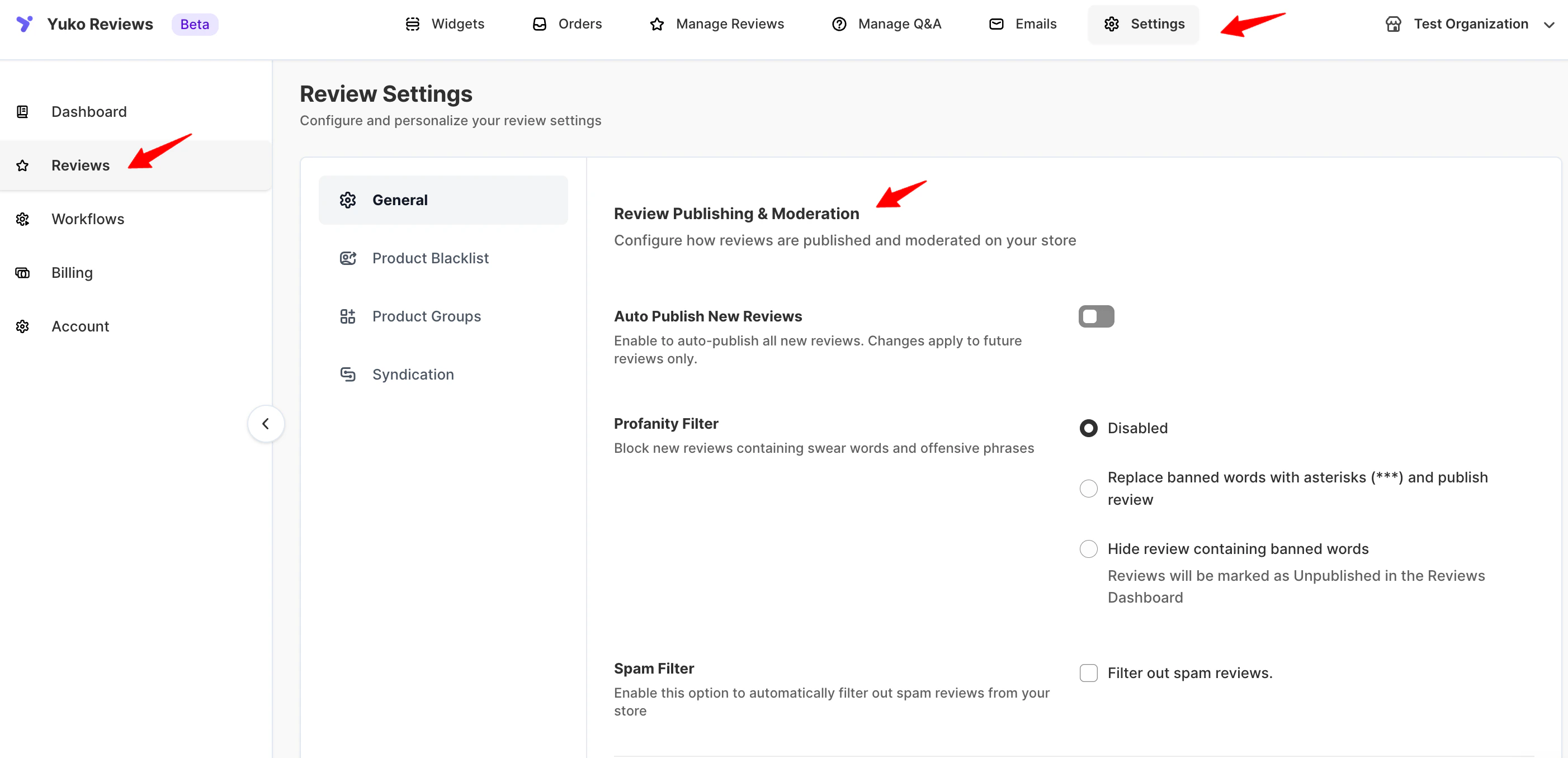
**Yuko Dashboard → Reviews → Settings → General → Review Publishing & Moderation**
 ## Profanity Filter
Block or censor offensive language automatically using the following settings in Yuko:
**Automatically censor profanity**
* Offensive words or phrases in a review are automatically replaced with `***`.
* The review remains visible on your product pages, widgets, and contributes to the average rating.
* Ensures that genuine feedback is not lost while keeping content appropriate for all audiences.
* Best practice: Use this for minor profanity to maintain flow of reviews without hiding customer sentiment.
**Best for:** Casual brands, high review volume
**Recommended:** Use replacement for mild profanity. For severe language, use "hold for review" instead. This feature is available in the paid plans
**Block reviews with profanity**
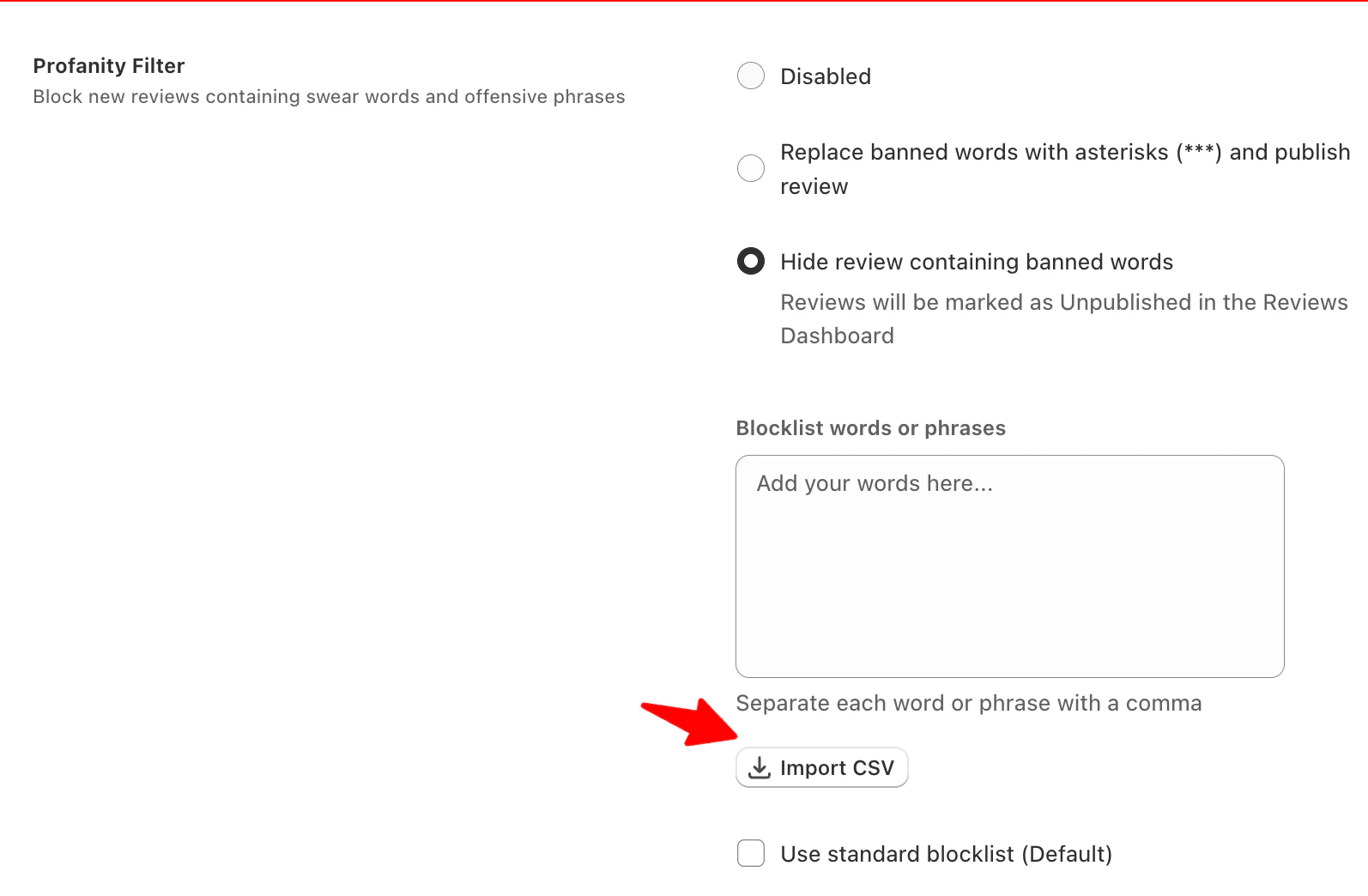
* Reviews with blocked words are automatically marked as unpublished.
* These reviews will not appear on your store or in review widgets.
* Ideal for severe language or inappropriate content that could harm your store’s reputation.
* You can manually review hidden content in the dashboard to recover if needed.
**Best for:** Stores prioritizing a fully clean review section over visibility of flagged reviews.
**Time investment:** Medium – requires occasional review of hidden content.
**Applies Yuko’s pre-configured list of common offensive words automatically.**
* Saves time and ensures consistency in moderating inappropriate content.
* You can combine this with custom words or phrases to tailor moderation to your store’s requirements.
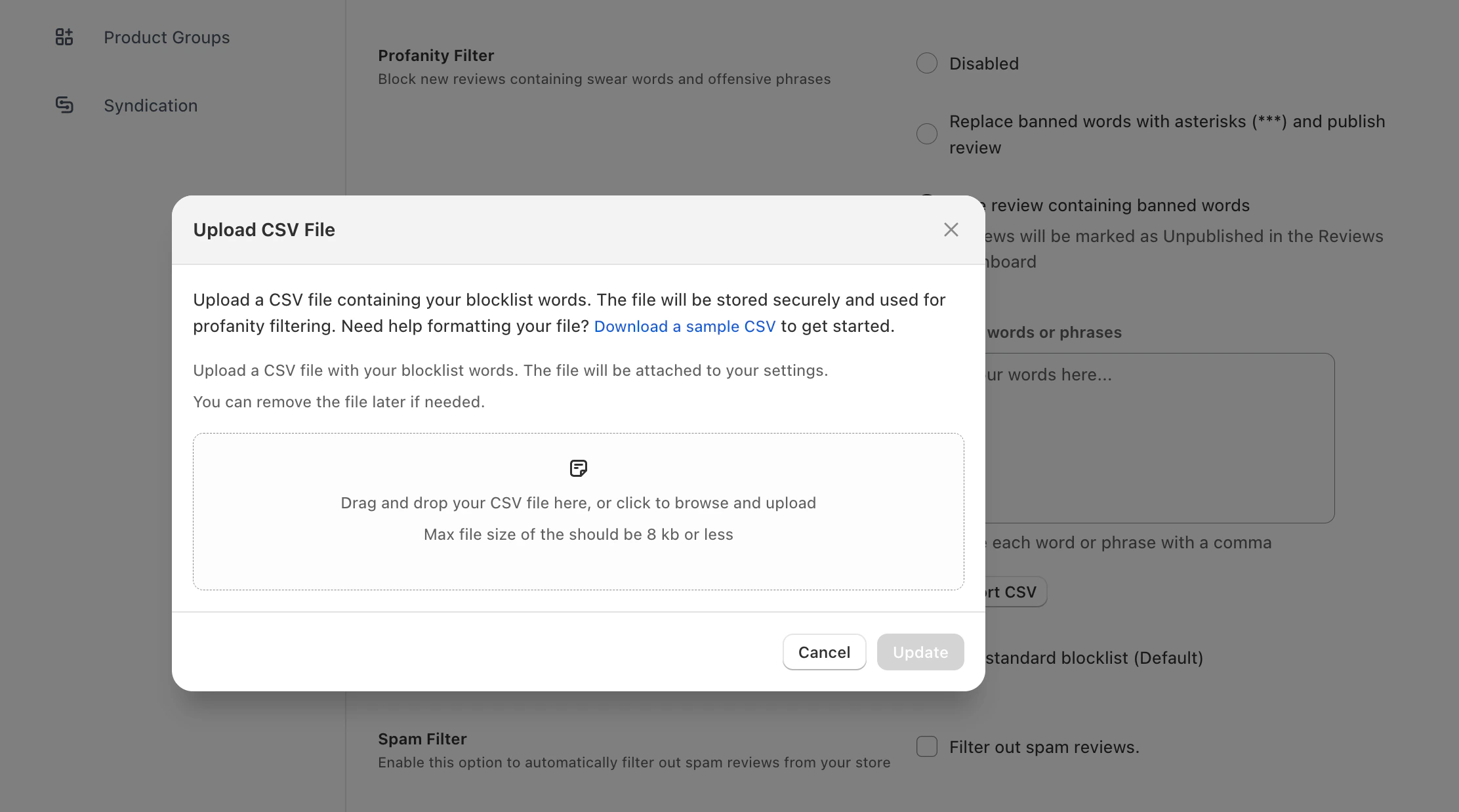
**Optional:** Upload a CSV file containing custom blocklist words. The file is securely stored and applied to all incoming reviews. You can remove or update the file anytime.
## Profanity Filter
Block or censor offensive language automatically using the following settings in Yuko:
**Automatically censor profanity**
* Offensive words or phrases in a review are automatically replaced with `***`.
* The review remains visible on your product pages, widgets, and contributes to the average rating.
* Ensures that genuine feedback is not lost while keeping content appropriate for all audiences.
* Best practice: Use this for minor profanity to maintain flow of reviews without hiding customer sentiment.
**Best for:** Casual brands, high review volume
**Recommended:** Use replacement for mild profanity. For severe language, use "hold for review" instead. This feature is available in the paid plans
**Block reviews with profanity**
* Reviews with blocked words are automatically marked as unpublished.
* These reviews will not appear on your store or in review widgets.
* Ideal for severe language or inappropriate content that could harm your store’s reputation.
* You can manually review hidden content in the dashboard to recover if needed.
**Best for:** Stores prioritizing a fully clean review section over visibility of flagged reviews.
**Time investment:** Medium – requires occasional review of hidden content.
**Applies Yuko’s pre-configured list of common offensive words automatically.**
* Saves time and ensures consistency in moderating inappropriate content.
* You can combine this with custom words or phrases to tailor moderation to your store’s requirements.
**Optional:** Upload a CSV file containing custom blocklist words. The file is securely stored and applied to all incoming reviews. You can remove or update the file anytime.
 \
**Best for:** Stores starting with profanity filtering or without custom blocklist needs.
**Time investment:** Very low – ready-to-use out of the box.
**Best practice:** Regularly review your blocked words list to ensure it aligns with your brand tone and keeps your reviews trustworthy and family-friendly.
***
## Spam Filter
Enable Yuko’s Spam Filter to automatically block suspicious or spammy reviews from appearing on your store. This keeps your review section clean and your ratings trustworthy.
### How It Works
\
**Best for:** Stores starting with profanity filtering or without custom blocklist needs.
**Time investment:** Very low – ready-to-use out of the box.
**Best practice:** Regularly review your blocked words list to ensure it aligns with your brand tone and keeps your reviews trustworthy and family-friendly.
***
## Spam Filter
Enable Yuko’s Spam Filter to automatically block suspicious or spammy reviews from appearing on your store. This keeps your review section clean and your ratings trustworthy.
### How It Works
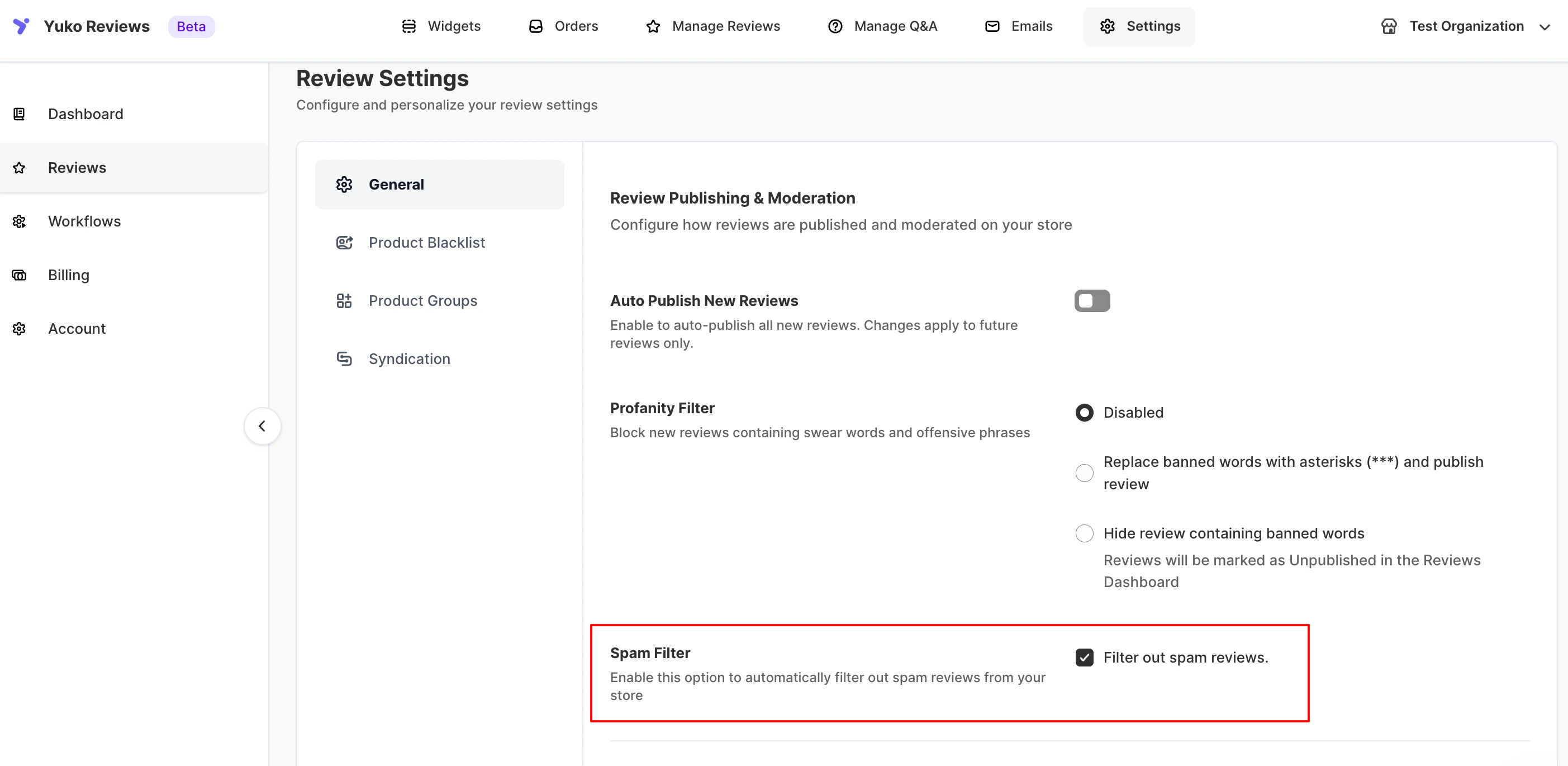 * Once enabled, Yuko scans incoming reviews for common spam indicators.
* Reviews flagged as spam are automatically hidden and moved to the **Spam** section in your dashboard.
### Key Points
* **Automatic Protection:** Reduces fake, duplicate, or malicious reviews.
* **Minimal Manual Work:** Just enable the filter—Yuko handles the rest.
* **Review Spam Folder Occasionally:** Check periodically for any legitimate reviews mistakenly flagged.
### Best For
* Stores receiving frequent reviews
* Stores wanting to maintain accurate ratings and customer trust
## Next Steps
Block known spam domains.
**Time:** 10 minutes → [Email blacklist setup](/managing-reviews/email-blacklist)
Decide: Manual, filtered auto-publish, or full auto.
**Time:** 15 minutes → [Auto-publishing configuration](/managing-reviews/auto-publishing-reviews)
Check spam rate weekly, adjust filters as needed.
**Time:** 10 min/week **Action:** Review spam folder, check false positives
***
## Need Help?
Talk to our team for personalized setup help
**Time:** 30 minutes
Reach our team at yukoreviews.com/support
**Response time:** Within 24 hours
Browse detailed guides for every feature
Connect Yuko with other tools
**Pro tip:** Start with "hold for manual review" for profanity and spam. After 30 days, you'll understand your false positive rate and can switch to more aggressive auto-hide if filters are working well.
* Once enabled, Yuko scans incoming reviews for common spam indicators.
* Reviews flagged as spam are automatically hidden and moved to the **Spam** section in your dashboard.
### Key Points
* **Automatic Protection:** Reduces fake, duplicate, or malicious reviews.
* **Minimal Manual Work:** Just enable the filter—Yuko handles the rest.
* **Review Spam Folder Occasionally:** Check periodically for any legitimate reviews mistakenly flagged.
### Best For
* Stores receiving frequent reviews
* Stores wanting to maintain accurate ratings and customer trust
## Next Steps
Block known spam domains.
**Time:** 10 minutes → [Email blacklist setup](/managing-reviews/email-blacklist)
Decide: Manual, filtered auto-publish, or full auto.
**Time:** 15 minutes → [Auto-publishing configuration](/managing-reviews/auto-publishing-reviews)
Check spam rate weekly, adjust filters as needed.
**Time:** 10 min/week **Action:** Review spam folder, check false positives
***
## Need Help?
Talk to our team for personalized setup help
**Time:** 30 minutes
Reach our team at yukoreviews.com/support
**Response time:** Within 24 hours
Browse detailed guides for every feature
Connect Yuko with other tools
**Pro tip:** Start with "hold for manual review" for profanity and spam. After 30 days, you'll understand your false positive rate and can switch to more aggressive auto-hide if filters are working well.