> ## Documentation Index
> Fetch the complete documentation index at: https://docs.yukoreviews.com/llms.txt
> Use this file to discover all available pages before exploring further.
> Engage with customers by replying to reviews and building lasting relationships
# Replying to Reviews
## Turn Reviews into Conversations That Build Loyalty
Responding to customer feedback shows you care and transforms one-time buyers into loyal advocates.
**What you'll achieve:**
* Strengthen customer relationships with personalized, thoughtful responses
* Resolve issues publicly and showcase excellent customer service
* Increase review response rates by 40-60%
* Improve customer retention by 25-35%
**Impact:** Merchants who reply to 80%+ of reviews see:
* 30-45% higher repeat purchase rates
* 50-70% improvement in negative review resolution
* 35-50% increase in customer satisfaction scores
* 40-60% boost in average customer lifetime value
## How to Reply to Any Review
You can reply to both **Product Reviews** and **Store Reviews** directly from the Yuko dashboard. Replies are public and appear on all review widgets where the review is displayed.
**Navigation: Yuko Dashboard → Reviews → Manage Reviews**
On the **Manage Reviews** page, you’ll see two tabs:
* **Product Reviews**
* **Store Reviews**
Both follow the same reply workflow.
From this page, you can:
* View all submitted reviews
* Manage replies
* Adjust review-related email preferences
Click on the review you want to respond to.
* Go to **Reviews → Manage Reviews**
* Locate the review you want to respond to
* Under the **review date** , click **Add Reply**
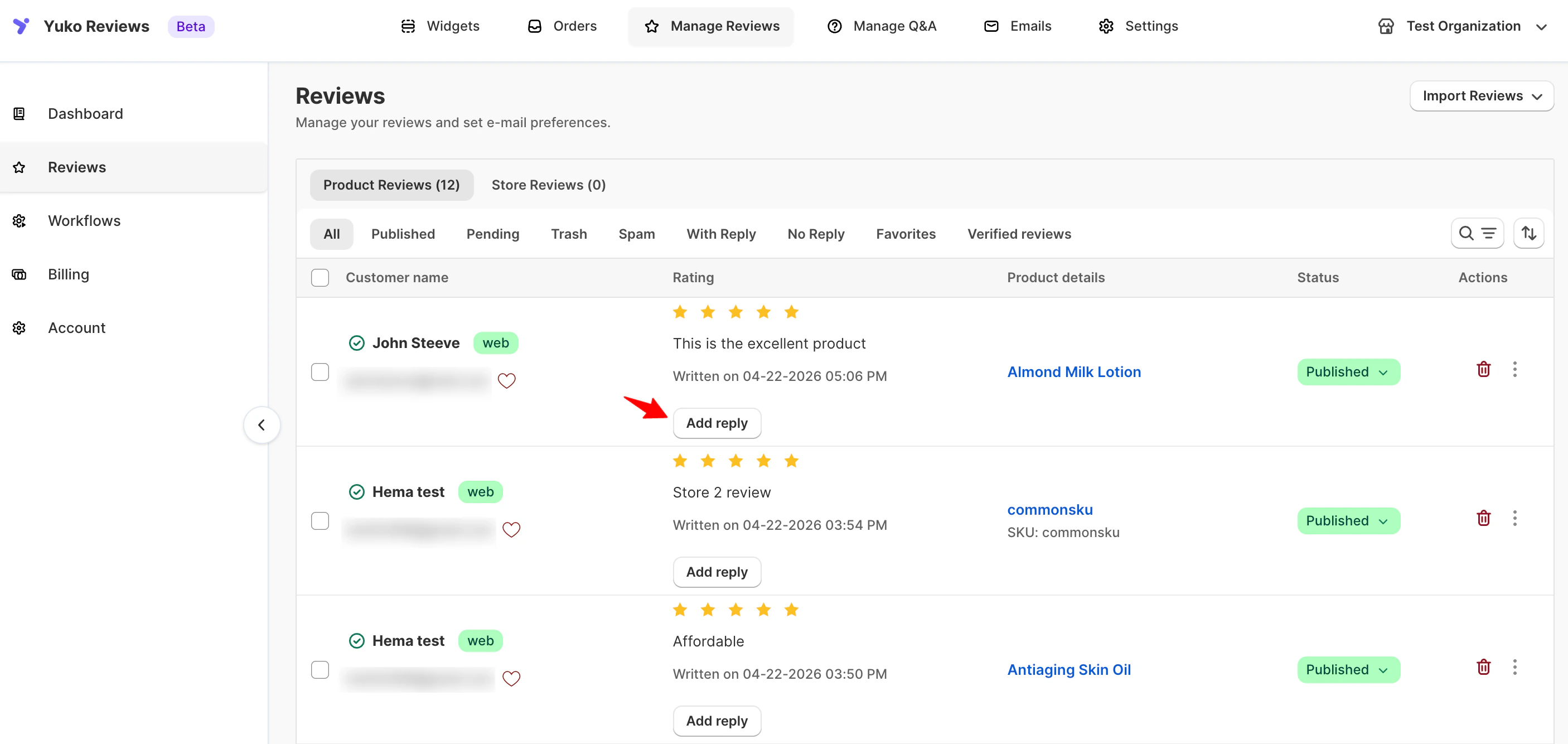 Enter your reply in the text box provided.
After clicking **Add Reply**, a dialog box opens showing:
Enter your reply in the text box provided.
After clicking **Add Reply**, a dialog box opens showing:
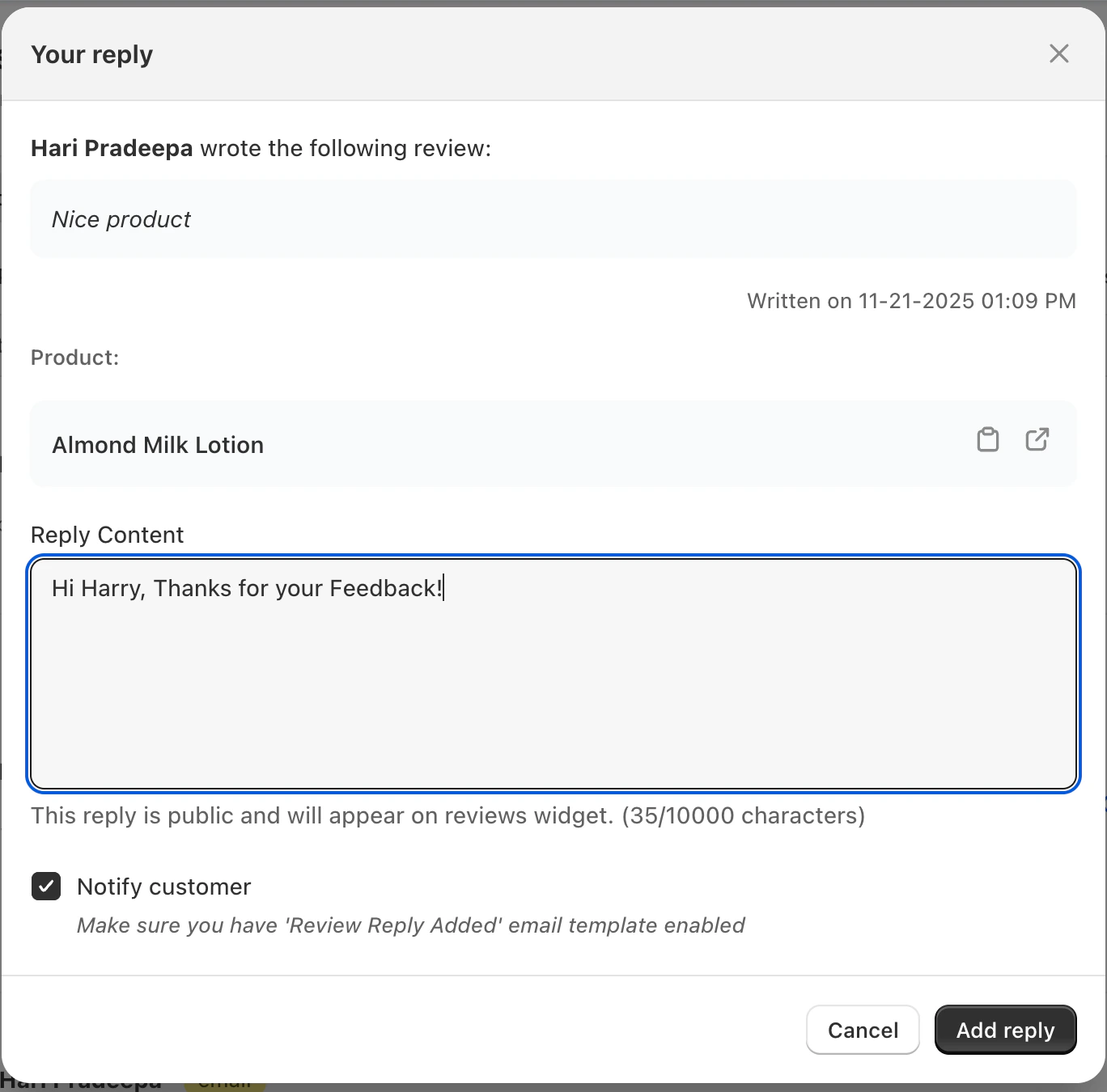 * The customer’s review content
* Product name
* Review date
* Customer details
In the **Reply Content** field:
* Enter your response to the customer
* Replies are **public** and will appear on the review widget\
\
**Reply best practices:**
* Address the customer by name when possible
* Reference specific points from their review
* Keep tone professional but friendly
* Offer solutions for negative feedback
* Express genuine gratitude for positive reviews
**Character limit:** Up to 10,000 characters per reply
Review your reply for tone, spelling, and clarity.
**Check that your reply:**
* Sounds genuine and personal (not template-like)
* Addresses the customer's specific feedback
* Maintains your brand voice
* Contains no spelling or grammar errors
* Includes next steps if applicable (refund, replacement, contact info)
* Enable the **Notify customer** checkbox if you want the customer to receive an email notification
* To use this option, make sure the **“Review Reply Added” email template** is enabled in your email settings
Click **Add Reply** to publish your response.
Once added:
* The customer’s review content
* Product name
* Review date
* Customer details
In the **Reply Content** field:
* Enter your response to the customer
* Replies are **public** and will appear on the review widget\
\
**Reply best practices:**
* Address the customer by name when possible
* Reference specific points from their review
* Keep tone professional but friendly
* Offer solutions for negative feedback
* Express genuine gratitude for positive reviews
**Character limit:** Up to 10,000 characters per reply
Review your reply for tone, spelling, and clarity.
**Check that your reply:**
* Sounds genuine and personal (not template-like)
* Addresses the customer's specific feedback
* Maintains your brand voice
* Contains no spelling or grammar errors
* Includes next steps if applicable (refund, replacement, contact info)
* Enable the **Notify customer** checkbox if you want the customer to receive an email notification
* To use this option, make sure the **“Review Reply Added” email template** is enabled in your email settings
Click **Add Reply** to publish your response.
Once added:
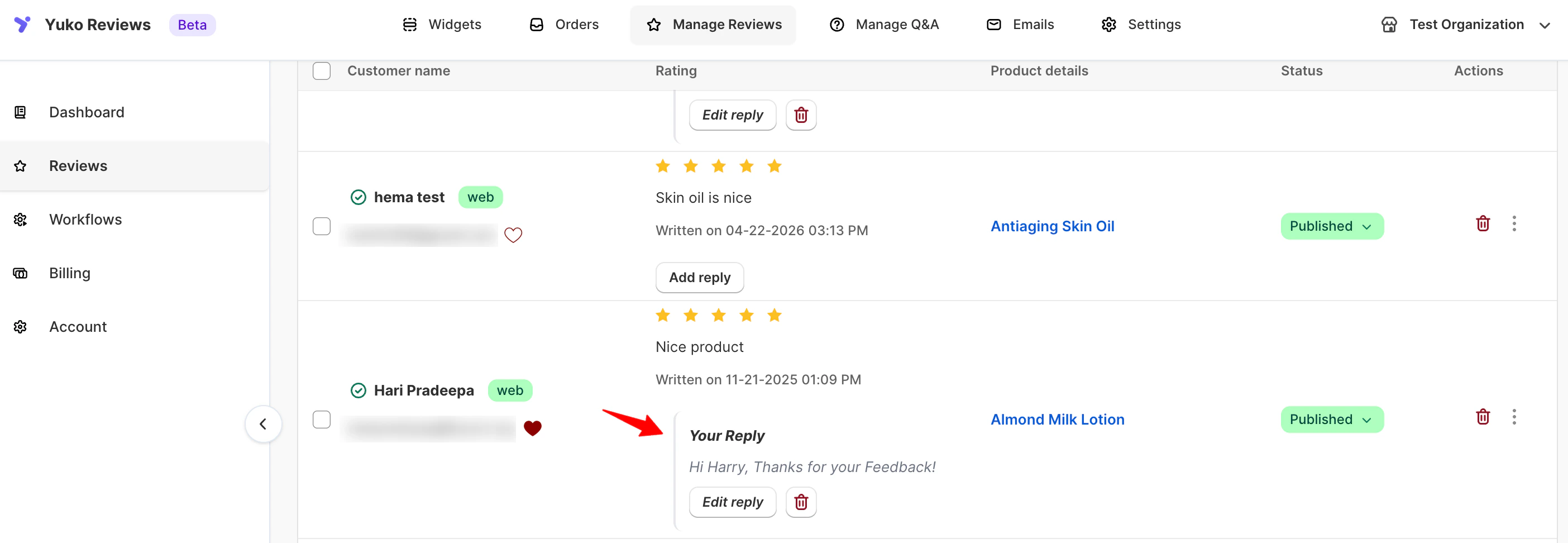
 * The reply appears below the review in the dashboard
* The review list shows **Your Reply** under the corresponding review
* The reply is visible on all widgets where the review is displayed
## Editing or Deleting a Reply
You can update or remove your reply at any time.
* Click **Edit Reply** to modify the response
* Click **Delete Reply** to remove it completely
Changes are reflected immediately on the storefront widgets.
***
## Reply Best Practices
To build trust and improve customer experience:
* Address the customer by name when possible
* Reference specific points from their review
* Keep the tone friendly, professional, and on-brand
* Offer solutions for negative feedback
* Thank customers for positive reviews
> 💡 **Tip:** Customers are more likely to trust brands that respond quickly. Consider enabling reply notifications to stay updated on new reviews.
**Timing matters:** 85% of customers expect a response within 48 hours. Set up reply notifications in **Settings → Notifications** to stay on top of new reviews.
## Reply Strategies by Review Type
Different review ratings require different response approaches for maximum effectiveness.
**Show appreciation and build loyalty**
**Reply objectives:**
* Thank the customer genuinely
* Reinforce their positive experience
* Encourage repeat purchases
* Invite them to share with friends
**Example template:**
```text theme={null}
Thank you so much for the 5-star review, [Name]! We're thrilled
that you love your [Product Name]. Your feedback about [specific
detail they mentioned] truly makes our day.
We'd love to welcome you back soon! Use code THANKS15 for 15% off
your next order.
Cheers,
[Your Name] at [Store Name]
```
**Pro tips:**
* Personalize by mentioning specific product features they praised
* Offer a small discount or loyalty reward to encourage repeat purchase
* Ask if they'd recommend the product to friends
* Keep tone enthusiastic but professional
**Acknowledge positives and address concerns**
**Reply objectives:**
* Thank them for honest feedback
* Address any concerns or suggestions mentioned
* Show you're listening and improving
* Invite them to try again
**Example template:**
```text theme={null}
Hi [Name], thank you for your thoughtful 4-star review! We're glad
you enjoyed [positive aspect they mentioned].
We've noted your feedback about [issue or suggestion]. We're
actually working on [improvement/solution] and would love your
input. Feel free to reach out at [email] if you'd like to discuss
further.
Looking forward to serving you again!
[Your Name]
```
**Pro tips:**
* Acknowledge both positive and negative points they mentioned
* Explain if there's a reason for limitations they noted
* Invite direct communication for detailed feedback
* Show you're taking action on their suggestions
**Turn neutrality into opportunity for improvement**
**Reply objectives:**
* Understand their specific concerns
* Offer solutions or alternatives
* Show commitment to better experience
* Invite them to update review after resolution
**Example template:**
```text theme={null}
Hi [Name], thank you for taking the time to share your experience.
We appreciate your honesty about [specific issue].
We'd like to make this right. Would you be open to trying
[solution/alternative]? Please contact us at [email/phone] and
mention this review - we'll prioritize your case.
We're committed to earning your 5-star experience.
Best regards,
[Your Name]
```
**Pro tips:**
* Don't be defensive - focus on solutions
* Offer specific remedies (refund, replacement, discount)
* Move detailed resolution to private channels
* Follow up to ensure satisfaction
**Respond quickly, resolve professionally**
**Reply objectives:**
* Apologize sincerely for poor experience
* Take ownership (even if issue isn't entirely your fault)
* Offer immediate resolution path
* Demonstrate excellent customer service publicly
**Example template:**
```text theme={null}
[Name], we sincerely apologize that your experience didn't meet
our standards. This is not the level of service/quality we pride
ourselves on.
We'd like to make this right immediately. Please contact [email/
phone] within 24 hours - we'll arrange [refund/replacement/
solution].
Your satisfaction is our priority, and we hope to regain your
trust.
[Your Name], Customer Care Manager
```
**Critical rules:**
* Reply within 24 hours (ideally within 12)
* Never argue or make excuses
* Take conversation offline for resolution details
* Update public reply once issue is resolved
* Learn from feedback to prevent future issues
**Avoid these mistakes:**
* ❌ Blaming the customer or shipping company
* ❌ Making excuses without offering solutions
* ❌ Ignoring negative reviews hoping they'll disappear
* ❌ Using defensive or aggressive language
## Need Help ?
Talk to our team for personalized setup help
**Time:** 30 minutes
Reach our team at yukoreviews.com/support
**Response time:** Within 24 hours
Browse detailed guides for every feature
Connect Yuko with other tools
**Pro tip:** Stores with 85%+ reply rates see 40% higher conversion rates than those who rarely respond. Make replying to reviews a daily habit, not an occasional task.
**Next:** Learn how to add **Verified Buyer** badges to reviews from actual purchasers, building even more trust with potential customers.
* The reply appears below the review in the dashboard
* The review list shows **Your Reply** under the corresponding review
* The reply is visible on all widgets where the review is displayed
## Editing or Deleting a Reply
You can update or remove your reply at any time.
* Click **Edit Reply** to modify the response
* Click **Delete Reply** to remove it completely
Changes are reflected immediately on the storefront widgets.
***
## Reply Best Practices
To build trust and improve customer experience:
* Address the customer by name when possible
* Reference specific points from their review
* Keep the tone friendly, professional, and on-brand
* Offer solutions for negative feedback
* Thank customers for positive reviews
> 💡 **Tip:** Customers are more likely to trust brands that respond quickly. Consider enabling reply notifications to stay updated on new reviews.
**Timing matters:** 85% of customers expect a response within 48 hours. Set up reply notifications in **Settings → Notifications** to stay on top of new reviews.
## Reply Strategies by Review Type
Different review ratings require different response approaches for maximum effectiveness.
**Show appreciation and build loyalty**
**Reply objectives:**
* Thank the customer genuinely
* Reinforce their positive experience
* Encourage repeat purchases
* Invite them to share with friends
**Example template:**
```text theme={null}
Thank you so much for the 5-star review, [Name]! We're thrilled
that you love your [Product Name]. Your feedback about [specific
detail they mentioned] truly makes our day.
We'd love to welcome you back soon! Use code THANKS15 for 15% off
your next order.
Cheers,
[Your Name] at [Store Name]
```
**Pro tips:**
* Personalize by mentioning specific product features they praised
* Offer a small discount or loyalty reward to encourage repeat purchase
* Ask if they'd recommend the product to friends
* Keep tone enthusiastic but professional
**Acknowledge positives and address concerns**
**Reply objectives:**
* Thank them for honest feedback
* Address any concerns or suggestions mentioned
* Show you're listening and improving
* Invite them to try again
**Example template:**
```text theme={null}
Hi [Name], thank you for your thoughtful 4-star review! We're glad
you enjoyed [positive aspect they mentioned].
We've noted your feedback about [issue or suggestion]. We're
actually working on [improvement/solution] and would love your
input. Feel free to reach out at [email] if you'd like to discuss
further.
Looking forward to serving you again!
[Your Name]
```
**Pro tips:**
* Acknowledge both positive and negative points they mentioned
* Explain if there's a reason for limitations they noted
* Invite direct communication for detailed feedback
* Show you're taking action on their suggestions
**Turn neutrality into opportunity for improvement**
**Reply objectives:**
* Understand their specific concerns
* Offer solutions or alternatives
* Show commitment to better experience
* Invite them to update review after resolution
**Example template:**
```text theme={null}
Hi [Name], thank you for taking the time to share your experience.
We appreciate your honesty about [specific issue].
We'd like to make this right. Would you be open to trying
[solution/alternative]? Please contact us at [email/phone] and
mention this review - we'll prioritize your case.
We're committed to earning your 5-star experience.
Best regards,
[Your Name]
```
**Pro tips:**
* Don't be defensive - focus on solutions
* Offer specific remedies (refund, replacement, discount)
* Move detailed resolution to private channels
* Follow up to ensure satisfaction
**Respond quickly, resolve professionally**
**Reply objectives:**
* Apologize sincerely for poor experience
* Take ownership (even if issue isn't entirely your fault)
* Offer immediate resolution path
* Demonstrate excellent customer service publicly
**Example template:**
```text theme={null}
[Name], we sincerely apologize that your experience didn't meet
our standards. This is not the level of service/quality we pride
ourselves on.
We'd like to make this right immediately. Please contact [email/
phone] within 24 hours - we'll arrange [refund/replacement/
solution].
Your satisfaction is our priority, and we hope to regain your
trust.
[Your Name], Customer Care Manager
```
**Critical rules:**
* Reply within 24 hours (ideally within 12)
* Never argue or make excuses
* Take conversation offline for resolution details
* Update public reply once issue is resolved
* Learn from feedback to prevent future issues
**Avoid these mistakes:**
* ❌ Blaming the customer or shipping company
* ❌ Making excuses without offering solutions
* ❌ Ignoring negative reviews hoping they'll disappear
* ❌ Using defensive or aggressive language
## Need Help ?
Talk to our team for personalized setup help
**Time:** 30 minutes
Reach our team at yukoreviews.com/support
**Response time:** Within 24 hours
Browse detailed guides for every feature
Connect Yuko with other tools
**Pro tip:** Stores with 85%+ reply rates see 40% higher conversion rates than those who rarely respond. Make replying to reviews a daily habit, not an occasional task.
**Next:** Learn how to add **Verified Buyer** badges to reviews from actual purchasers, building even more trust with potential customers.