> ## Documentation Index
> Fetch the complete documentation index at: https://docs.yukoreviews.com/llms.txt
> Use this file to discover all available pages before exploring further.
# Product Blacklist
> Exclude specific products from review collection without affecting existing reviews.
export const DashboardPath = ({path}) =>
**In the Yuko Dashboard:** {path}
;
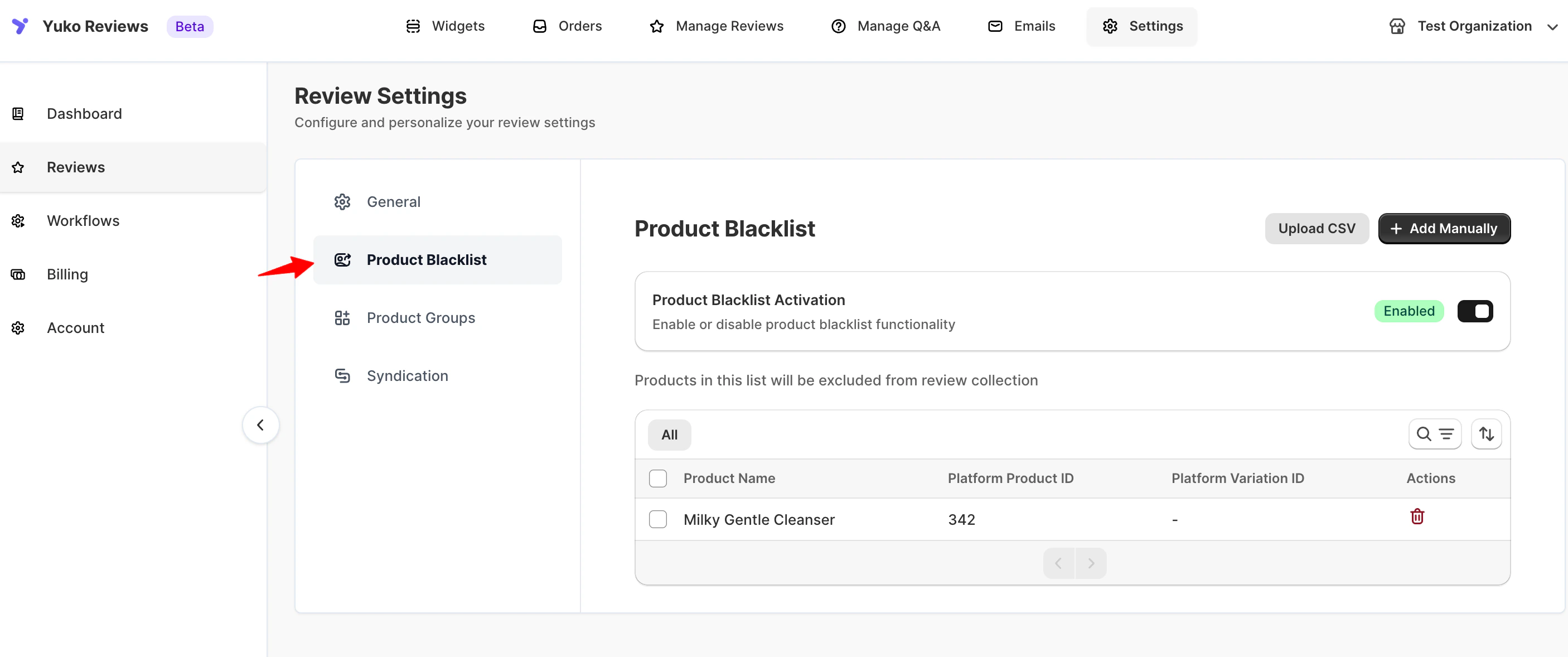
The Product Blacklist tells Yuko to skip certain products when sending review requests. Use it for products where reviews don't make sense — gift cards, services, bundles, or discontinued items.
 ***
## What the blacklist does
* Blacklisted products **don't receive review request emails**
* **Manual review requests** from the Orders screen also skip these products
* **Existing reviews are kept** — the blacklist only affects future collection
* Removing a product from the blacklist immediately re-enables review requests
The Product Blacklist affects **review collection**, not review display. To stop a review from appearing on the storefront, moderate the review directly from **Reviews → Manage Reviews**.
***
## Add products to the blacklist
1. Click **Add Manually**
2. Enter **numeric product IDs**, separated by commas
3. Click **Save**
**Example:** `123, 456, 789`
You can find a product's ID in WordPress Admin → Products — hover over a product row to see the ID in the bottom status bar, or check the browser address bar when editing it (`post=123`).
Invalid or non-numeric IDs are ignored silently.
For larger catalogs, use CSV upload.
**CSV requirements:**
* A header row with the column name `product_id`
* One numeric product ID per row below the header
* Invalid or non-numeric IDs are skipped silently
Click **Download sample CSV** to see the exact format.
***
## Good candidates for the blacklist
Customers rarely review a gift card itself — reviews on these products usually describe the buying experience, not the product.
Installation, warranties, and subscription add-ons don't benefit from product reviews.
Free samples and trials distort average ratings — skip them and let paid purchases drive the review flow.
Stop sending review requests for items you no longer stock, so new customers don't land on an empty page.
***
## Related controls
* [**Email Blacklist**](/managing-reviews/email-blacklist) — stop email to specific addresses or domains
* [**Product Groups**](/managing-reviews/product-groups) — apply review logic to a set of products at once
* [**Review restrictions**](/managing-reviews/review-restrictions-limits) — control who can submit reviews
***
## Need Help?
Talk to our team for personalized setup help
**Time:** 30 minutes
Reach our team at yukoreviews.com/support
**Response time:** Within 24 hours
Browse detailed guides for every feature
Connect Yuko with other tools
***
## What the blacklist does
* Blacklisted products **don't receive review request emails**
* **Manual review requests** from the Orders screen also skip these products
* **Existing reviews are kept** — the blacklist only affects future collection
* Removing a product from the blacklist immediately re-enables review requests
The Product Blacklist affects **review collection**, not review display. To stop a review from appearing on the storefront, moderate the review directly from **Reviews → Manage Reviews**.
***
## Add products to the blacklist
1. Click **Add Manually**
2. Enter **numeric product IDs**, separated by commas
3. Click **Save**
**Example:** `123, 456, 789`
You can find a product's ID in WordPress Admin → Products — hover over a product row to see the ID in the bottom status bar, or check the browser address bar when editing it (`post=123`).
Invalid or non-numeric IDs are ignored silently.
For larger catalogs, use CSV upload.
**CSV requirements:**
* A header row with the column name `product_id`
* One numeric product ID per row below the header
* Invalid or non-numeric IDs are skipped silently
Click **Download sample CSV** to see the exact format.
***
## Good candidates for the blacklist
Customers rarely review a gift card itself — reviews on these products usually describe the buying experience, not the product.
Installation, warranties, and subscription add-ons don't benefit from product reviews.
Free samples and trials distort average ratings — skip them and let paid purchases drive the review flow.
Stop sending review requests for items you no longer stock, so new customers don't land on an empty page.
***
## Related controls
* [**Email Blacklist**](/managing-reviews/email-blacklist) — stop email to specific addresses or domains
* [**Product Groups**](/managing-reviews/product-groups) — apply review logic to a set of products at once
* [**Review restrictions**](/managing-reviews/review-restrictions-limits) — control who can submit reviews
***
## Need Help?
Talk to our team for personalized setup help
**Time:** 30 minutes
Reach our team at yukoreviews.com/support
**Response time:** Within 24 hours
Browse detailed guides for every feature
Connect Yuko with other tools