> ## Documentation Index
> Fetch the complete documentation index at: https://docs.yukoreviews.com/llms.txt
> Use this file to discover all available pages before exploring further.
# Managing Customer Reviews
> Control what reviews appear on your store with moderation, approval, and organization tools
## Stay in Control of Your Review Content
Your reviews shape how shoppers perceive your store.\
Yuko’s Review Management Dashboard gives you all the tools you need to moderate, organize, and maintain a clean, trustworthy review section.
With clear statuses, powerful filters, and quick actions, you can keep your reviews accurate, authentic, and aligned with your brand.
### **What You Can Do**
* Approve or reject reviews before they appear on your store
* Flag or remove spam and inappropriate submissions
* Reply directly to customers to build trust and transparency
* Filter reviews by status, replies, and favorites for easier management
* Maintain a consistent, high-quality review presence across your store
**Impact:** Stores that actively moderate and reply to reviews see 20-30% higher conversion rates and better customer trust scores
***
## Why Active Review Management Matters
**Filter out low-quality content**
* Approve genuine reviews
* Reject low-quality or irrelevant content
* Remove spam or fake reviews
* Hide reviews with inappropriate language
* Ensure published reviews add value\
\
**Result:** Higher quality reviews = higher conversion rates
**Show you care about feedback**
* Reply to positive reviews (thank customers)
* Address negative reviews (resolve issues)
* Answer questions in reviews
* Show responsiveness
* Build relationships
**Result:** 35% more customers leave reviews when they see store responses
**Stop harmful content early**
* Flag suspicious or spammy content
* Remove competitor attacks
* Hide offensive or harmful language
* Prevent fake reviews from appearing\
\
**Result:** Clean review section maintains customer trust
**Learn from customer feedback**
* Identify repeated customer issues
* Spot product quality trends
* Discover improvement opportunities
* Track sentiment over time\
\
**Result:** Better products and customer satisfaction
***
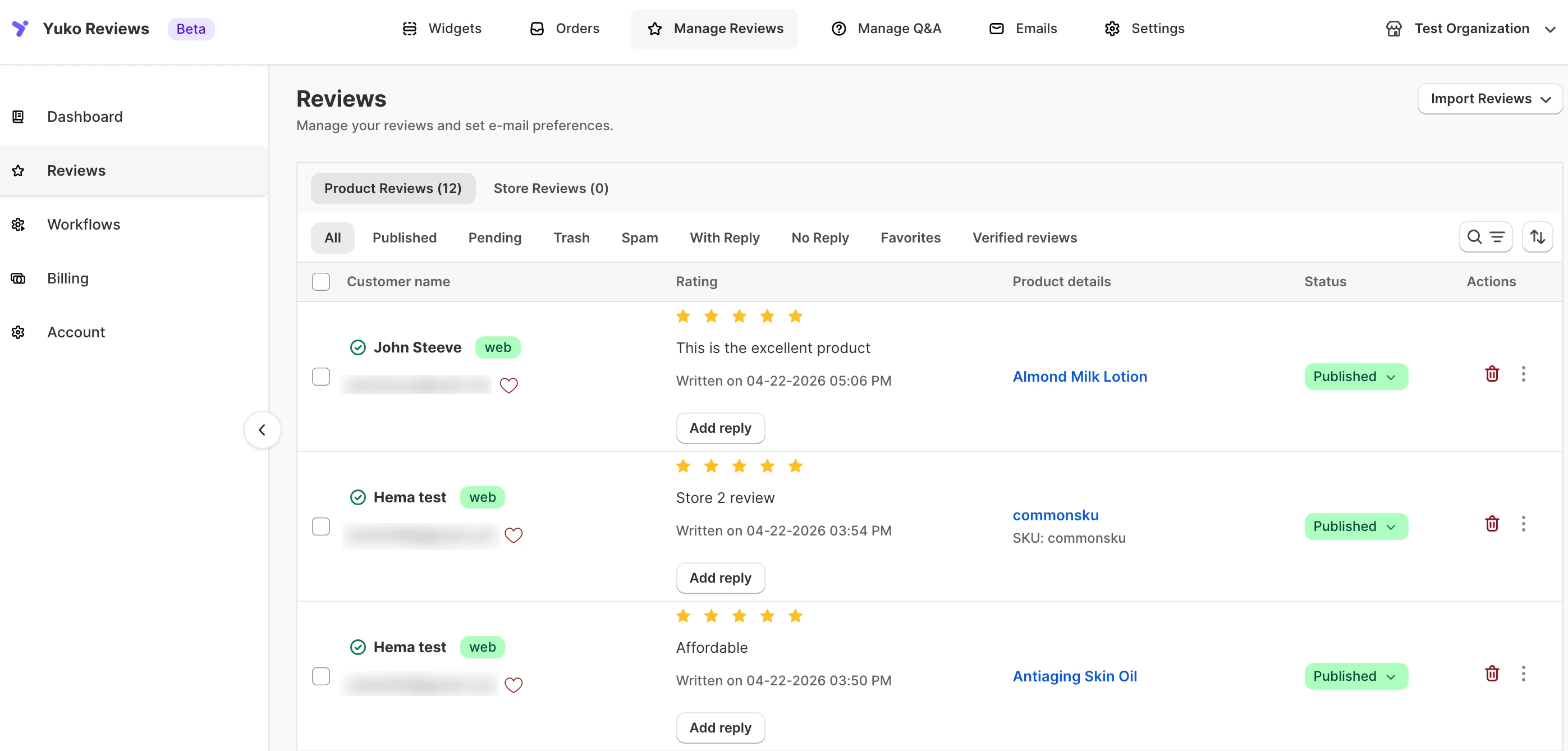
## Review Management Dashboard
Yuko Dashboard → **Reviews → Manage Reviews**
 ### Review Status Types
Every review has a status that determines whether it's visible to customers:
**Reviews visible on your store**
**What this means:**
* Shown on product pages and review widgets
* Counted toward average ratings
* Included in search-indexed content
* Fully visible to shoppers
**When to publish:**
* Helpful, constructive feedback
* Verified or genuine reviews
* Clear and appropriate language
* Reviews that add value to your store
Publishing quality reviews strengthens trust and increases conversions.
**Approved reviews are your social proof** - they drive sales
**Reviews waiting for your approval**
**What this means:**
* Not yet visible to customers
* Do not affect average rating
* Require a manual action from you
* Can be published or moved to spam/trash
**How reviews become pending:**
* Auto-publish disabled (all reviews pending)
* Low star ratings (1-3 stars if auto-publish only 4-5)
* First-time reviewers (trust verification)
* Flagged by spam filters (needs manual check)
* Contains certain keywords (custom moderation rules)
**What to do with pending reviews:**
* Review content for quality and appropriateness
* Approve if legitimate
* Reject if spam or inappropriate
* Reply before publishing (address concerns)
**Response time matters** - approve within 24 hours for best results
**Reviews marked as spam or fake**
**What this means:**
* Hidden from all customer-facing areas
* Not counted in ratings
* Stored in the Spam folder
* Can be restored if incorrectly flagged
**Common spam indicators:**
* Irrelevant, nonsensical, or promotional content
* Attempts to post links or advertisements
* Duplicate submissions
* Reviews clearly not linked to real customers
Use the Spam folder to keep harmful or misleading content out of your store.
**Don't delete immediately** - review spam folder occasionally for false positives
**Reviews removed but recoverable**
**What this means:**
* Not visible anywhere
* Stored in the Trash section
* Can be restored
* Permanently deleted after 30 days
**Why move to trash:**
* Customer requested deletion
* Duplicate reviews
* Review for wrong product
* Outdated information
* Policy violation
**Trash vs Spam:**
* Trash: Legitimate reviews you don't want displayed
* Spam: Fake/malicious reviews
**Recovery option:**
* Trash allows 30-day recovery period
* Restore if deleted by mistake
* Permanent after 30 days
**Best practice:** Use trash for legitimate deletions, spam for fake reviews
***
## Review Filters and Search
Find specific reviews quickly with advanced filtering:
**View reviews by approval status**
**All Reviews:**
* Shows every review regardless of status
* Includes Approved + Pending + Spam + Trash
* Displays total review count
* Default dashboard view
**Approved Only:**
* Reviews currently live on your store
* Visible to customers on product pages
* Count toward average rating
* Best for checking review quality
**Pending Only:**
* Reviews awaiting your action
* Not yet visible to customers
* Approve or reject required
* Check daily for new submissions
**Spam Only:**
* Reviews flagged as spam or fake
* Review for false positives
* Permanently delete if required
* Check weekly
**Trash Only:**
* Reviews intentionally removed
* Recover within 30 days
* Permanently delete when needed
* Helpful for cleanup
**Daily workflow:**
* Filter “Pending” → moderate new reviews
* Filter “Approved” → quick quality check
**Daily workflow:** Filter by "Pending" each morning, moderate new reviews, then check "Approved" for quality.
**View reviews by rating level**
**5-Star Reviews:**
* Your best social proof
* Feature in marketing
* Thank these customers
* Share on social media
**4-Star Reviews:**
* Generally positive
* May have minor concerns
* Address feedback
* Still valuable proof
**3-Star Reviews:**
* Mixed feedback
* Identify improvements
* Reply to concerns
* Opportunity to win back
**1-2 Star Reviews:**
* Negative feedback
* URGENT: Reply quickly
* Resolve issues
* Prevent reputation damage
**Strategic uses:**
* Export 5-star reviews for testimonials
* Monitor 1-2 star trends (product issues?)
* Address 3-4 star concerns (improvements)
**Custom date range:**
* Filter reviews from a specific start date
* Monitor feedback after a product launch
* Analyze review impact during marketing campaigns
* Compare periods for product improvements
**Why use “From Date” filters:**
* Focus on recent customer feedback
* Track improvement over time
* Measure impact of changes or campaigns
* Identify actionable trends and insights
**Custom end date:**
* Set any end date for a specific period
* Filter reviews before product updates or campaigns
* Analyze performance for marketing initiatives
* Compare trends across time periods
**Why use end date filters:**
* Track performance over specific periods
* Measure impact of campaigns or product changes
* Identify seasonal or long-term trends
* Focus on actionable insights
* Shows every review regardless of status
* Published + Pending + Trash + Spam
* Total count visible
* Default view
* Reviews currently live on site
* What customers see
* Check for quality
* Most commonly used filter
* Reviews awaiting your action
* Action required filter
* Check daily
* Approve or reject
* Deleted reviews
* Recover if needed
* Empty trash periodically
* Daily workflow: Filter by "Pending" each morning, moderate new reviews, then check "Published" for quality
* Flagged spam reviews
* Review false positives
* Delete permanently
* Check weekly
* Reviews you have already responded to
* Check for customer follow-up
* Verify reply quality
* Engagement complete
* Reviews awaiting your response
* Requires attention, prioritize negative reviews
* Thank positive reviewers
* Respond within 24–48 hours
* Reviews you’ve marked as favorites
* Quick access to important feedback
* Highlight reviews for marketing or internal reference
* Monitor top-quality content easily
* Reviews from genuine, confirmed customers
* Helps identify high-trust feedback
* Best for showcasing authentic experiences
* Useful when exporting or displaying verified-only reviews on widgets
***
## Review Moderation Strategies
**Review and approve each review individually**
Choose whether new reviews should appear on your store immediately or stay in moderation until you approve them.
**When enabled:**
* All new reviews are published automatically
* Updates storefront instantly with fresh reviews
* Good for stores with high review volume
**When disabled:**
* New reviews stay Unpublished
* You approve each review manually
* Better for strict moderation
> Auto-publish applies only to *future* reviews; existing reviews remain unchanged.
**Replace banned words with asterisks \*:**
* Masks offensive words
* Review stays published
* Keeps content family-friendly
**Hide review containing banned words:**
* Marks review as Unpublished
* Hidden from storefront
* Suitable for brands with strict guidelines
**When enabled:**
* Automatically flags suspicious reviews
* Prevents spam from appearing publicly
* You can review and restore if needed
**Why use it:**
* Protects store credibility
* Reduces bot or fake reviews
* Keeps review section clean
***
## Next Steps
Choose your review approval process.
**Time:** 10 minutes → [Configure auto-publishing](/managing-reviews/auto-publishing-reviews) → [Set up moderation rules](/managing-reviews/review-moderation)
Prepare templates for common review types.
**Time:** 20 minutes → [Reply guidelines and templates](/managing-reviews/replying-to-reviews)
Get alerted when new reviews arrive.
**Time:** 5 minutes → [Configure admin notifications](/managing-reviews/admin-notifications)
Protect against fake and spam reviews.
**Time:** 15 minutes → [Email blacklist setup](/managing-reviews/email-blacklist) → [Review restrictions](/managing-reviews/review-restrictions-limits)
***
## Need Help?
Talk to our team for personalized setup help
**Time:** 30 minutes
Reach our team at yukoreviews.com/support
**Response time:** Within 24 hours
Browse detailed guides for every feature
Connect Yuko with other tools
**Pro tip:** Spend your first 30 days manually moderating every review to understand your customers and establish quality standards. Then switch to auto-publish with filters based on what you learned.
### Review Status Types
Every review has a status that determines whether it's visible to customers:
**Reviews visible on your store**
**What this means:**
* Shown on product pages and review widgets
* Counted toward average ratings
* Included in search-indexed content
* Fully visible to shoppers
**When to publish:**
* Helpful, constructive feedback
* Verified or genuine reviews
* Clear and appropriate language
* Reviews that add value to your store
Publishing quality reviews strengthens trust and increases conversions.
**Approved reviews are your social proof** - they drive sales
**Reviews waiting for your approval**
**What this means:**
* Not yet visible to customers
* Do not affect average rating
* Require a manual action from you
* Can be published or moved to spam/trash
**How reviews become pending:**
* Auto-publish disabled (all reviews pending)
* Low star ratings (1-3 stars if auto-publish only 4-5)
* First-time reviewers (trust verification)
* Flagged by spam filters (needs manual check)
* Contains certain keywords (custom moderation rules)
**What to do with pending reviews:**
* Review content for quality and appropriateness
* Approve if legitimate
* Reject if spam or inappropriate
* Reply before publishing (address concerns)
**Response time matters** - approve within 24 hours for best results
**Reviews marked as spam or fake**
**What this means:**
* Hidden from all customer-facing areas
* Not counted in ratings
* Stored in the Spam folder
* Can be restored if incorrectly flagged
**Common spam indicators:**
* Irrelevant, nonsensical, or promotional content
* Attempts to post links or advertisements
* Duplicate submissions
* Reviews clearly not linked to real customers
Use the Spam folder to keep harmful or misleading content out of your store.
**Don't delete immediately** - review spam folder occasionally for false positives
**Reviews removed but recoverable**
**What this means:**
* Not visible anywhere
* Stored in the Trash section
* Can be restored
* Permanently deleted after 30 days
**Why move to trash:**
* Customer requested deletion
* Duplicate reviews
* Review for wrong product
* Outdated information
* Policy violation
**Trash vs Spam:**
* Trash: Legitimate reviews you don't want displayed
* Spam: Fake/malicious reviews
**Recovery option:**
* Trash allows 30-day recovery period
* Restore if deleted by mistake
* Permanent after 30 days
**Best practice:** Use trash for legitimate deletions, spam for fake reviews
***
## Review Filters and Search
Find specific reviews quickly with advanced filtering:
**View reviews by approval status**
**All Reviews:**
* Shows every review regardless of status
* Includes Approved + Pending + Spam + Trash
* Displays total review count
* Default dashboard view
**Approved Only:**
* Reviews currently live on your store
* Visible to customers on product pages
* Count toward average rating
* Best for checking review quality
**Pending Only:**
* Reviews awaiting your action
* Not yet visible to customers
* Approve or reject required
* Check daily for new submissions
**Spam Only:**
* Reviews flagged as spam or fake
* Review for false positives
* Permanently delete if required
* Check weekly
**Trash Only:**
* Reviews intentionally removed
* Recover within 30 days
* Permanently delete when needed
* Helpful for cleanup
**Daily workflow:**
* Filter “Pending” → moderate new reviews
* Filter “Approved” → quick quality check
**Daily workflow:** Filter by "Pending" each morning, moderate new reviews, then check "Approved" for quality.
**View reviews by rating level**
**5-Star Reviews:**
* Your best social proof
* Feature in marketing
* Thank these customers
* Share on social media
**4-Star Reviews:**
* Generally positive
* May have minor concerns
* Address feedback
* Still valuable proof
**3-Star Reviews:**
* Mixed feedback
* Identify improvements
* Reply to concerns
* Opportunity to win back
**1-2 Star Reviews:**
* Negative feedback
* URGENT: Reply quickly
* Resolve issues
* Prevent reputation damage
**Strategic uses:**
* Export 5-star reviews for testimonials
* Monitor 1-2 star trends (product issues?)
* Address 3-4 star concerns (improvements)
**Custom date range:**
* Filter reviews from a specific start date
* Monitor feedback after a product launch
* Analyze review impact during marketing campaigns
* Compare periods for product improvements
**Why use “From Date” filters:**
* Focus on recent customer feedback
* Track improvement over time
* Measure impact of changes or campaigns
* Identify actionable trends and insights
**Custom end date:**
* Set any end date for a specific period
* Filter reviews before product updates or campaigns
* Analyze performance for marketing initiatives
* Compare trends across time periods
**Why use end date filters:**
* Track performance over specific periods
* Measure impact of campaigns or product changes
* Identify seasonal or long-term trends
* Focus on actionable insights
* Shows every review regardless of status
* Published + Pending + Trash + Spam
* Total count visible
* Default view
* Reviews currently live on site
* What customers see
* Check for quality
* Most commonly used filter
* Reviews awaiting your action
* Action required filter
* Check daily
* Approve or reject
* Deleted reviews
* Recover if needed
* Empty trash periodically
* Daily workflow: Filter by "Pending" each morning, moderate new reviews, then check "Published" for quality
* Flagged spam reviews
* Review false positives
* Delete permanently
* Check weekly
* Reviews you have already responded to
* Check for customer follow-up
* Verify reply quality
* Engagement complete
* Reviews awaiting your response
* Requires attention, prioritize negative reviews
* Thank positive reviewers
* Respond within 24–48 hours
* Reviews you’ve marked as favorites
* Quick access to important feedback
* Highlight reviews for marketing or internal reference
* Monitor top-quality content easily
* Reviews from genuine, confirmed customers
* Helps identify high-trust feedback
* Best for showcasing authentic experiences
* Useful when exporting or displaying verified-only reviews on widgets
***
## Review Moderation Strategies
**Review and approve each review individually**
Choose whether new reviews should appear on your store immediately or stay in moderation until you approve them.
**When enabled:**
* All new reviews are published automatically
* Updates storefront instantly with fresh reviews
* Good for stores with high review volume
**When disabled:**
* New reviews stay Unpublished
* You approve each review manually
* Better for strict moderation
> Auto-publish applies only to *future* reviews; existing reviews remain unchanged.
**Replace banned words with asterisks \*:**
* Masks offensive words
* Review stays published
* Keeps content family-friendly
**Hide review containing banned words:**
* Marks review as Unpublished
* Hidden from storefront
* Suitable for brands with strict guidelines
**When enabled:**
* Automatically flags suspicious reviews
* Prevents spam from appearing publicly
* You can review and restore if needed
**Why use it:**
* Protects store credibility
* Reduces bot or fake reviews
* Keeps review section clean
***
## Next Steps
Choose your review approval process.
**Time:** 10 minutes → [Configure auto-publishing](/managing-reviews/auto-publishing-reviews) → [Set up moderation rules](/managing-reviews/review-moderation)
Prepare templates for common review types.
**Time:** 20 minutes → [Reply guidelines and templates](/managing-reviews/replying-to-reviews)
Get alerted when new reviews arrive.
**Time:** 5 minutes → [Configure admin notifications](/managing-reviews/admin-notifications)
Protect against fake and spam reviews.
**Time:** 15 minutes → [Email blacklist setup](/managing-reviews/email-blacklist) → [Review restrictions](/managing-reviews/review-restrictions-limits)
***
## Need Help?
Talk to our team for personalized setup help
**Time:** 30 minutes
Reach our team at yukoreviews.com/support
**Response time:** Within 24 hours
Browse detailed guides for every feature
Connect Yuko with other tools
**Pro tip:** Spend your first 30 days manually moderating every review to understand your customers and establish quality standards. Then switch to auto-publish with filters based on what you learned.