> ## Documentation Index
> Fetch the complete documentation index at: https://docs.yukoreviews.com/llms.txt
> Use this file to discover all available pages before exploring further.
# Email Blacklist
> Stop Yuko from sending review emails to specific addresses, domains, or patterns.
export const DashboardPath = ({path}) =>
**In the Yuko Dashboard:** {path}
;
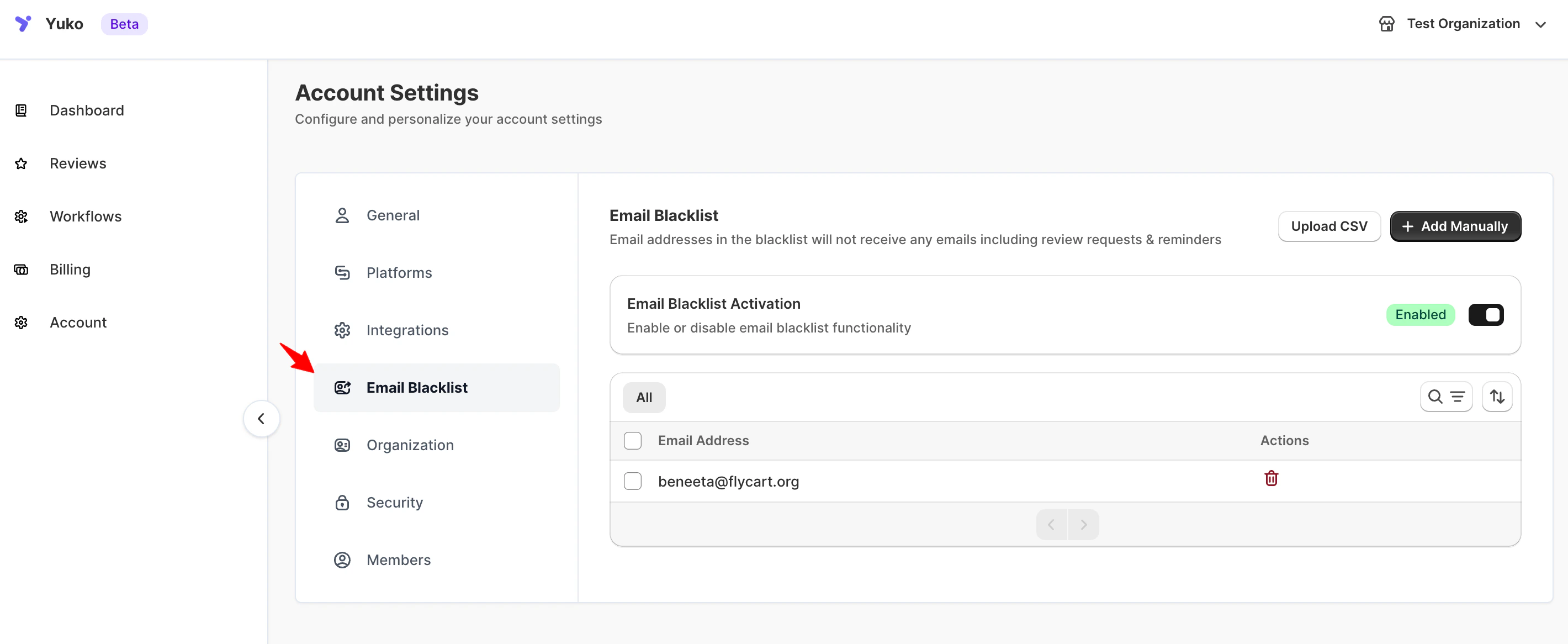
The Email Blacklist lets you exclude specific email addresses — or entire domains — from **all Yuko emails**, including review requests, reminders, photo follow-ups, and reply notifications.
Common uses:
* Skip internal team inboxes and test accounts
* Block support, billing, or no-reply addresses that shouldn't get marketing email
* Respect customers who've asked not to be emailed
* Prevent bounces from known-bad domains
 ## How it works
* Blacklisted addresses **never receive any Yuko email** — automated or manual.
* The filter applies across every store and workflow on your account.
* Matching is **case-insensitive** and supports wildcards (`*`).
* Removing an address immediately re-enables email delivery for future sends.
* **Existing reviews are not affected.** Blacklisting only stops future email — it does not delete reviews that address has already submitted.
***
## Add addresses to the blacklist
You can add entries one at a time, in bulk via comma-separated list, or by CSV upload.
Click **Add Manually** and enter one or more addresses.
**Supported formats:**
| Pattern | Matches |
| -------------------- | ------------------------------------------------------------- |
| `sample@example.com` | One specific address |
| `*@anydomain.com` | Every address on that domain |
| `no-reply@*` | Any address starting with `no-reply@` |
| `*+test@*` | Any address containing `+test` (useful for catch-all testing) |
Separate multiple entries with commas. Invalid formats are skipped without an error — double-check your list before saving.
For large lists, click **Upload CSV**.
**CSV requirements:**
* One email or pattern per row
* No header row required
* Wildcards (`*`) supported
* Maximum file size: **15 KB**
Click **Download sample CSV** to see the correct format.
CSV upload is the fastest way to block internal mailing lists, a whole role-based domain (`*@contractors.example.com`), or a batch of test accounts at once.
***
## Remove addresses from the blacklist
1. Find the entry in the list (use search for large lists)
2. Click the **Remove** icon next to the entry
3. Future emails to that address will resume on the next scheduled send
***
## Wildcard recipes
Useful during testing or for internal QA accounts.
```text theme={null}
*@yourstore.com
```
Removes review requests for your whole team in one entry.
Prevents bounces and complaints from shared inboxes that shouldn't receive marketing email.
```text theme={null}
admin@*
billing@*
support@*
no-reply@*
noreply@*
```
If gift orders send to a placeholder address, you can exclude that domain entirely.
```text theme={null}
*@giftcards.example.com
```
***
## How this differs from other controls
| Tool | What it blocks | Affects existing reviews? |
| ----------------------------------------------------------------------- | -------------------------------------------------- | ------------------------- |
| **Email Blacklist** | Outbound Yuko emails to specific addresses/domains | No |
| [**Product Blacklist**](/managing-reviews/product-blacklist) | Review requests for specific products | No |
| [**Review restrictions**](/managing-reviews/review-restrictions-limits) | Who is allowed to submit reviews | No |
| **Trash / Spam status** | Where an individual review appears | Yes — hides it |
Use the Email Blacklist when the issue is **who receives mail**. Use the Product Blacklist when the issue is **which products get reviewed**.
***
## Need Help?
Talk to our team for personalized setup help
**Time:** 30 minutes
Reach our team at yukoreviews.com/support
**Response time:** Within 24 hours
Browse detailed guides for every feature
Connect Yuko with other tools
## How it works
* Blacklisted addresses **never receive any Yuko email** — automated or manual.
* The filter applies across every store and workflow on your account.
* Matching is **case-insensitive** and supports wildcards (`*`).
* Removing an address immediately re-enables email delivery for future sends.
* **Existing reviews are not affected.** Blacklisting only stops future email — it does not delete reviews that address has already submitted.
***
## Add addresses to the blacklist
You can add entries one at a time, in bulk via comma-separated list, or by CSV upload.
Click **Add Manually** and enter one or more addresses.
**Supported formats:**
| Pattern | Matches |
| -------------------- | ------------------------------------------------------------- |
| `sample@example.com` | One specific address |
| `*@anydomain.com` | Every address on that domain |
| `no-reply@*` | Any address starting with `no-reply@` |
| `*+test@*` | Any address containing `+test` (useful for catch-all testing) |
Separate multiple entries with commas. Invalid formats are skipped without an error — double-check your list before saving.
For large lists, click **Upload CSV**.
**CSV requirements:**
* One email or pattern per row
* No header row required
* Wildcards (`*`) supported
* Maximum file size: **15 KB**
Click **Download sample CSV** to see the correct format.
CSV upload is the fastest way to block internal mailing lists, a whole role-based domain (`*@contractors.example.com`), or a batch of test accounts at once.
***
## Remove addresses from the blacklist
1. Find the entry in the list (use search for large lists)
2. Click the **Remove** icon next to the entry
3. Future emails to that address will resume on the next scheduled send
***
## Wildcard recipes
Useful during testing or for internal QA accounts.
```text theme={null}
*@yourstore.com
```
Removes review requests for your whole team in one entry.
Prevents bounces and complaints from shared inboxes that shouldn't receive marketing email.
```text theme={null}
admin@*
billing@*
support@*
no-reply@*
noreply@*
```
If gift orders send to a placeholder address, you can exclude that domain entirely.
```text theme={null}
*@giftcards.example.com
```
***
## How this differs from other controls
| Tool | What it blocks | Affects existing reviews? |
| ----------------------------------------------------------------------- | -------------------------------------------------- | ------------------------- |
| **Email Blacklist** | Outbound Yuko emails to specific addresses/domains | No |
| [**Product Blacklist**](/managing-reviews/product-blacklist) | Review requests for specific products | No |
| [**Review restrictions**](/managing-reviews/review-restrictions-limits) | Who is allowed to submit reviews | No |
| **Trash / Spam status** | Where an individual review appears | Yes — hides it |
Use the Email Blacklist when the issue is **who receives mail**. Use the Product Blacklist when the issue is **which products get reviewed**.
***
## Need Help?
Talk to our team for personalized setup help
**Time:** 30 minutes
Reach our team at yukoreviews.com/support
**Response time:** Within 24 hours
Browse detailed guides for every feature
Connect Yuko with other tools