> ## Documentation Index
> Fetch the complete documentation index at: https://docs.yukoreviews.com/llms.txt
> Use this file to discover all available pages before exploring further.
# Auto-Publishing Reviews
> Automatically publish reviews based on criteria to balance social proof speed with quality control
## Automate Review Approval for Faster Social Proof
Manually approving every review takes time. Auto-publishing lets you automatically approve reviews that meet your criteria, so positive social proof appears instantly while questionable reviews still get your attention.
**What you'll achieve:**
* Publish new reviews instantly (no manual work)
* Keep spam and offensive content unpublished
* Reduce daily moderation time
* Show fresh social proof to increase conversions
* Maintain review quality while speeding up workflow
**Impact:** Stores using smart auto-publish rules get 40-50% more reviews displayed while maintaining quality standards
***
## How Auto-Publishing Works
Yuko automatically checks each incoming review and decides whether to publish it instantly or hold it for manual moderation — based on the rules you set.
### When a customer submits a review:
* Review is received with rating, text, media, and reviewer details
* Yuko evaluates it using your auto-publish settings
### Auto-Publish New Reviews:
**If enabled:**
* New reviews are auto-approved
* Review becomes visible on product pages immediately
* Added to all review widgets
* Included in average rating\
If disabled:
* All reviews go to Pending
* You manually approve each one
### Star Rating Rules:
You choose which ratings auto-publish:
* Example: Only 5-star reviews go live automatically
* Other ratings (1–4 stars) move to Pending
* Gives you tighter control over low-rated reviews
### If review meets your rules → **Published**
* Visible instantly
* No moderation needed
* Adds to social proof
* Helps increase conversion rates
### If review does NOT meet your rules → **Pending**
* Hidden from customers
* Requires manual approval
* You can approve, reject, or reply before publishing
* Recommended to check pending reviews daily
### What typically ends up Pending:
* Ratings outside your auto-publish selection
* Low-star reviews (1–3 stars)
* First-time reviewers
* Reviews with suspicious patterns
* Reviews you want to inspect manually
### What you achieve with auto-publishing:
* Faster display of positive reviews
* Reduced daily moderation workload
* Stronger and more frequent social proof
* Control over negative or uncertain reviews
***
## How to Auto-Publish New Reviews :
**Yuko Dashboard → Reviews → Settings → General → Auto-Publishing Rules**
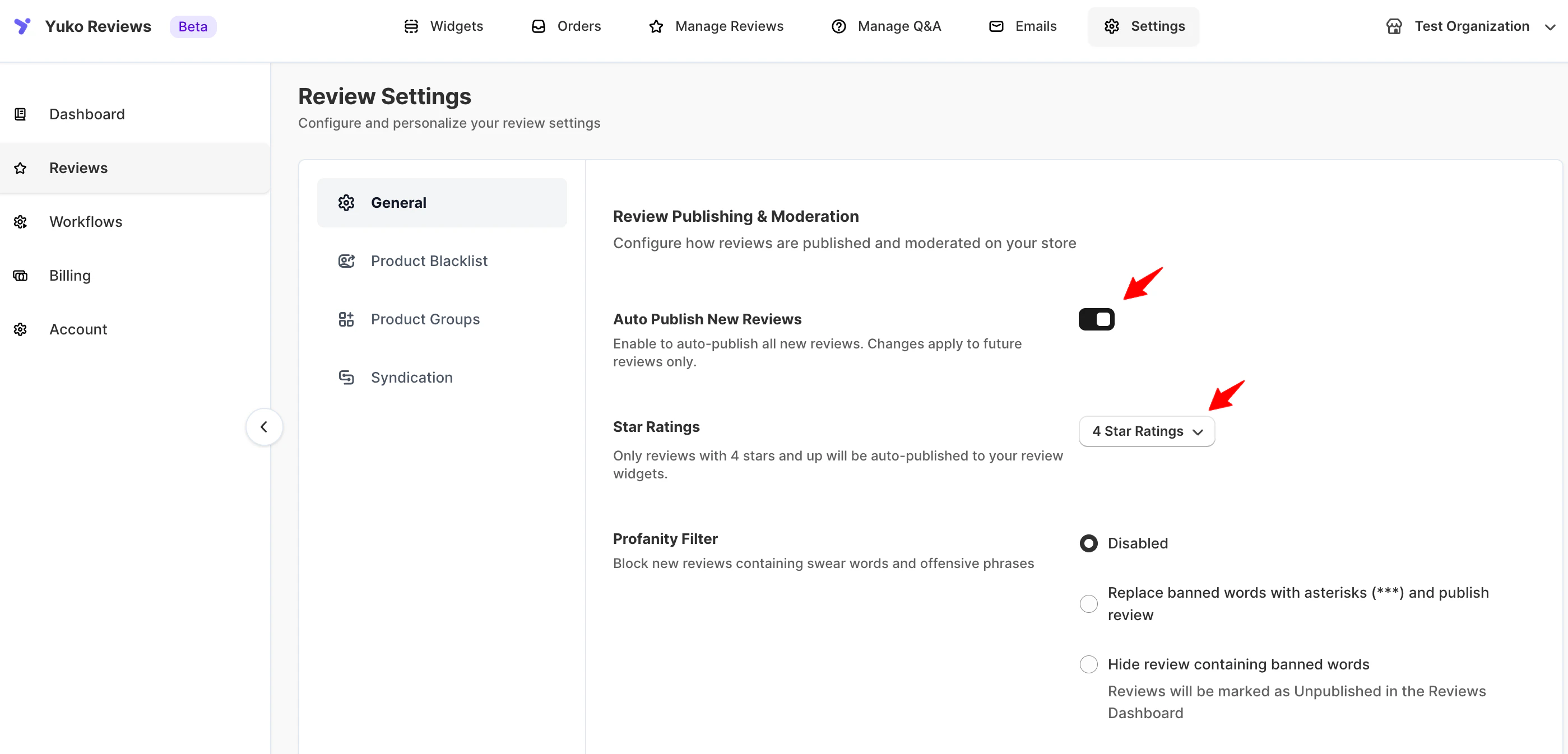 **Auto-publish based on review rating**
* Automatically publish all new incoming reviews.
* What happens when enabled:
* Reviews go live instantly
* No manual approval needed
* Great for fast social proof
* What happens when disabled:
* All reviews remain Unpublished
* You must approve reviews manually
* Better control, slower publishing
```text theme={null}
Auto-publish reviews with rating:
[ ] 5 stars only
[✓] 4-5 stars (recommended)
[ ] All ratings
[ ] None (manual moderation)
```
**Pro tip:** Auto-publish 4-5 stars. This captures 70-80% of reviews and lets them go live instantly, while you still catch negative feedback early.
**Star Ratings (Auto-Publish Rules)**\
Choose which star ratings should be auto-published (e.g., only 5⭐, 4–5⭐, or all). Reviews outside your selected range will be sent to **Pending** for manual moderation.
## Common Questions
**Not if configured correctly with good filters**
**Risks of auto-publishing:**
* Spam reviews go live
* Negative reviews appear before you can respond
* Low-quality reviews published
* Fake reviews slip through
**Mitigation strategies:**
**1. Use verified-purchase filter**
* Auto-publish only verified purchases
* Reduces fake reviews by 95%
* Most important protection
**2. Set minimum quality bar**
* Auto-publish 4-5 stars only
* Manual review negative feedback
* Respond before publishing low ratings
**3. Enable spam detection**
* Keyword filters
* Email blacklist
* Multiple review detection
* Auto-flag suspicious patterns
**4. Monitor daily**
* Check published reviews daily
* Quick spam removal
* Respond to negative reviews within 24 hours
* Adjust rules based on issues
**5. Start conservative**
* Begin with manual moderation
* Learn your review patterns
* Add auto-publish gradually
* Tighten rules if spam increases
**Reality check:**
* 99% of verified purchase reviews are legitimate
* Auto-publishing speeds up social proof by 50%
* Manual moderation doesn't prevent all spam
* Can remove bad reviews quickly if they slip through
**Best practice:** Auto-publish verified 4-5 star reviews only. This is safe for 99% of stores and dramatically speeds up social proof building.
**Yes - adjust anytime based on results**
**Common adjustments:**
**Tighten rules if:**
* Spam increasing
* Low-quality reviews appearing
* Negative reviews need more attention
* Growing too fast to monitor
**Example:** Switch from auto-publish all to auto-publish 4-5 stars only
**Loosen rules if:**
* Too much manual work
* Missing social proof opportunity
* Spam filters working well
* Review volume overwhelming moderation
**Example:** Switch from manual to auto-publish verified purchases
**How to change:**
1. Go to Settings → Reviews → Auto-Publishing
2. Update rules
3. Save changes
4. Applies to new reviews immediately
5. Existing reviews unaffected
**Testing changes:**
* Make small adjustments
* Monitor for 7 days
* Check spam rate and moderation time
* Adjust again if needed
**Seasonal adjustments:**
* Holiday season: More conservative (higher volume)
* Slow periods: More aggressive (need reviews)
* Product launches: Manual review initially
* After issues resolved: Back to auto-publish
**Pro tip:** Review your auto-publish settings quarterly. As your store grows and review patterns change, optimize your rules for current volume and quality.
**Yes - photo reviews are valuable and usually legitimate**
**Why auto-publish photo reviews:**
* **Higher trust:** Customers who upload photos usually genuine
* **More effort:** Spammers rarely add photos
* **Valuable content:** Photo reviews convert 3x better
* **Customer engagement:** Reward customers who go extra mile
**Recommended rule:**
* Auto-publish ANY review with photos (even 3-star if has photos)
* Photos indicate authentic customer
* Rarely spam
**Settings:**
```text theme={null}
Auto-publish if:
[✓] Has photos (any rating)
OR
[✓] 4-5 stars without photos
```
**Exception handling:**
* Inappropriate photos → Auto-detect and hold
* Competitor product photos → Manual review
* Offensive images → Spam filter catches
**Photo review fast-track:**
* Some platforms auto-approve photo reviews regardless of rating
* Rewards customer effort
* Increases photo review rate
* Generally safe (legitimate customers upload photos)
**Trade-off:**
* 3-star review with photos goes live
* But: Photo provides context
* Customers see authentic feedback
* You can still reply
**Recommended:** Auto-publish all reviews with photos, regardless of rating. Photo reviews are 95% legitimate and highly valuable for conversion.
## Need Help?
Talk to our team for personalized setup help
**Time:** 30 minutes
Reach our team at yukoreviews.com/support
**Response time:** Within 24 hours
Browse detailed guides for every feature
Connect Yuko with other tools
**Pro tip:** Start with conservative auto-publish rules (4-5 stars + verified only). After 30 days, loosen restrictions if spam is low. It's easier to start strict and loosen than to deal with spam from being too permissive.
**Auto-publish based on review rating**
* Automatically publish all new incoming reviews.
* What happens when enabled:
* Reviews go live instantly
* No manual approval needed
* Great for fast social proof
* What happens when disabled:
* All reviews remain Unpublished
* You must approve reviews manually
* Better control, slower publishing
```text theme={null}
Auto-publish reviews with rating:
[ ] 5 stars only
[✓] 4-5 stars (recommended)
[ ] All ratings
[ ] None (manual moderation)
```
**Pro tip:** Auto-publish 4-5 stars. This captures 70-80% of reviews and lets them go live instantly, while you still catch negative feedback early.
**Star Ratings (Auto-Publish Rules)**\
Choose which star ratings should be auto-published (e.g., only 5⭐, 4–5⭐, or all). Reviews outside your selected range will be sent to **Pending** for manual moderation.
## Common Questions
**Not if configured correctly with good filters**
**Risks of auto-publishing:**
* Spam reviews go live
* Negative reviews appear before you can respond
* Low-quality reviews published
* Fake reviews slip through
**Mitigation strategies:**
**1. Use verified-purchase filter**
* Auto-publish only verified purchases
* Reduces fake reviews by 95%
* Most important protection
**2. Set minimum quality bar**
* Auto-publish 4-5 stars only
* Manual review negative feedback
* Respond before publishing low ratings
**3. Enable spam detection**
* Keyword filters
* Email blacklist
* Multiple review detection
* Auto-flag suspicious patterns
**4. Monitor daily**
* Check published reviews daily
* Quick spam removal
* Respond to negative reviews within 24 hours
* Adjust rules based on issues
**5. Start conservative**
* Begin with manual moderation
* Learn your review patterns
* Add auto-publish gradually
* Tighten rules if spam increases
**Reality check:**
* 99% of verified purchase reviews are legitimate
* Auto-publishing speeds up social proof by 50%
* Manual moderation doesn't prevent all spam
* Can remove bad reviews quickly if they slip through
**Best practice:** Auto-publish verified 4-5 star reviews only. This is safe for 99% of stores and dramatically speeds up social proof building.
**Yes - adjust anytime based on results**
**Common adjustments:**
**Tighten rules if:**
* Spam increasing
* Low-quality reviews appearing
* Negative reviews need more attention
* Growing too fast to monitor
**Example:** Switch from auto-publish all to auto-publish 4-5 stars only
**Loosen rules if:**
* Too much manual work
* Missing social proof opportunity
* Spam filters working well
* Review volume overwhelming moderation
**Example:** Switch from manual to auto-publish verified purchases
**How to change:**
1. Go to Settings → Reviews → Auto-Publishing
2. Update rules
3. Save changes
4. Applies to new reviews immediately
5. Existing reviews unaffected
**Testing changes:**
* Make small adjustments
* Monitor for 7 days
* Check spam rate and moderation time
* Adjust again if needed
**Seasonal adjustments:**
* Holiday season: More conservative (higher volume)
* Slow periods: More aggressive (need reviews)
* Product launches: Manual review initially
* After issues resolved: Back to auto-publish
**Pro tip:** Review your auto-publish settings quarterly. As your store grows and review patterns change, optimize your rules for current volume and quality.
**Yes - photo reviews are valuable and usually legitimate**
**Why auto-publish photo reviews:**
* **Higher trust:** Customers who upload photos usually genuine
* **More effort:** Spammers rarely add photos
* **Valuable content:** Photo reviews convert 3x better
* **Customer engagement:** Reward customers who go extra mile
**Recommended rule:**
* Auto-publish ANY review with photos (even 3-star if has photos)
* Photos indicate authentic customer
* Rarely spam
**Settings:**
```text theme={null}
Auto-publish if:
[✓] Has photos (any rating)
OR
[✓] 4-5 stars without photos
```
**Exception handling:**
* Inappropriate photos → Auto-detect and hold
* Competitor product photos → Manual review
* Offensive images → Spam filter catches
**Photo review fast-track:**
* Some platforms auto-approve photo reviews regardless of rating
* Rewards customer effort
* Increases photo review rate
* Generally safe (legitimate customers upload photos)
**Trade-off:**
* 3-star review with photos goes live
* But: Photo provides context
* Customers see authentic feedback
* You can still reply
**Recommended:** Auto-publish all reviews with photos, regardless of rating. Photo reviews are 95% legitimate and highly valuable for conversion.
## Need Help?
Talk to our team for personalized setup help
**Time:** 30 minutes
Reach our team at yukoreviews.com/support
**Response time:** Within 24 hours
Browse detailed guides for every feature
Connect Yuko with other tools
**Pro tip:** Start with conservative auto-publish rules (4-5 stars + verified only). After 30 days, loosen restrictions if spam is low. It's easier to start strict and loosen than to deal with spam from being too permissive.