> ## Documentation Index
> Fetch the complete documentation index at: https://docs.yukoreviews.com/llms.txt
> Use this file to discover all available pages before exploring further.
# Importing from WooCommerce Reviews
> Import your existing WooCommerce product reviews into Yuko with one-click automatic import
## Learn how to Migrate WooCommerce Reviews in Minutes
Already have product reviews in WooCommerce? Import them to Yuko instantly with our automatic one-click import. All your reviews, ratings, and verified purchase badges transfer seamlessly — no CSV files or manual work required.
**What you'll achieve:**
* Import all WooCommerce reviews automatically
* Preserve star ratings and review dates
* Maintain verified purchase status
* Keep reviewer information intact
* Switch to Yuko without losing social proof
**Impact:** WooCommerce import takes 2-30 minutes depending on review count. All reviews automatically mapped to correct products.
***
## Why Import WooCommerce Reviews
**No manual work required**
* One-click automatic import ( Simply Sync in the Settings -> Integrations -> WooCommerce -> Configure -> Sync )
* No CSV files to format
* No product ID mapping needed
* Yuko auto-matches reviews to products
* Fully automated process
**Result:** Import completes in minutes without any manual effort
**Everything transfers**
* All review text and titles
* Star ratings (1-5)
* Reviewer names and emails
* Review dates (preserved)
* Verified purchase badges
* Approval status
**Result:** Perfect 1:1 migration from WooCommerce to Yuko
**Maintain trust badges**
* WooCommerce "Verified Owner" preserved
* Converts to Yuko "Verified Purchase"
* Shows on reviews automatically
* Maintains credibility
**Result:** No loss of review authenticity during migration
**Your data stays safe**
* Original WooCommerce reviews unchanged
* Duplicate prevention (won't import twice)
* Can re-import if needed
* Rollback friendly
**Result:** Risk-free migration with backup intact
***
## Step-by-Step Import Instructions
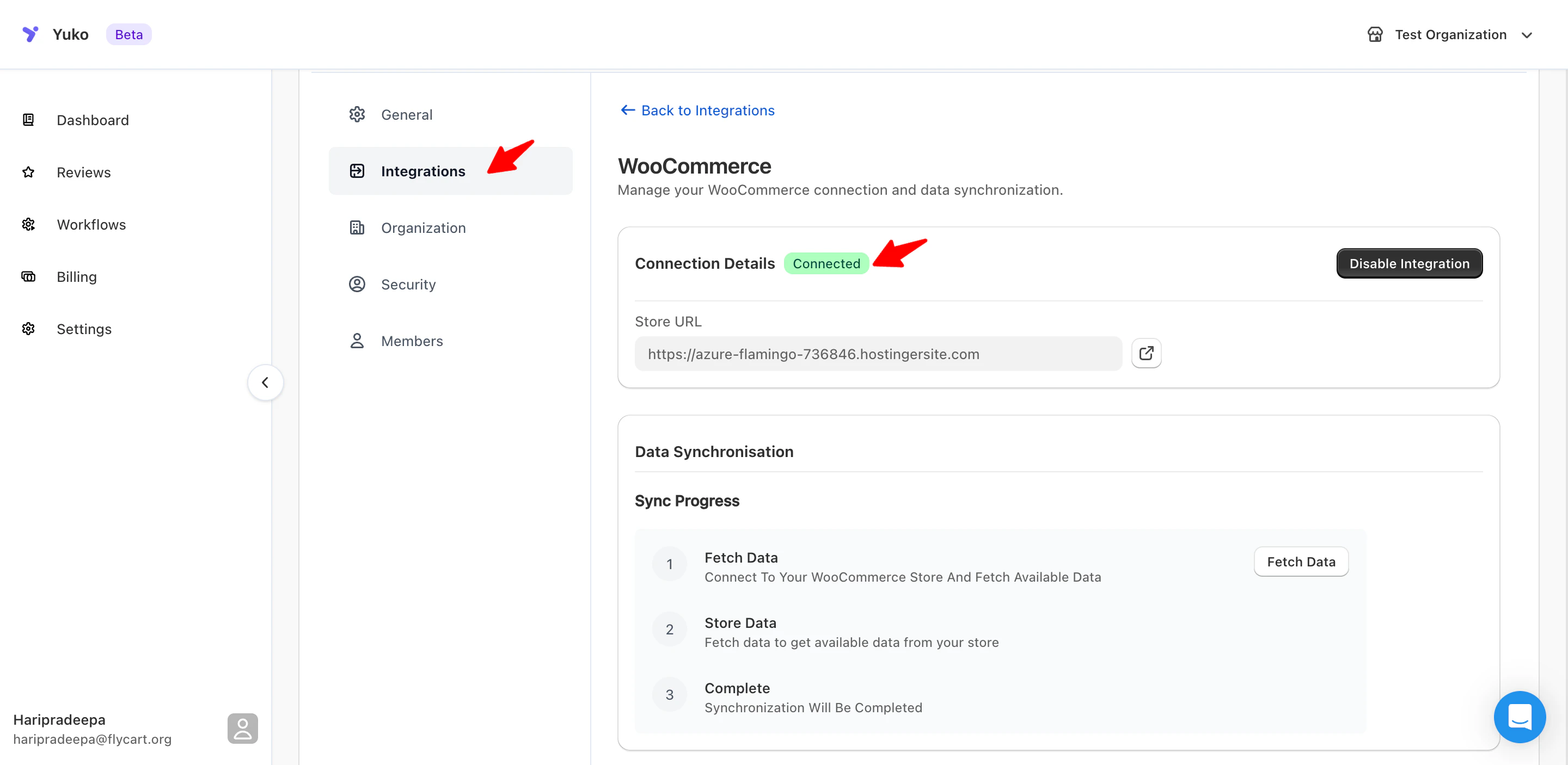
Yuko Dashboard → **Settings → Integration → WooCommerce**
* Go to **Settings → Integrations → WooCommerce**
* This page manages your store connection and sync settings
* If your store is **not connected**, click **Connect WooCommerce Store**
* Enter your store URL
* Authorize access
* Once connected, the integration will show as **Active**\
\
\
\
**Fix:** Ensure correct store URL format ([https://yourstore.com](https://yourstore.com))
 **Pro tip:** Test WooCommerce connection by importing 1-2 reviews first (you'll do this in Step 4). If connection works for test import, it will work for full import.
* Locate the **Data Synchronisation** section
* This area controls how customers, products, and reviews are imported into Yuko
* Click **Fetch Data** to pull customer, product, and review information from WooCommerce
* Yuko will display how many items were found (e.g., customers, products)
\
\
Why this matters:
* Allows Yuko to fetch WooCommerce review records.
* Go to **Settings → Integrations → WooCommerce**
* Scroll to **Data Synchronisation / Store Data**
* Under **Store Data**, find the checkbox \*\*Include Reviews \*\*
* Enable **Include Reviews** (check the box)
**Pro tip:** Test WooCommerce connection by importing 1-2 reviews first (you'll do this in Step 4). If connection works for test import, it will work for full import.
* Locate the **Data Synchronisation** section
* This area controls how customers, products, and reviews are imported into Yuko
* Click **Fetch Data** to pull customer, product, and review information from WooCommerce
* Yuko will display how many items were found (e.g., customers, products)
\
\
Why this matters:
* Allows Yuko to fetch WooCommerce review records.
* Go to **Settings → Integrations → WooCommerce**
* Scroll to **Data Synchronisation / Store Data**
* Under **Store Data**, find the checkbox \*\*Include Reviews \*\*
* Enable **Include Reviews** (check the box)
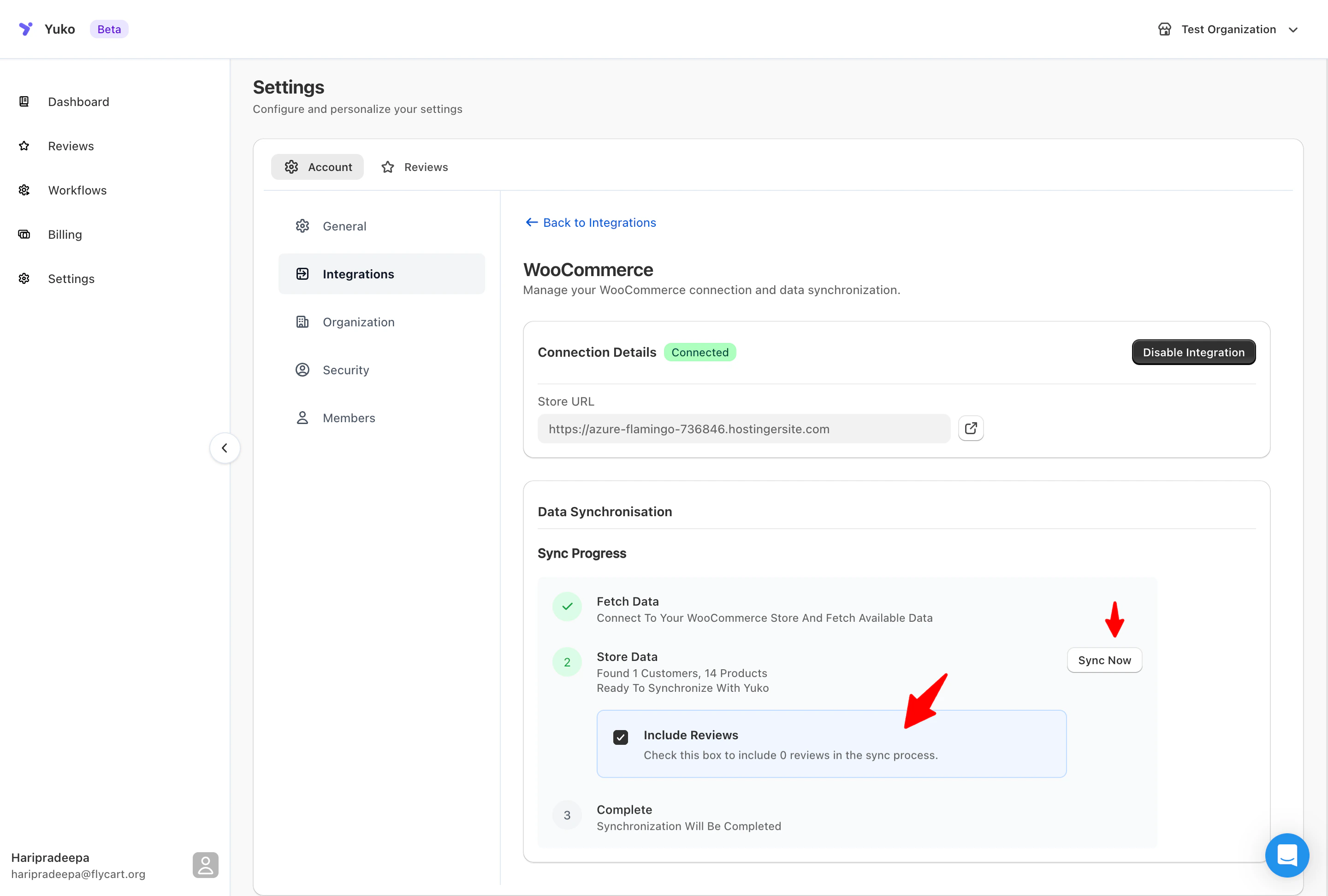 * Save settings
* After enabling the checkbox, the sync will continue
* Status indicators (Customers, Products, Reviews) will show **In progress**
* Save settings
* After enabling the checkbox, the sync will continue
* Status indicators (Customers, Products, Reviews) will show **In progress**
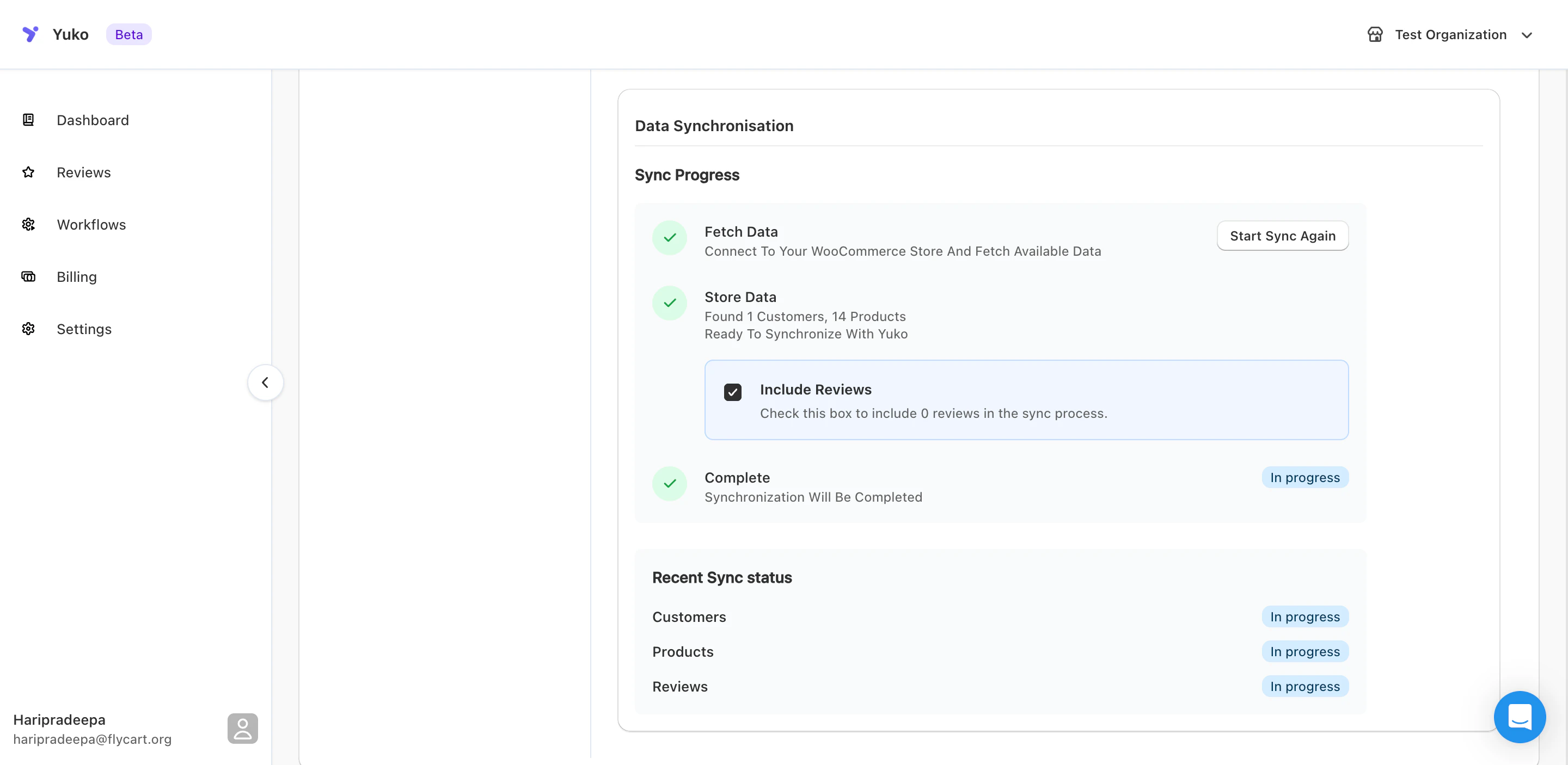 * They will automatically switch to **Completed** once the sync finishes
***
## After Import: Next Steps
Check that reviews imported correctly.
**Verification checklist:**
1. Total count
2. Random sampling: Check 10-20 random product pages
3. Verified badges: Ensure verified purchases show badge
4. Dates: Confirm original dates preserved (not all "today")
5. Product assignment: Reviews on correct products
**Time:** 15-30 minutes
Install Yuko widgets to show imported reviews on your store.
**Required for reviews to appear:**
1. Go to **Yuko Dashboard → Reviews → Widgets**
2. Install Product Review Widget
3. Install Star Rating Widget
4. Place widgets on product pages
5. Verify reviews displaying
**Imported reviews won't show until widgets installed**
→ [Widget installation guide](/display-reviews/introduction-to-widgets)
**Time:** 20-30 minutes
***
## Need Help?
Talk to our team for personalized setup help
**Time:** 30 minutes
Reach our team at yukoreviews.com/support
**Response time:** Within 24 hours
Browse detailed guides for every feature
Connect Yuko with other tools
**Pro tip:** Before importing, verify all your WooCommerce products are already in Yuko. This ensures perfect product matching. Then run a test import with 20 reviews to verify everything works before importing your full review database.
* They will automatically switch to **Completed** once the sync finishes
***
## After Import: Next Steps
Check that reviews imported correctly.
**Verification checklist:**
1. Total count
2. Random sampling: Check 10-20 random product pages
3. Verified badges: Ensure verified purchases show badge
4. Dates: Confirm original dates preserved (not all "today")
5. Product assignment: Reviews on correct products
**Time:** 15-30 minutes
Install Yuko widgets to show imported reviews on your store.
**Required for reviews to appear:**
1. Go to **Yuko Dashboard → Reviews → Widgets**
2. Install Product Review Widget
3. Install Star Rating Widget
4. Place widgets on product pages
5. Verify reviews displaying
**Imported reviews won't show until widgets installed**
→ [Widget installation guide](/display-reviews/introduction-to-widgets)
**Time:** 20-30 minutes
***
## Need Help?
Talk to our team for personalized setup help
**Time:** 30 minutes
Reach our team at yukoreviews.com/support
**Response time:** Within 24 hours
Browse detailed guides for every feature
Connect Yuko with other tools
**Pro tip:** Before importing, verify all your WooCommerce products are already in Yuko. This ensures perfect product matching. Then run a test import with 20 reviews to verify everything works before importing your full review database.