> ## Documentation Index
> Fetch the complete documentation index at: https://docs.yukoreviews.com/llms.txt
> Use this file to discover all available pages before exploring further.
> Learn how to display product reviews directly on your product pages using this widget.
# Product Reviews Display Widget
The Product Reviews Display Widget is the main review section on your product pages.\
It shows customer feedback, star ratings, photos, videos, and all review details in one clean place. Most stores place this widget below the product description so shoppers can read reviews before they buy.
You can customize the layout, style, colors, and what information you want to show — all with live preview inside Yuko.
### **Navigation**
Yuko Dashboard → **Reviews → Widgets → Product Reviews Display**
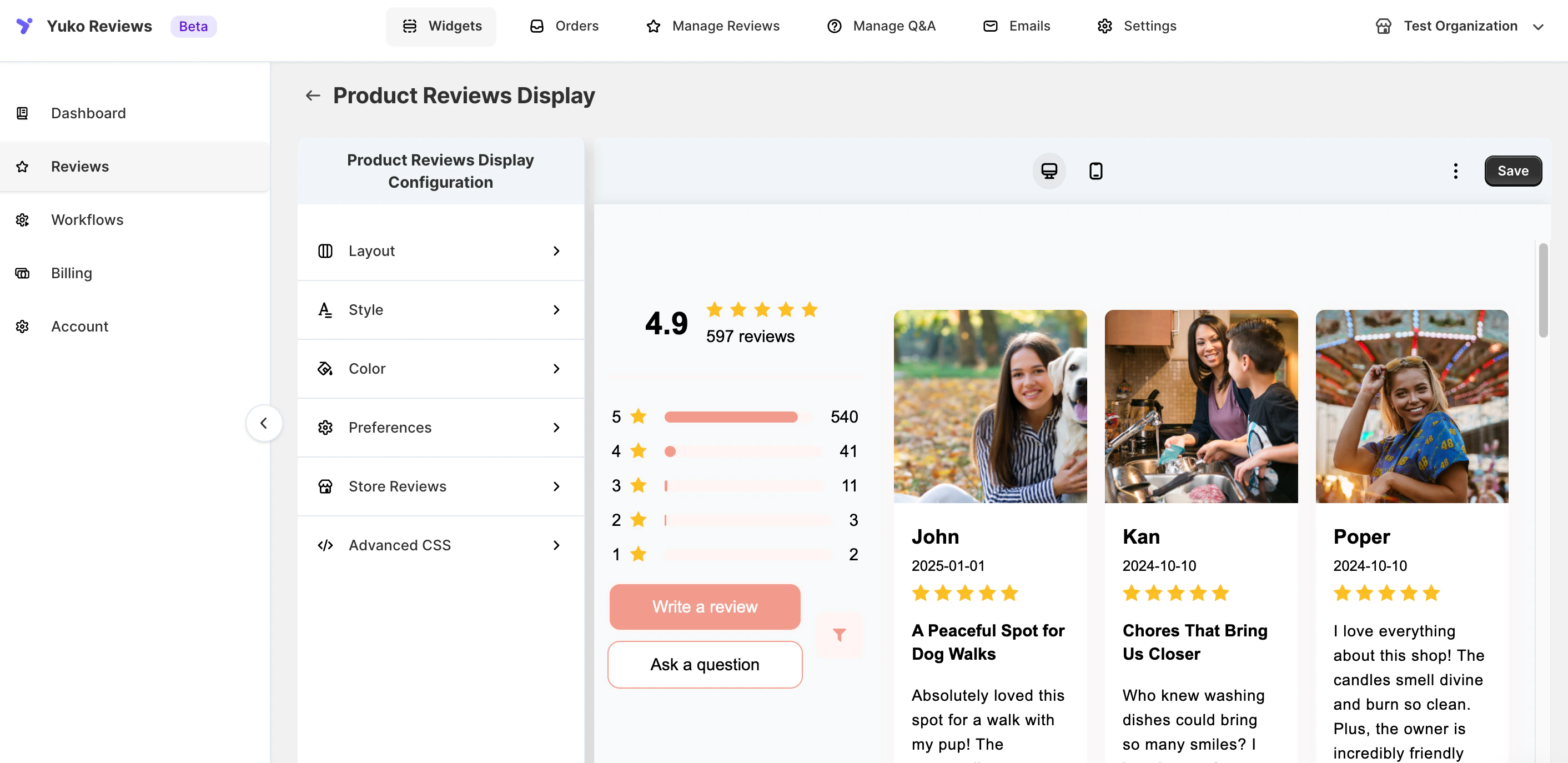 ### **Customize the Product Reviews Display Widget:**
\
The following are the options for customisation:
### Layout
Choose how reviews and ratings are displayed:
* **Review Layout:** Grid, List, or Mosaic
* **Rating Layout:** Horizontal or Compact
***
### Style
Control the appearance of review cards:
* **Card Shadow:** Classic, Light, Dark, or None
* **Card Corners:** Sharp to Extra Rounded
***
### Colors
Match the widget with your brand by customizing:
* Header text and rating bars
* Star icons
* Buttons (text, background, hover, border)
* Review cards, replies, badges, and arrows
***
### Preferences
Decide what to show and how reviews behave:
* Toggle review details (title, date, verified badge, replies, filters, sorting)
* Choose how reviews display when a product has no reviews
* Customize header text, buttons, and labels
* Set pagination and default sorting
***
### Store Reviews
If enabled, you can:
* Show or hide store reviews
* [Customize store review labels and buttons](/collect-reviews/collecting-shop-site-review)
***
### Advanced CSS
Use Custom CSS for fine-tuning fonts, spacing, borders, and mobile layout.
***
### **Customize the Product Reviews Display Widget:**
\
The following are the options for customisation:
### Layout
Choose how reviews and ratings are displayed:
* **Review Layout:** Grid, List, or Mosaic
* **Rating Layout:** Horizontal or Compact
***
### Style
Control the appearance of review cards:
* **Card Shadow:** Classic, Light, Dark, or None
* **Card Corners:** Sharp to Extra Rounded
***
### Colors
Match the widget with your brand by customizing:
* Header text and rating bars
* Star icons
* Buttons (text, background, hover, border)
* Review cards, replies, badges, and arrows
***
### Preferences
Decide what to show and how reviews behave:
* Toggle review details (title, date, verified badge, replies, filters, sorting)
* Choose how reviews display when a product has no reviews
* Customize header text, buttons, and labels
* Set pagination and default sorting
***
### Store Reviews
If enabled, you can:
* Show or hide store reviews
* [Customize store review labels and buttons](/collect-reviews/collecting-shop-site-review)
***
### Advanced CSS
Use Custom CSS for fine-tuning fonts, spacing, borders, and mobile layout.
***