> ## Documentation Index
> Fetch the complete documentation index at: https://docs.yukoreviews.com/llms.txt
> Use this file to discover all available pages before exploring further.
# Overview of Yuko Widgets
> Learn how to display customer reviews across your store using Yuko widgets.
Yuko offers a collection of widgets that help you showcase customer feedback, build trust, and increase conversions.\
\
In this guide, we’ll walk you through each widget, what it does, and how it appears on your store — so you can create a smooth and trustworthy shopping experience for your customers.
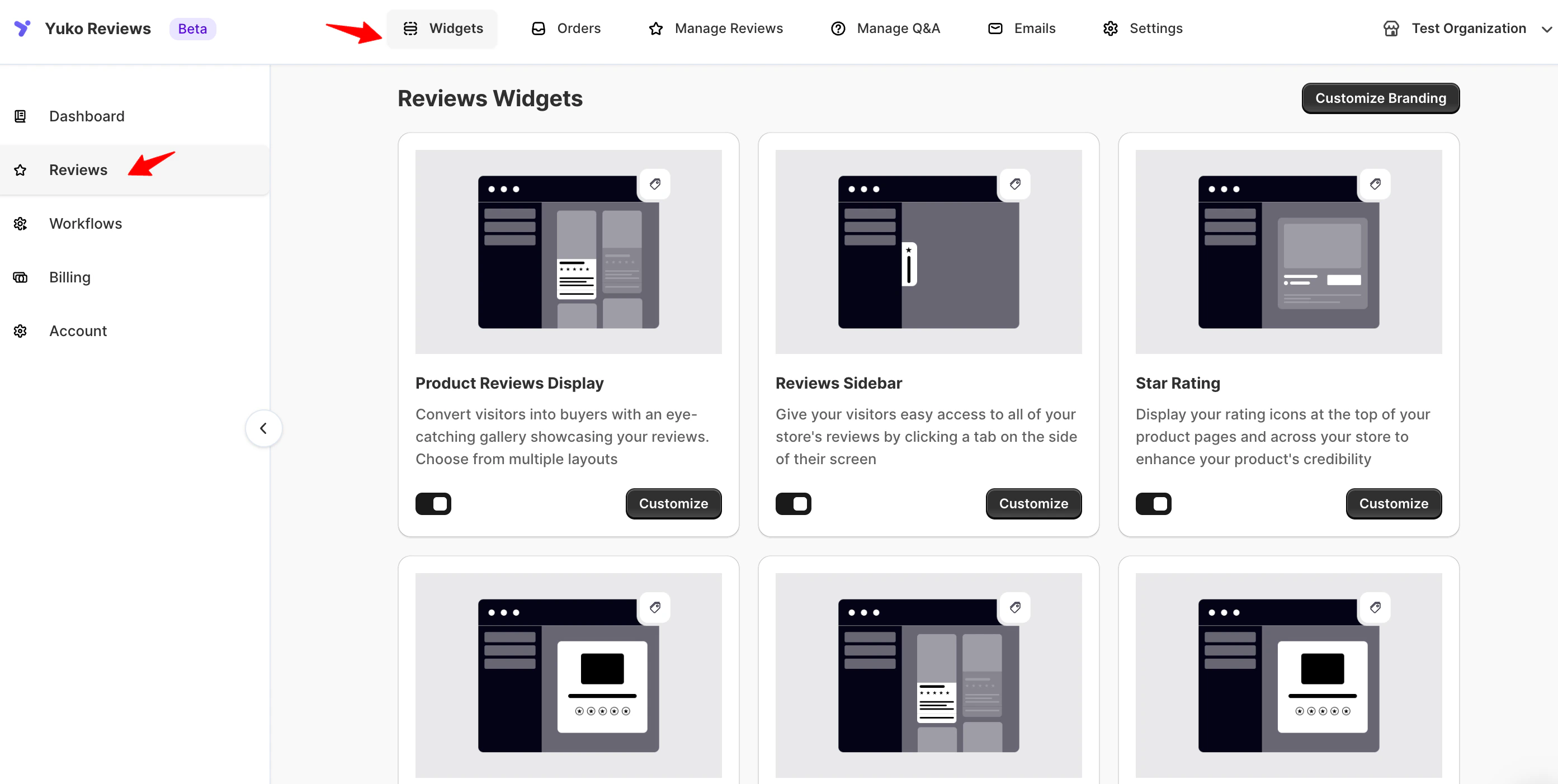
### **Navigation**
Yuko Dashboard → **Reviews → Widgets**
 ### **Why widgets matter**
Displaying reviews at key stages of the buying journey increases trust and gives customers the confidence to complete their purchase.\
With Yuko’s widgets, you can feature your best feedback, boost product credibility, and highlight real customer experiences across your store.
All widgets include options for:
* Custom colors & fonts
* Layout & visibility rules
* Advanced CSS styling
* Responsive display across devices
### **Available Widgets**
This widget shows all customer reviews on your product pages.\
It usually appears below your product description.\
Customers can read reviews, see photos or videos, and check the rating before buying.\
\
**Learn more**
* *How to add the Product Reviews Display Widget*
* *How to style and customize it*
The Sidebar Widget is a small panel that stays on the side of your website.\
It shows reviews on any page while customers browse.\
This helps customers see social proof without leaving the page.
**Learn more**
* *How to install the Sidebar Widget*
* *How to choose which reviews appear*
This widget shows the star rating and the total number of reviews for each product.\
You can display it under product titles, on collection pages, or in search results.\
It helps customers quickly compare products.
### **Learn more**
* *How to enable the Star Rating Widget*
* *How to show star ratings on collection pages*
This widget shows all approved reviews in one place.\
It can be used as a full page or a section on your site.\
Customers can scroll through every review from your store.
### **Learn more**
* *How to create a Wall of Fame Widget*
* *How to customize the layout*
This widget shows reviews in a rotating slider.\
It is great for homepages, landing pages, or any place where you want to highlight your best reviews.\
You can choose which reviews appear and how they rotate.
### **Learn more**
* *How to add the Carousel / Testimonial Widget*
* *How to select reviews for the carousel*
The Flowing Review Badge is a small floating badge that shows recent reviews or rating highlights.\
It updates while customers browse, giving real-time social proof.\
This helps build trust without disrupting the page.
Guides will be available when this feature is launched.
These controls help you manage how reviews are shown.\
You can sort reviews, filter them, hide low-star reviews, or pin important ones.\
This gives you full control over what customers see.
### **Learn more**
* *How to use Review Display Controls*
* *How to filter and sort reviews*
### **Why widgets matter**
Displaying reviews at key stages of the buying journey increases trust and gives customers the confidence to complete their purchase.\
With Yuko’s widgets, you can feature your best feedback, boost product credibility, and highlight real customer experiences across your store.
All widgets include options for:
* Custom colors & fonts
* Layout & visibility rules
* Advanced CSS styling
* Responsive display across devices
### **Available Widgets**
This widget shows all customer reviews on your product pages.\
It usually appears below your product description.\
Customers can read reviews, see photos or videos, and check the rating before buying.\
\
**Learn more**
* *How to add the Product Reviews Display Widget*
* *How to style and customize it*
The Sidebar Widget is a small panel that stays on the side of your website.\
It shows reviews on any page while customers browse.\
This helps customers see social proof without leaving the page.
**Learn more**
* *How to install the Sidebar Widget*
* *How to choose which reviews appear*
This widget shows the star rating and the total number of reviews for each product.\
You can display it under product titles, on collection pages, or in search results.\
It helps customers quickly compare products.
### **Learn more**
* *How to enable the Star Rating Widget*
* *How to show star ratings on collection pages*
This widget shows all approved reviews in one place.\
It can be used as a full page or a section on your site.\
Customers can scroll through every review from your store.
### **Learn more**
* *How to create a Wall of Fame Widget*
* *How to customize the layout*
This widget shows reviews in a rotating slider.\
It is great for homepages, landing pages, or any place where you want to highlight your best reviews.\
You can choose which reviews appear and how they rotate.
### **Learn more**
* *How to add the Carousel / Testimonial Widget*
* *How to select reviews for the carousel*
The Flowing Review Badge is a small floating badge that shows recent reviews or rating highlights.\
It updates while customers browse, giving real-time social proof.\
This helps build trust without disrupting the page.
Guides will be available when this feature is launched.
These controls help you manage how reviews are shown.\
You can sort reviews, filter them, hide low-star reviews, or pin important ones.\
This gives you full control over what customers see.
### **Learn more**
* *How to use Review Display Controls*
* *How to filter and sort reviews*