> ## Documentation Index
> Fetch the complete documentation index at: https://docs.yukoreviews.com/llms.txt
> Use this file to discover all available pages before exploring further.
# Carousel / Testimonial Widget
> Learn how to showcase customer testimonials in a rotating carousel on your store.
The Carousel Widget displays your best customer reviews in a rotating slider. It’s perfect for homepages, landing pages, and sales funnels where you want to add strong social proof without taking too much space.\
A well-placed carousel helps increase trust, highlight top feedback, and improve conversions.\
\
**How it looks**
You can add the Carousel Widget to:
* The homepage
* Landing/offer pages
* Testimonial sections
* Product or collection pages
The widget rotates reviews automatically or through arrows and dots, depending on your settings.
***
## Navigation
**Yuko Dashboard → Reviews → Widgets → Review Carousel**
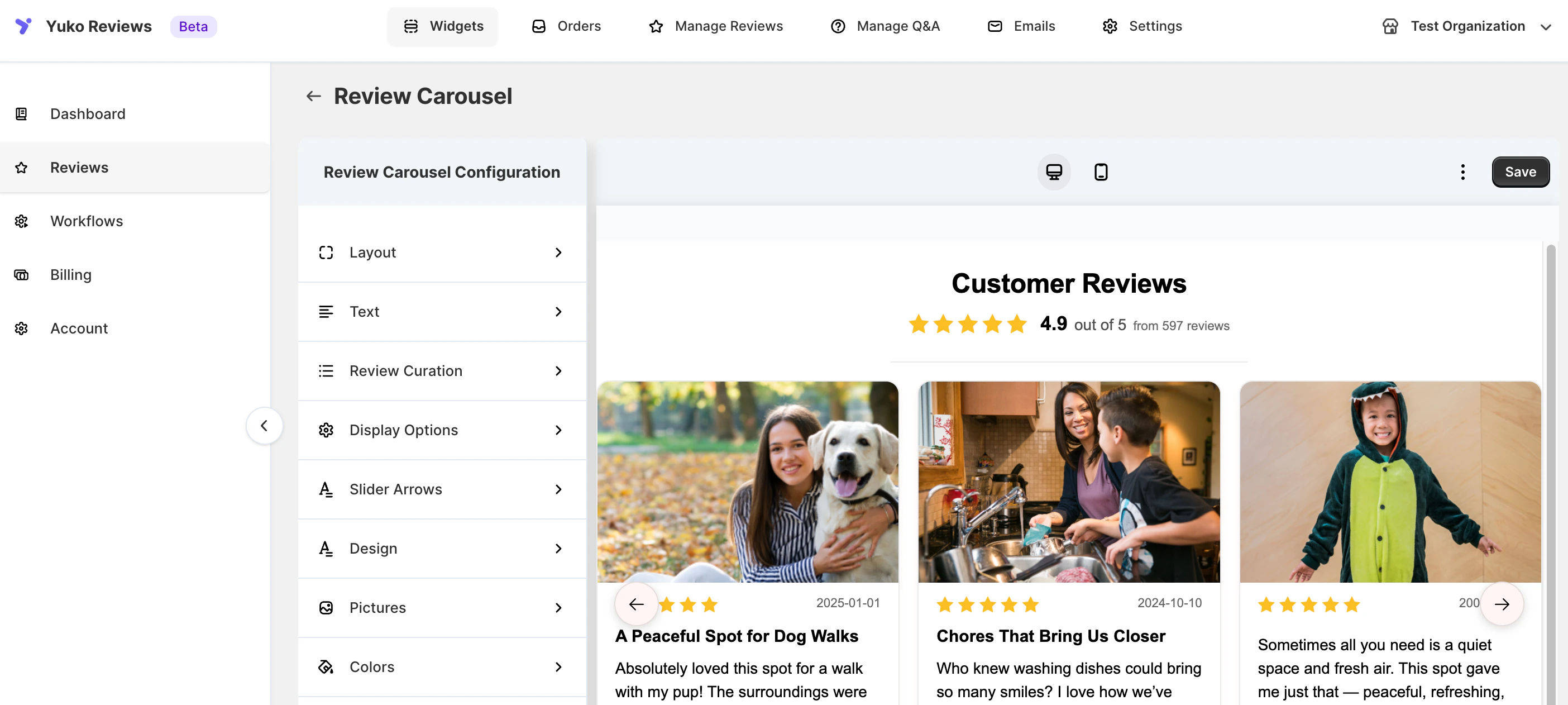 From here, you can access all customization options and preview your changes instantly.
***
### How to Customise Carousel Widget:
The following options are available for customisation:
### Layout
Choose how reviews move and align inside the carousel:
* **Focused View** – Highlights one main review
* **Vertical Sliding** – Slides reviews vertically
* **Centered** – Centers review cards for a balanced look
***
### Text
Customize the text shown in and above the carousel:
* **Header text**
* **Out of text** (e.g., “out of 5”)
* **Review count text** using `{{n}}`
***
### Review Curation
Decide which reviews appear:
* Show recent reviews or manually curate
* Set a **minimum star rating**
***
### Review Display
Control what appears on each review card:
* Number of reviews shown
* Reviewer name
* Review date
* Product block (image and title)
***
### Slider Controls
Adjust navigation and animation:
* Arrow position
* Auto-play
* Pagination dots
***
### Design
Style the structure of review cards:
* Show or hide star ratings
* Show or hide verified badge
* Set card height and carousel width
* Enable card shadow and rounded corners
***
### Pictures
Manage images in the carousel:
* Disable images
* Show product images
* Show review images (if available)
* Adjust image size (0px = auto-optimize)
* Prioritize reviews with pictures
***
### Colors
Customize widget colors:
* Header text
* Backgrounds (widget, cards, shadows)
* Text and rating icons
* Verified badge
* Slider arrows
***
### Advanced CSS
Enable Custom CSS to fine-tune styling directly within the carousel widget.
From here, you can access all customization options and preview your changes instantly.
***
### How to Customise Carousel Widget:
The following options are available for customisation:
### Layout
Choose how reviews move and align inside the carousel:
* **Focused View** – Highlights one main review
* **Vertical Sliding** – Slides reviews vertically
* **Centered** – Centers review cards for a balanced look
***
### Text
Customize the text shown in and above the carousel:
* **Header text**
* **Out of text** (e.g., “out of 5”)
* **Review count text** using `{{n}}`
***
### Review Curation
Decide which reviews appear:
* Show recent reviews or manually curate
* Set a **minimum star rating**
***
### Review Display
Control what appears on each review card:
* Number of reviews shown
* Reviewer name
* Review date
* Product block (image and title)
***
### Slider Controls
Adjust navigation and animation:
* Arrow position
* Auto-play
* Pagination dots
***
### Design
Style the structure of review cards:
* Show or hide star ratings
* Show or hide verified badge
* Set card height and carousel width
* Enable card shadow and rounded corners
***
### Pictures
Manage images in the carousel:
* Disable images
* Show product images
* Show review images (if available)
* Adjust image size (0px = auto-optimize)
* Prioritize reviews with pictures
***
### Colors
Customize widget colors:
* Header text
* Backgrounds (widget, cards, shadows)
* Text and rating icons
* Verified badge
* Slider arrows
***
### Advanced CSS
Enable Custom CSS to fine-tune styling directly within the carousel widget.