> ## Documentation Index
> Fetch the complete documentation index at: https://docs.yukoreviews.com/llms.txt
> Use this file to discover all available pages before exploring further.
> Customize the branding of your review widgets to match your store’s look and feel.
# Branding
### **Navigation**
Yuko Dashboard → **Reviews → Widgets → Customize Branding**
 ### **Overview**
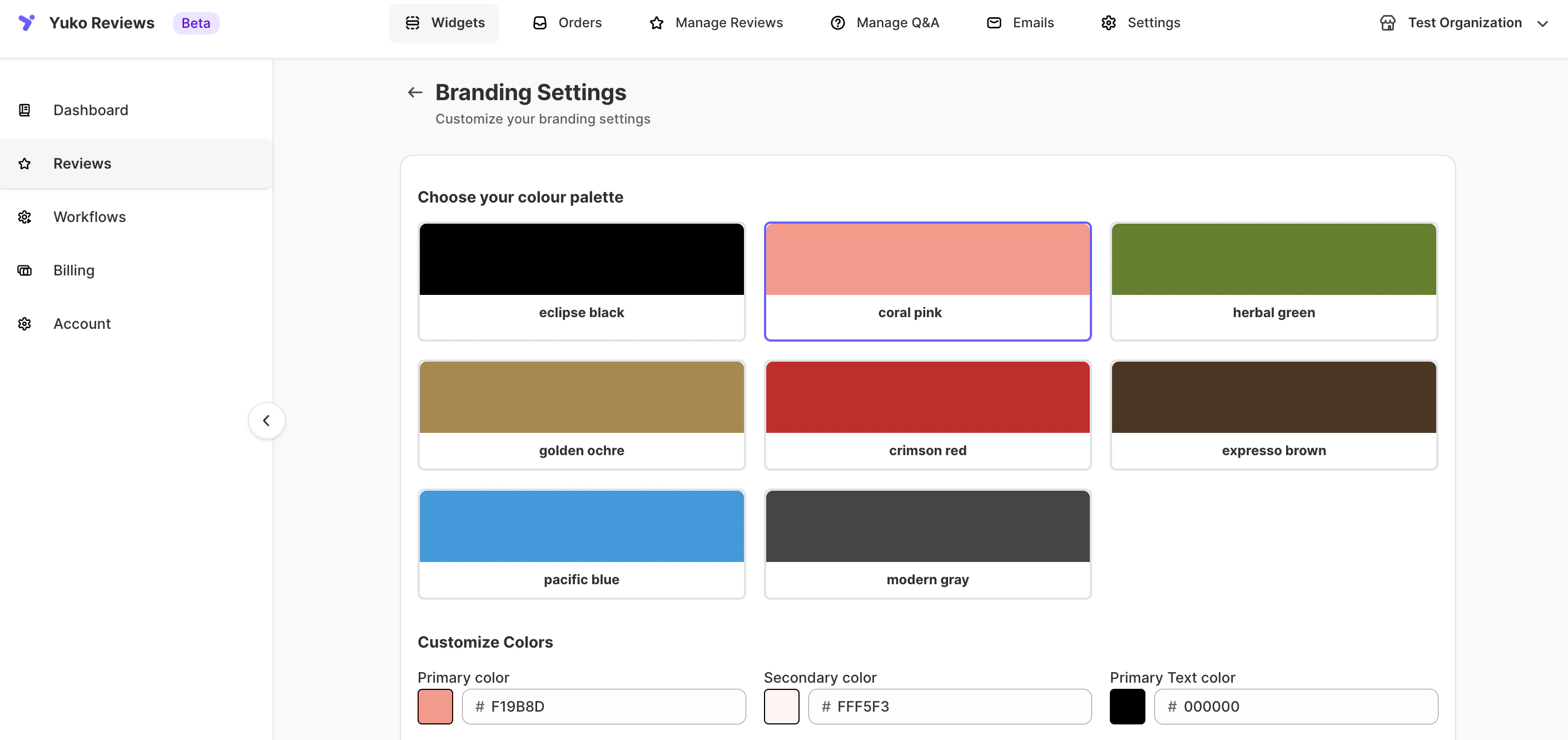
Personalize how your reviews appear across all widgets and emails.\
Choose your preferred color palette, font, and star icon style to match your store’s unique branding.\
All visual elements — from button colors to text styles — can be customized for a consistent brand experience.
### **Branding Options**
| **Setting** | **Description** |
| :------------------------------- | :------------------------------------------------------------------------------------------------------------------------------------------------------ |
| **Color Palette** | Choose from preset themes such as *Eclipse Black, Coral Pink, Herbal Green, Golden Ochre, Crimson Red, Espresso Brown, Pacific Blue,* or *Modern Gray.* |
| **Primary Color** | The main accent color used for stars, buttons, and highlights. |
| **Secondary Color** | A softer accent color used for backgrounds or secondary elements. |
| **Primary Text Color** | Default color for review titles and main text. |
| **Secondary Text Color** | Used for less prominent text, such as timestamps or meta details. |
| **Icon Color** | Defines the color of icons such as the star rating. |
| **Review Font** | Choose the font family (e.g., Arial) used to display reviews in widgets. |
| **Star Rating Icon** | Select the star icon style — *Star-Sharp, Star-Rounded,* or *Classic.* |
| **Apply Changes to All Widgets** | Apply the same color and font settings across all review widgets at once. |
| **Save Changes** | Save your new branding preferences. |
### What You Can Customize:
From the Branding section, you can configure:
* Review color palette and custom colors
* Fonts used in review widgets
* Star rating icon style
* Global branding application across widgets
These settings apply to all Yuko review widgets unless otherwise specified.
***
### Review Color & Style Settings
Yuko allows you to customize the colors used across your review widgets, including text, buttons, and star ratings.
### Available Options
You can:
* Choose a predefined color palette
* Customize individual colors manually
* Adjust button and input styles
* Control how ratings and descriptions appear
These controls help ensure your reviews feel like a natural extension of your storefront design.
***
### Apply Branding to All Widgets
You can enable **Apply to all widgets** to enforce consistent branding across your store.
When enabled:
* All review widgets will use the same branding settings
* Any widget-level color customizations will be overwritten
> ⚠️ **Note:** Enabling this option will replace any individual styling changes made inside specific widgets.
***
### Review Font Settings
You can choose the font used to display reviews on your storefront.
### Font Customization Includes:
* Font family selection
* Font style consistency across widgets
Using the same font as your storefront improves visual consistency and readability.
> 💡 **Tip:** Match your review font with your theme’s body or product font for the best results.
***
### Star Rating Icon Style
Yuko lets you customize the icon used for star ratings across all review widgets.
### Available Icon Styles:
* Star
* Shop
* Round Star
* Rocket
* Leaf
* Heart
* Gem
This allows you to choose an icon that best reflects your brand personality.
***
### Saving Your Changes
After making your branding updates:
1. Review your selections
2. Click **Save changes**
Your updated branding will be applied immediately to all applicable review widgets.
***
### When to Use Branding Settings
Use Branding settings when you want to:
* Match reviews to your storefront theme
* Maintain consistent design across all widgets
* Update the look of reviews without editing individual widgets
For review behavior, moderation rules, or collection settings, refer to other sections under **Settings → Reviews**.
### **Overview**
Personalize how your reviews appear across all widgets and emails.\
Choose your preferred color palette, font, and star icon style to match your store’s unique branding.\
All visual elements — from button colors to text styles — can be customized for a consistent brand experience.
### **Branding Options**
| **Setting** | **Description** |
| :------------------------------- | :------------------------------------------------------------------------------------------------------------------------------------------------------ |
| **Color Palette** | Choose from preset themes such as *Eclipse Black, Coral Pink, Herbal Green, Golden Ochre, Crimson Red, Espresso Brown, Pacific Blue,* or *Modern Gray.* |
| **Primary Color** | The main accent color used for stars, buttons, and highlights. |
| **Secondary Color** | A softer accent color used for backgrounds or secondary elements. |
| **Primary Text Color** | Default color for review titles and main text. |
| **Secondary Text Color** | Used for less prominent text, such as timestamps or meta details. |
| **Icon Color** | Defines the color of icons such as the star rating. |
| **Review Font** | Choose the font family (e.g., Arial) used to display reviews in widgets. |
| **Star Rating Icon** | Select the star icon style — *Star-Sharp, Star-Rounded,* or *Classic.* |
| **Apply Changes to All Widgets** | Apply the same color and font settings across all review widgets at once. |
| **Save Changes** | Save your new branding preferences. |
### What You Can Customize:
From the Branding section, you can configure:
* Review color palette and custom colors
* Fonts used in review widgets
* Star rating icon style
* Global branding application across widgets
These settings apply to all Yuko review widgets unless otherwise specified.
***
### Review Color & Style Settings
Yuko allows you to customize the colors used across your review widgets, including text, buttons, and star ratings.
### Available Options
You can:
* Choose a predefined color palette
* Customize individual colors manually
* Adjust button and input styles
* Control how ratings and descriptions appear
These controls help ensure your reviews feel like a natural extension of your storefront design.
***
### Apply Branding to All Widgets
You can enable **Apply to all widgets** to enforce consistent branding across your store.
When enabled:
* All review widgets will use the same branding settings
* Any widget-level color customizations will be overwritten
> ⚠️ **Note:** Enabling this option will replace any individual styling changes made inside specific widgets.
***
### Review Font Settings
You can choose the font used to display reviews on your storefront.
### Font Customization Includes:
* Font family selection
* Font style consistency across widgets
Using the same font as your storefront improves visual consistency and readability.
> 💡 **Tip:** Match your review font with your theme’s body or product font for the best results.
***
### Star Rating Icon Style
Yuko lets you customize the icon used for star ratings across all review widgets.
### Available Icon Styles:
* Star
* Shop
* Round Star
* Rocket
* Leaf
* Heart
* Gem
This allows you to choose an icon that best reflects your brand personality.
***
### Saving Your Changes
After making your branding updates:
1. Review your selections
2. Click **Save changes**
Your updated branding will be applied immediately to all applicable review widgets.
***
### When to Use Branding Settings
Use Branding settings when you want to:
* Match reviews to your storefront theme
* Maintain consistent design across all widgets
* Update the look of reviews without editing individual widgets
For review behavior, moderation rules, or collection settings, refer to other sections under **Settings → Reviews**.