> ## Documentation Index
> Fetch the complete documentation index at: https://docs.yukoreviews.com/llms.txt
> Use this file to discover all available pages before exploring further.
> Automatically notify customers when you reply to their reviews and build stronger relationships
# Review Reply Added Email Setup
## Turn One-Time Reviewers into Engaged Community Members
When you reply to customer reviews, most reviewers never see your response unless they happen to visit your site again. This email automatically notifies them that you took the time to respond, building relationships and showing you value their feedback.
**What you'll achieve:**
* Show customers you read and care about their feedback
* Build stronger customer relationships and loyalty
* Encourage ongoing engagement with your brand
* Handle negative reviews professionally and publicly
* Increase customer lifetime value
**Impact:** Higher customer retention and loyalty | **Time to set up:** 5 minutes
***
## How It Works
Navigation: Yuko Dashboard → **Reviews → Emails → Review Reply Added Email**
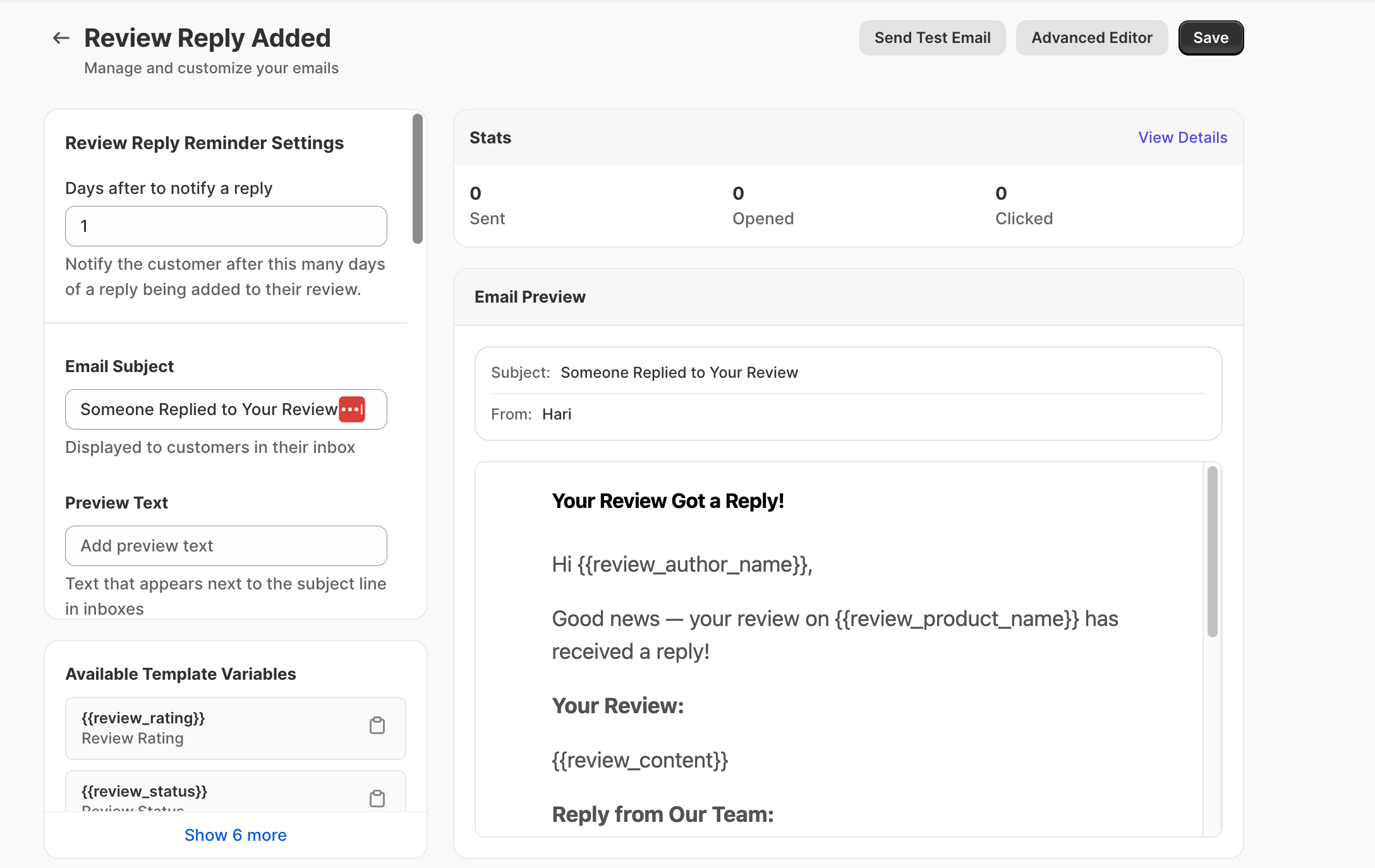
 ### The Automatic Process
Customer writes a review on your store (positive, neutral, or negative).
**Any rating:** This email works for all reviews, regardless of star rating.
You read the review and write a thoughtful reply in the Yuko Dashboard.
**Public reply:** Your response appears on your store for everyone to see.
Yuko automatically detects that you added a reply to a customer's review.
**Smart tracking:** Only sends email when reply is published (not saved as draft).
Customer receives email notification that you replied to their review.
**Timing:** Instant or delayed (your choice - default is 1 day later).
Customer clicks link in email and reads your response on your store.
**Engagement:** Many customers update their review or make another purchase after seeing your reply.
***
## Why This Matters
**The problem with replies:**
* Customer leaves review and moves on
* You reply publicly on your store
* But original reviewer never visits again
* They never see you acknowledged them
* Wasted opportunity to connect
**This email solves it:** Brings them back to see your reply
**Builds emotional connection:**
* "They actually read my review!"
* "They took time to respond personally"
* "My feedback matters to them"
* "This is a company that cares"
**Result:** Customer feels valued and appreciated
**Handle complaints professionally:**
* Acknowledge negative reviews
* Apologize and offer solution
* Customer receives notification
* Many update review or give second chance
**Result:** Recovery from bad experiences
**Creates brand advocates:**
* Customer sees you reply to everyone
* Impressed by responsiveness
* Tells friends about good experience
* Returns for future purchases
**Result:** Increased customer lifetime value
***
## Email Settings
**Setting: Days after to notify a reply**
\*\*Navigation: \*\*Yuko Dashboard → \*\*Reviews → Emails → Review Reply Added Email \*\*
### The Automatic Process
Customer writes a review on your store (positive, neutral, or negative).
**Any rating:** This email works for all reviews, regardless of star rating.
You read the review and write a thoughtful reply in the Yuko Dashboard.
**Public reply:** Your response appears on your store for everyone to see.
Yuko automatically detects that you added a reply to a customer's review.
**Smart tracking:** Only sends email when reply is published (not saved as draft).
Customer receives email notification that you replied to their review.
**Timing:** Instant or delayed (your choice - default is 1 day later).
Customer clicks link in email and reads your response on your store.
**Engagement:** Many customers update their review or make another purchase after seeing your reply.
***
## Why This Matters
**The problem with replies:**
* Customer leaves review and moves on
* You reply publicly on your store
* But original reviewer never visits again
* They never see you acknowledged them
* Wasted opportunity to connect
**This email solves it:** Brings them back to see your reply
**Builds emotional connection:**
* "They actually read my review!"
* "They took time to respond personally"
* "My feedback matters to them"
* "This is a company that cares"
**Result:** Customer feels valued and appreciated
**Handle complaints professionally:**
* Acknowledge negative reviews
* Apologize and offer solution
* Customer receives notification
* Many update review or give second chance
**Result:** Recovery from bad experiences
**Creates brand advocates:**
* Customer sees you reply to everyone
* Impressed by responsiveness
* Tells friends about good experience
* Returns for future purchases
**Result:** Increased customer lifetime value
***
## Email Settings
**Setting: Days after to notify a reply**
\*\*Navigation: \*\*Yuko Dashboard → \*\*Reviews → Emails → Review Reply Added Email \*\*
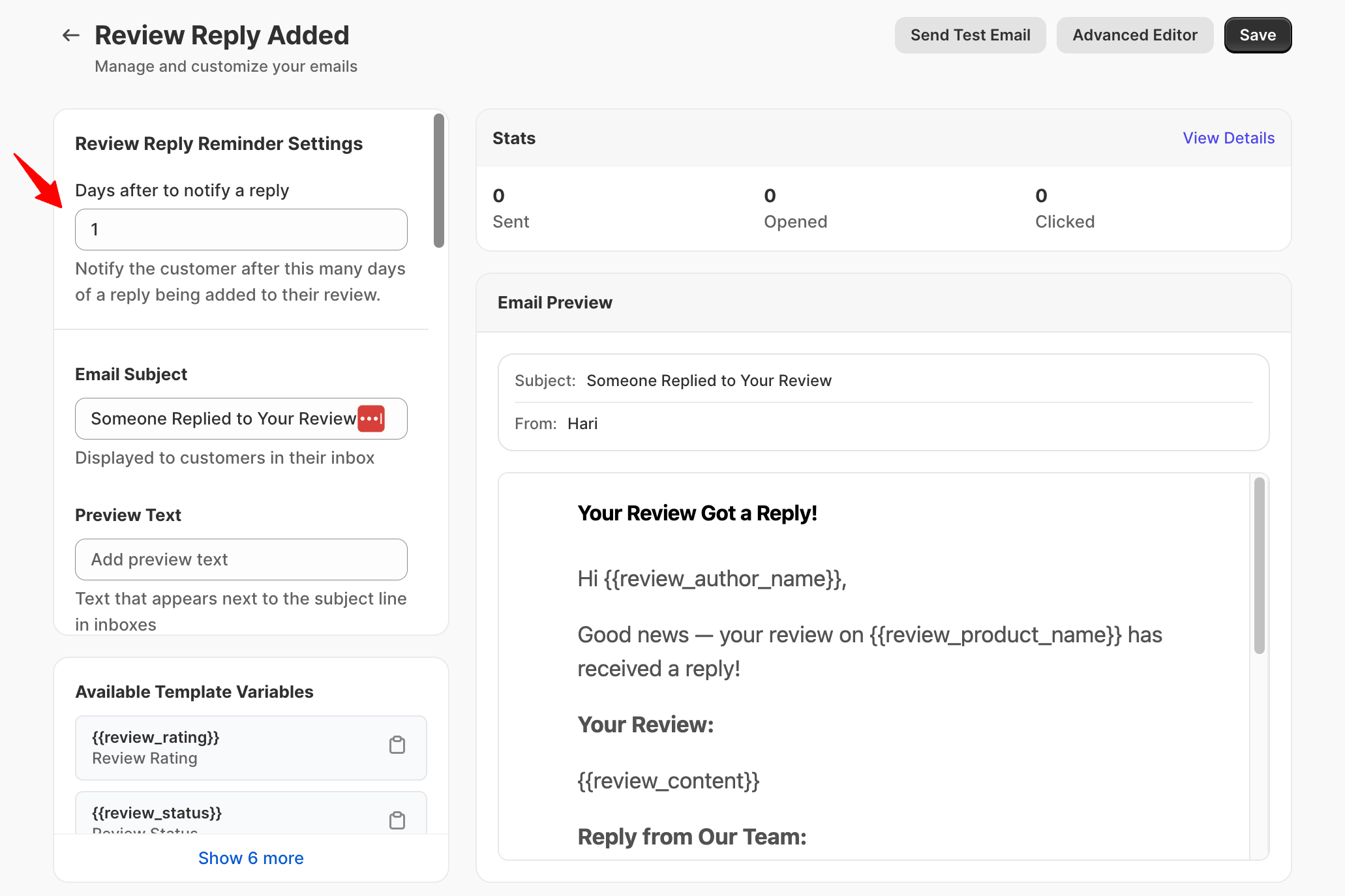
 **What this setting does**
Controls how many days YUKO waits **after a reply is added to a customer’s review** before notifying the customer by email.
This notification lets customers know their feedback has been seen and responded to.
**Default value:** 1 day
### When to use this setting
| Delay | When to use | Why |
| :---------------------- | :------------------------ | :-------------------------------------------- |
| **1 day (recommended)** | Most stores | Timely notification without feeling intrusive |
| **2–3 days** | High review volume stores | Avoids frequent notifications |
| **0 days** | ❌ Not recommended | Can feel immediate and disruptive |
**Best practice:**\
A short delay keeps the interaction human and thoughtful, rather than automated.
**Setting:** Email Subject
### What this setting does
Defines the subject line shown in the customer’s inbox when a reply is added to their review.
***
### Best practices for reply notification subject lines
Subjects should feel personal and appreciative, not transactional.
#### ✅ Recommended examples
* \_We replied to your review on \_
* \_Thanks for your feedback on \_
* *Your review has a new reply*
* *We’ve responded to your review*
#### ❌ Avoid
* Urgent or promotional language
* Discount-related wording
* Vague system messages (“Notification update”)
**Personal touch:** Using your actual name ("Sarah replied to your review") feels more human than "\[Store Name] replied."
### What this setting does
Controls the short line of text shown next to the subject line in inboxes.
### Best practices
* Clearly state that a reply was added
* Keep it short and friendly
**Examples**
* *We’ve added a reply to your review*
* *Thanks for sharing your experience*
* *Your feedback matters to us*
### What this setting does
Sets the heading displayed at the top of the email.
### Best practices
* Appreciation-focused
* Calm and respectful
**Examples**
* *We’ve Replied to Your Review*
* *Thanks for Your Feedback*
* *Your Review Matters*
### What makes a good reply notification email
* Acknowledges the customer’s original review
* Clearly shows the reply content
* Keeps the tone conversational
* No calls to action or promotions
***
### Example message structure (shortcode-safe)
```text theme={null}
Hi {{review_author_name}},
Thank you for sharing your feedback on {{review_product_name}}.
We’ve added a reply to your review.
Your review:
"{{review_content}}"
Our reply:
"{{reply_content}}"
Thanks again for taking the time to share your experience.
```
***
### Optional review elements
You can also include:
* – Display the rating
* – Show the product image
* – Link to the product page
***
### What to avoid
* Promotional or sales language
* Asking for another review
* Urgent or automated-sounding messages
* Long explanations
Pro tip: Reply notifications work best when they feel like a real conversation, not a system alert.
**How this works**
Footer details are automatically pulled from:\
**Settings → Organization**
This footer is shared across all review-related emails.
### Why this matters
* Required by law in most regions
* Builds trust with customers
* Reduces spam complaints
* Protects sender reputation
### Best practices
* Make unsubscribe links clear and visible
* Respect opt-outs immediately
* Keep wording neutral and respectful
***
## Available Shortcodes
**Information about their review:**
* `{{review_rating}}` - Star rating (1-5)
* `{{review_author_name}}` - Customer's name
* `{{review_content}}` - Their review text
* `{{review_status}}` - Review status (published, pending)
* `{{review_product_name}}` - Product they reviewed
* `{{review_product_url}}` - Link to product page
* `{{review_product_image}}` - Product image URL
**Example:**
```text theme={null}
Thanks for your {{review_rating}}-star review of {{review_product_name}}!
```
**Your reply information:**
* `{{reply_content}}` - Your full reply text
**Example:**
```text theme={null}
Our response:
{{reply_content}}
```
**Note:** Use carefully - showing full reply in email reduces click-through to your site
**Their purchase details:**
* `{{order_name}}` - Order reference
* `{{order_number}}` - Order number
**Example:**
```text theme={null}
Regarding your order {{order_name}}
```
**Formatted review display:**
* Can show customer's review in formatted block
* Useful to remind them what they wrote
* Makes email more personal
**Use this to:** Jog their memory about what they wrote before seeing your reply
***
## Best Practices for Replying to Reviews
**Yes, every single one**
**Why reply to all reviews:**
* Shows you read every piece of feedback
* Positive reviews: Thank customer publicly
* Negative reviews: Show you care about problems
* Neutral reviews: Opportunity to connect
* Other customers see you're responsive
**How to manage:**
* Set aside 15-30 minutes daily
* Reply to yesterday's reviews
* Use templates for common types
* Keep replies brief (2-4 sentences)
**What if you get 100+ reviews per week?**
* Reply to all negative reviews (priority)
* Reply to detailed positive reviews (selective)
* Thank reviews with photos (selective)
* Consider hiring customer service help
**80/20 rule:** If you can't reply to all reviews, prioritize negatives (handle complaints) and photo reviews (reward effort). This covers 80% of the value with 20% of the work.
**Never use generic templates verbatim**
**What to personalize:**
* Use customer's name
* Reference specific product
* Mention something from their review
* Acknowledge their specific concern or praise
**Template vs Personal:**
❌ **Generic template:** "Thank you for your review! We appreciate your feedback. Come back soon!"
✅ **Personalized reply:** "Hi Sarah! So glad the blue floral dress fit perfectly for your sister's wedding! Thanks for the photo - you look amazing. We hope to see you back for summer collection!"
**Why it matters:**
* Shows you actually read their review
* Builds real connection
* Demonstrates authenticity
* Encourages repeat business
**Save time with templates:** Create reply templates for common scenarios (positive, negative, neutral), but ALWAYS customize with customer's name and specific details from their review.
**Your reply is public - others are watching**
**The golden formula for negative reviews:**
1. **Thank them** - "Thank you for bringing this to our attention"
2. **Apologize** - "We're sorry you had this experience"
3. **Take responsibility** - Don't make excuses or blame customer
4. **Offer solution** - "We'd like to make this right..."
5. **Take offline if needed** - "Please email us at..."
**Example negative review reply:**
```text theme={null}
Hi John,
Thank you for your honest feedback about the shipping delay. We sincerely apologize - that's definitely not the experience we want you to have.
I see your order was delayed due to our carrier issues. I've just sent you an email with a refund for the shipping cost and a 20% discount on your next order.
We'd love the chance to earn back your trust. Please reach out to support@store.com if there's anything else we can do.
- Sarah
```
**What NOT to do:**
* ❌ Argue or defend yourself
* ❌ Blame the customer
* ❌ Ignore or delete the review
* ❌ Ask them to remove/change review in exchange for refund
* ❌ Be defensive or sarcastic
**Never delete honest negative reviews:** It damages trust. Reply professionally instead - it shows other customers you handle problems well.
**When to write your replies:**
**Best practice schedule:**
* Check reviews once daily (morning or evening)
* Reply to all new reviews from yesterday
* Negative reviews: Reply within 24 hours (priority)
* Positive reviews: Reply within 48 hours (still good)
**Why batch replies:**
* More efficient than replying one-by-one
* Maintains consistent tone/quality
* Less mental context-switching
* Easier to spot patterns/trends
**Urgency levels:**
| Review Type | Reply Speed | Why |
| ----------------- | --------------- | --------------------------------- |
| 1-2 star negative | Within 24 hours | Damage control, show you care |
| 3 star neutral | Within 48 hours | Opportunity to improve experience |
| 4-5 star positive | Within 72 hours | Thank them, build relationship |
| Photo reviews | Within 48 hours | Reward the extra effort |
**Set calendar reminder:** Block 15-30 minutes daily for "review replies" - makes it a habit instead of forgotten task.
***
## Common Questions
**Yes, at much higher rates than other emails**
**Open rates:**
* Average promotional email: 15-20% open rate
* Review reply notification: 40-60% open rate
* Negative review replies: 60-80% open rate
**Why such high engagement:**
* Personal to them (about THEIR review)
* Unexpected (most stores don't reply)
* Curiosity (what did they say?)
* Investment (they already took time to review)
**What they do after opening:**
* 50-70% click through to view full reply on site
* 20-30% browse other products while there
* 10-15% make another purchase within 30 days
* Many update their review or leave more detailed feedback
**High ROI activity:** Replying to reviews (and notifying customers) has one of the highest customer retention ROIs - costs almost nothing, builds loyalty significantly.
**BOTH - but with different approaches**
**Positive reviews (4-5 stars):**
**Why reply:**
* Thank them publicly
* Reinforce positive behavior
* Show other customers you're engaged
* Build loyalty for repeat purchases
**How to reply:**
* Brief thank you (2-3 sentences)
* Personalize with their name
* Reference specific product or detail
* Invite them back
**Example:** "Thanks Sarah! So happy you love the blue dress. Your photo looks amazing! Come back for our summer collection 😊"
***
**Negative reviews (1-3 stars):**
**Why reply:**
* Damage control (show others you care)
* Opportunity to fix problem
* Prevent customer churn
* Demonstrate professionalism
**How to reply:**
* Longer, more detailed (4-6 sentences)
* Apologize sincerely
* Offer concrete solution
* Take conversation offline if complex
**Example:** "Hi John, we sincerely apologize for the sizing issue. I've emailed you directly to arrange a free return and sent a discount for your next order. We'd love to make this right..."
**Priority:** If short on time, reply to ALL negatives and SOME positives. Negatives have higher business impact, but positives build relationships.
**Depends on the review type**
**Negative reviews (1-3 stars):**
**Yes, offer compensation:**
* Shows you take responsibility
* Gives customer reason to try again
* Public gesture of goodwill
* Often results in review update
**Example:** "We've sent you 20% off your next order and refunded shipping. We'd love to earn back your trust."
**Typical compensation:** 15-25% off, free shipping, or store credit
***
**Positive reviews (4-5 stars):**
**Usually no - but can be strategic:**
**Don't offer incentive if:**
* Just saying thank you (no incentive needed)
* Standard positive review
* Already rewarded for photo review
**Do offer incentive if:**
* Exceptional review (detailed, photos, videos)
* Influential reviewer (large following)
* Want to encourage repeat purchase
* Customer went above and beyond
**Example:** "Your detailed review with photos is amazing! As a thank-you, here's 10% off your next order..."
**Typical reward:** 10-15% off
**Don't incentivize all positive reviews:** This trains customers to expect discounts for reviews, which is expensive and potentially violates platform policies.
***
## Next Steps
Turn on automatic notifications when you reply to reviews.
**Time:** 1 minute **Location:** Reviews → Emails → Review Reply Added Email
Configure notification to send 1 day after you reply (batches multiple replies).
**Why 1 day:** Efficient for you, still responsive for customer
Write warm, personal notification message.
**Time:** 3 minutes **Tone:** Grateful and authentic, signed with real name
Draft templates for common reply types (positive, negative, neutral).
**Remember:** Always personalize templates with customer name and specific details
Set daily reminder to reply to yesterday's reviews.
**Time:** 15-30 minutes per day **Priority:** Negative reviews first, then positive/photo reviews
***
## Need Help?
Talk to our team for personalized setup help
**Time:** 30 minutes
Reach our team at yukoreviews.com/support
**Response time:** Within 24 hours
Browse detailed guides for every feature
Connect Yuko with other tools
**Pro tip:** Replying to reviews (especially negative ones) publicly shows potential customers that you care about feedback and handle problems professionally. This builds more trust than having only 5-star reviews with no replies.
**What this setting does**
Controls how many days YUKO waits **after a reply is added to a customer’s review** before notifying the customer by email.
This notification lets customers know their feedback has been seen and responded to.
**Default value:** 1 day
### When to use this setting
| Delay | When to use | Why |
| :---------------------- | :------------------------ | :-------------------------------------------- |
| **1 day (recommended)** | Most stores | Timely notification without feeling intrusive |
| **2–3 days** | High review volume stores | Avoids frequent notifications |
| **0 days** | ❌ Not recommended | Can feel immediate and disruptive |
**Best practice:**\
A short delay keeps the interaction human and thoughtful, rather than automated.
**Setting:** Email Subject
### What this setting does
Defines the subject line shown in the customer’s inbox when a reply is added to their review.
***
### Best practices for reply notification subject lines
Subjects should feel personal and appreciative, not transactional.
#### ✅ Recommended examples
* \_We replied to your review on \_
* \_Thanks for your feedback on \_
* *Your review has a new reply*
* *We’ve responded to your review*
#### ❌ Avoid
* Urgent or promotional language
* Discount-related wording
* Vague system messages (“Notification update”)
**Personal touch:** Using your actual name ("Sarah replied to your review") feels more human than "\[Store Name] replied."
### What this setting does
Controls the short line of text shown next to the subject line in inboxes.
### Best practices
* Clearly state that a reply was added
* Keep it short and friendly
**Examples**
* *We’ve added a reply to your review*
* *Thanks for sharing your experience*
* *Your feedback matters to us*
### What this setting does
Sets the heading displayed at the top of the email.
### Best practices
* Appreciation-focused
* Calm and respectful
**Examples**
* *We’ve Replied to Your Review*
* *Thanks for Your Feedback*
* *Your Review Matters*
### What makes a good reply notification email
* Acknowledges the customer’s original review
* Clearly shows the reply content
* Keeps the tone conversational
* No calls to action or promotions
***
### Example message structure (shortcode-safe)
```text theme={null}
Hi {{review_author_name}},
Thank you for sharing your feedback on {{review_product_name}}.
We’ve added a reply to your review.
Your review:
"{{review_content}}"
Our reply:
"{{reply_content}}"
Thanks again for taking the time to share your experience.
```
***
### Optional review elements
You can also include:
* – Display the rating
* – Show the product image
* – Link to the product page
***
### What to avoid
* Promotional or sales language
* Asking for another review
* Urgent or automated-sounding messages
* Long explanations
Pro tip: Reply notifications work best when they feel like a real conversation, not a system alert.
**How this works**
Footer details are automatically pulled from:\
**Settings → Organization**
This footer is shared across all review-related emails.
### Why this matters
* Required by law in most regions
* Builds trust with customers
* Reduces spam complaints
* Protects sender reputation
### Best practices
* Make unsubscribe links clear and visible
* Respect opt-outs immediately
* Keep wording neutral and respectful
***
## Available Shortcodes
**Information about their review:**
* `{{review_rating}}` - Star rating (1-5)
* `{{review_author_name}}` - Customer's name
* `{{review_content}}` - Their review text
* `{{review_status}}` - Review status (published, pending)
* `{{review_product_name}}` - Product they reviewed
* `{{review_product_url}}` - Link to product page
* `{{review_product_image}}` - Product image URL
**Example:**
```text theme={null}
Thanks for your {{review_rating}}-star review of {{review_product_name}}!
```
**Your reply information:**
* `{{reply_content}}` - Your full reply text
**Example:**
```text theme={null}
Our response:
{{reply_content}}
```
**Note:** Use carefully - showing full reply in email reduces click-through to your site
**Their purchase details:**
* `{{order_name}}` - Order reference
* `{{order_number}}` - Order number
**Example:**
```text theme={null}
Regarding your order {{order_name}}
```
**Formatted review display:**
* Can show customer's review in formatted block
* Useful to remind them what they wrote
* Makes email more personal
**Use this to:** Jog their memory about what they wrote before seeing your reply
***
## Best Practices for Replying to Reviews
**Yes, every single one**
**Why reply to all reviews:**
* Shows you read every piece of feedback
* Positive reviews: Thank customer publicly
* Negative reviews: Show you care about problems
* Neutral reviews: Opportunity to connect
* Other customers see you're responsive
**How to manage:**
* Set aside 15-30 minutes daily
* Reply to yesterday's reviews
* Use templates for common types
* Keep replies brief (2-4 sentences)
**What if you get 100+ reviews per week?**
* Reply to all negative reviews (priority)
* Reply to detailed positive reviews (selective)
* Thank reviews with photos (selective)
* Consider hiring customer service help
**80/20 rule:** If you can't reply to all reviews, prioritize negatives (handle complaints) and photo reviews (reward effort). This covers 80% of the value with 20% of the work.
**Never use generic templates verbatim**
**What to personalize:**
* Use customer's name
* Reference specific product
* Mention something from their review
* Acknowledge their specific concern or praise
**Template vs Personal:**
❌ **Generic template:** "Thank you for your review! We appreciate your feedback. Come back soon!"
✅ **Personalized reply:** "Hi Sarah! So glad the blue floral dress fit perfectly for your sister's wedding! Thanks for the photo - you look amazing. We hope to see you back for summer collection!"
**Why it matters:**
* Shows you actually read their review
* Builds real connection
* Demonstrates authenticity
* Encourages repeat business
**Save time with templates:** Create reply templates for common scenarios (positive, negative, neutral), but ALWAYS customize with customer's name and specific details from their review.
**Your reply is public - others are watching**
**The golden formula for negative reviews:**
1. **Thank them** - "Thank you for bringing this to our attention"
2. **Apologize** - "We're sorry you had this experience"
3. **Take responsibility** - Don't make excuses or blame customer
4. **Offer solution** - "We'd like to make this right..."
5. **Take offline if needed** - "Please email us at..."
**Example negative review reply:**
```text theme={null}
Hi John,
Thank you for your honest feedback about the shipping delay. We sincerely apologize - that's definitely not the experience we want you to have.
I see your order was delayed due to our carrier issues. I've just sent you an email with a refund for the shipping cost and a 20% discount on your next order.
We'd love the chance to earn back your trust. Please reach out to support@store.com if there's anything else we can do.
- Sarah
```
**What NOT to do:**
* ❌ Argue or defend yourself
* ❌ Blame the customer
* ❌ Ignore or delete the review
* ❌ Ask them to remove/change review in exchange for refund
* ❌ Be defensive or sarcastic
**Never delete honest negative reviews:** It damages trust. Reply professionally instead - it shows other customers you handle problems well.
**When to write your replies:**
**Best practice schedule:**
* Check reviews once daily (morning or evening)
* Reply to all new reviews from yesterday
* Negative reviews: Reply within 24 hours (priority)
* Positive reviews: Reply within 48 hours (still good)
**Why batch replies:**
* More efficient than replying one-by-one
* Maintains consistent tone/quality
* Less mental context-switching
* Easier to spot patterns/trends
**Urgency levels:**
| Review Type | Reply Speed | Why |
| ----------------- | --------------- | --------------------------------- |
| 1-2 star negative | Within 24 hours | Damage control, show you care |
| 3 star neutral | Within 48 hours | Opportunity to improve experience |
| 4-5 star positive | Within 72 hours | Thank them, build relationship |
| Photo reviews | Within 48 hours | Reward the extra effort |
**Set calendar reminder:** Block 15-30 minutes daily for "review replies" - makes it a habit instead of forgotten task.
***
## Common Questions
**Yes, at much higher rates than other emails**
**Open rates:**
* Average promotional email: 15-20% open rate
* Review reply notification: 40-60% open rate
* Negative review replies: 60-80% open rate
**Why such high engagement:**
* Personal to them (about THEIR review)
* Unexpected (most stores don't reply)
* Curiosity (what did they say?)
* Investment (they already took time to review)
**What they do after opening:**
* 50-70% click through to view full reply on site
* 20-30% browse other products while there
* 10-15% make another purchase within 30 days
* Many update their review or leave more detailed feedback
**High ROI activity:** Replying to reviews (and notifying customers) has one of the highest customer retention ROIs - costs almost nothing, builds loyalty significantly.
**BOTH - but with different approaches**
**Positive reviews (4-5 stars):**
**Why reply:**
* Thank them publicly
* Reinforce positive behavior
* Show other customers you're engaged
* Build loyalty for repeat purchases
**How to reply:**
* Brief thank you (2-3 sentences)
* Personalize with their name
* Reference specific product or detail
* Invite them back
**Example:** "Thanks Sarah! So happy you love the blue dress. Your photo looks amazing! Come back for our summer collection 😊"
***
**Negative reviews (1-3 stars):**
**Why reply:**
* Damage control (show others you care)
* Opportunity to fix problem
* Prevent customer churn
* Demonstrate professionalism
**How to reply:**
* Longer, more detailed (4-6 sentences)
* Apologize sincerely
* Offer concrete solution
* Take conversation offline if complex
**Example:** "Hi John, we sincerely apologize for the sizing issue. I've emailed you directly to arrange a free return and sent a discount for your next order. We'd love to make this right..."
**Priority:** If short on time, reply to ALL negatives and SOME positives. Negatives have higher business impact, but positives build relationships.
**Depends on the review type**
**Negative reviews (1-3 stars):**
**Yes, offer compensation:**
* Shows you take responsibility
* Gives customer reason to try again
* Public gesture of goodwill
* Often results in review update
**Example:** "We've sent you 20% off your next order and refunded shipping. We'd love to earn back your trust."
**Typical compensation:** 15-25% off, free shipping, or store credit
***
**Positive reviews (4-5 stars):**
**Usually no - but can be strategic:**
**Don't offer incentive if:**
* Just saying thank you (no incentive needed)
* Standard positive review
* Already rewarded for photo review
**Do offer incentive if:**
* Exceptional review (detailed, photos, videos)
* Influential reviewer (large following)
* Want to encourage repeat purchase
* Customer went above and beyond
**Example:** "Your detailed review with photos is amazing! As a thank-you, here's 10% off your next order..."
**Typical reward:** 10-15% off
**Don't incentivize all positive reviews:** This trains customers to expect discounts for reviews, which is expensive and potentially violates platform policies.
***
## Next Steps
Turn on automatic notifications when you reply to reviews.
**Time:** 1 minute **Location:** Reviews → Emails → Review Reply Added Email
Configure notification to send 1 day after you reply (batches multiple replies).
**Why 1 day:** Efficient for you, still responsive for customer
Write warm, personal notification message.
**Time:** 3 minutes **Tone:** Grateful and authentic, signed with real name
Draft templates for common reply types (positive, negative, neutral).
**Remember:** Always personalize templates with customer name and specific details
Set daily reminder to reply to yesterday's reviews.
**Time:** 15-30 minutes per day **Priority:** Negative reviews first, then positive/photo reviews
***
## Need Help?
Talk to our team for personalized setup help
**Time:** 30 minutes
Reach our team at yukoreviews.com/support
**Response time:** Within 24 hours
Browse detailed guides for every feature
Connect Yuko with other tools
**Pro tip:** Replying to reviews (especially negative ones) publicly shows potential customers that you care about feedback and handle problems professionally. This builds more trust than having only 5-star reviews with no replies.