> ## Documentation Index
> Fetch the complete documentation index at: https://docs.yukoreviews.com/llms.txt
> Use this file to discover all available pages before exploring further.
> Send gentle reminder emails to customers who didn't respond to your first review request
# Review Reminder Email Setup
## Get 50% More Reviews with One Gentle Reminder
Most customers who don't respond to the first review request aren't refusing - they're just busy and forgot. A single friendly reminder sent 3-5 days later can increase your review collection rate by 50% (from 5-10% to 7-15%).
**What you'll achieve:**
* Automatically remind non-responders without manual work
* Increase review collection by +50%
* Stay top-of-mind without being annoying
* Collect feedback from customers who needed a nudge
**Impact:** Adds +50% more reviews | **Time to set up:** 5 minutes
***
## How It Works
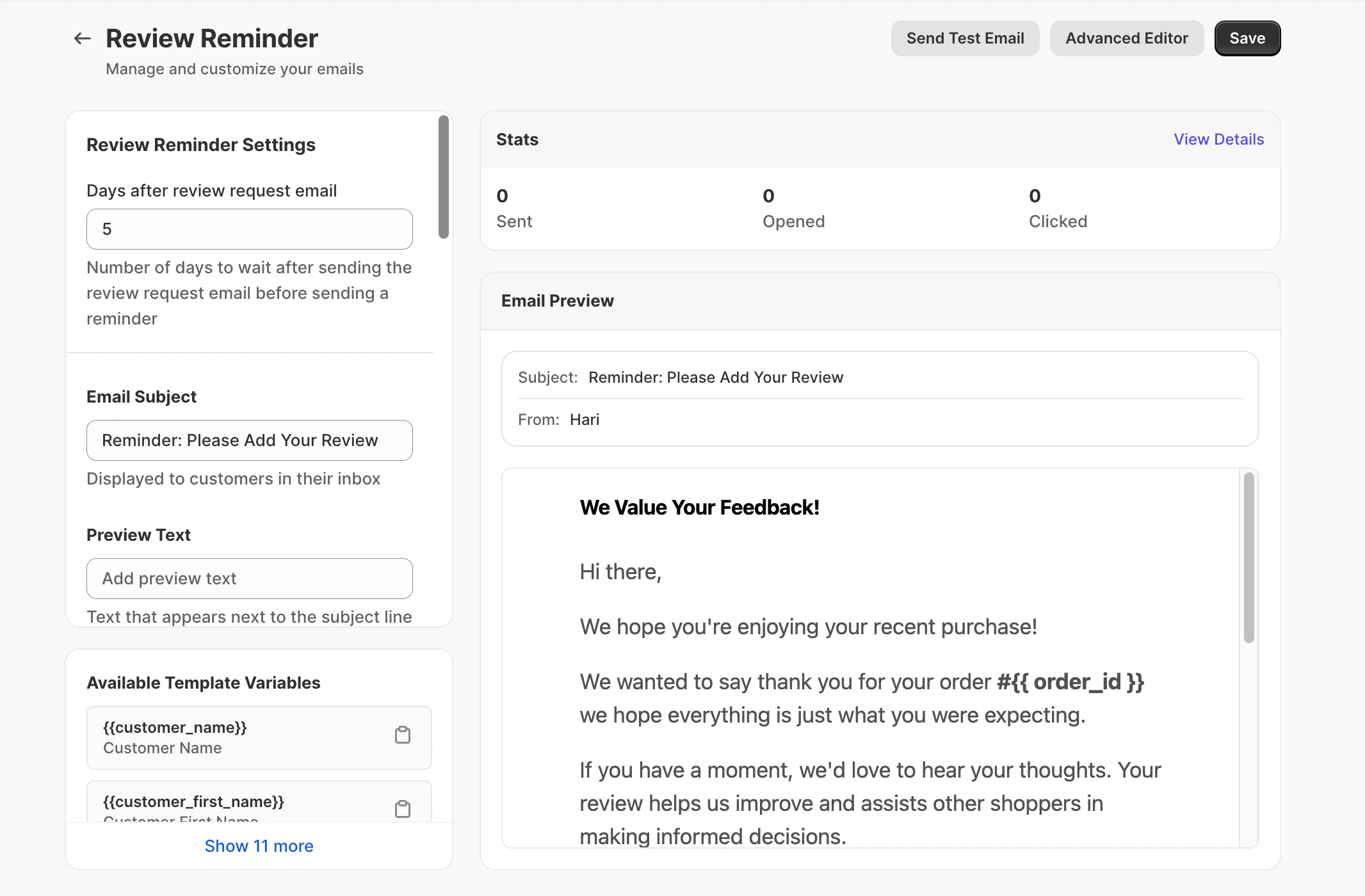
Yuko Dashboard → **Reviews → Emails → Review Reminder Email**
 ### The Automatic Process
Customer receives initial review request 5 days after order delivery (or your set delay).
Yuko automatically tracks whether customer clicked the review link or submitted a review.
**Yuko knows who responded** - only non-responders get the reminder.
For customers who didn't respond, Yuko waits your set delay (default: 5 days after first email).
**No duplicate emails** - customers who already reviewed won't get reminded.
Non-responders receive a gentle, friendly reminder with the same review link.
**One reminder only** - Yuko won't send multiple reminders (that would be spam).
The reminder jogs their memory and they write the review.
**Additional response rate:** +2-5% of customers respond to reminder.
***
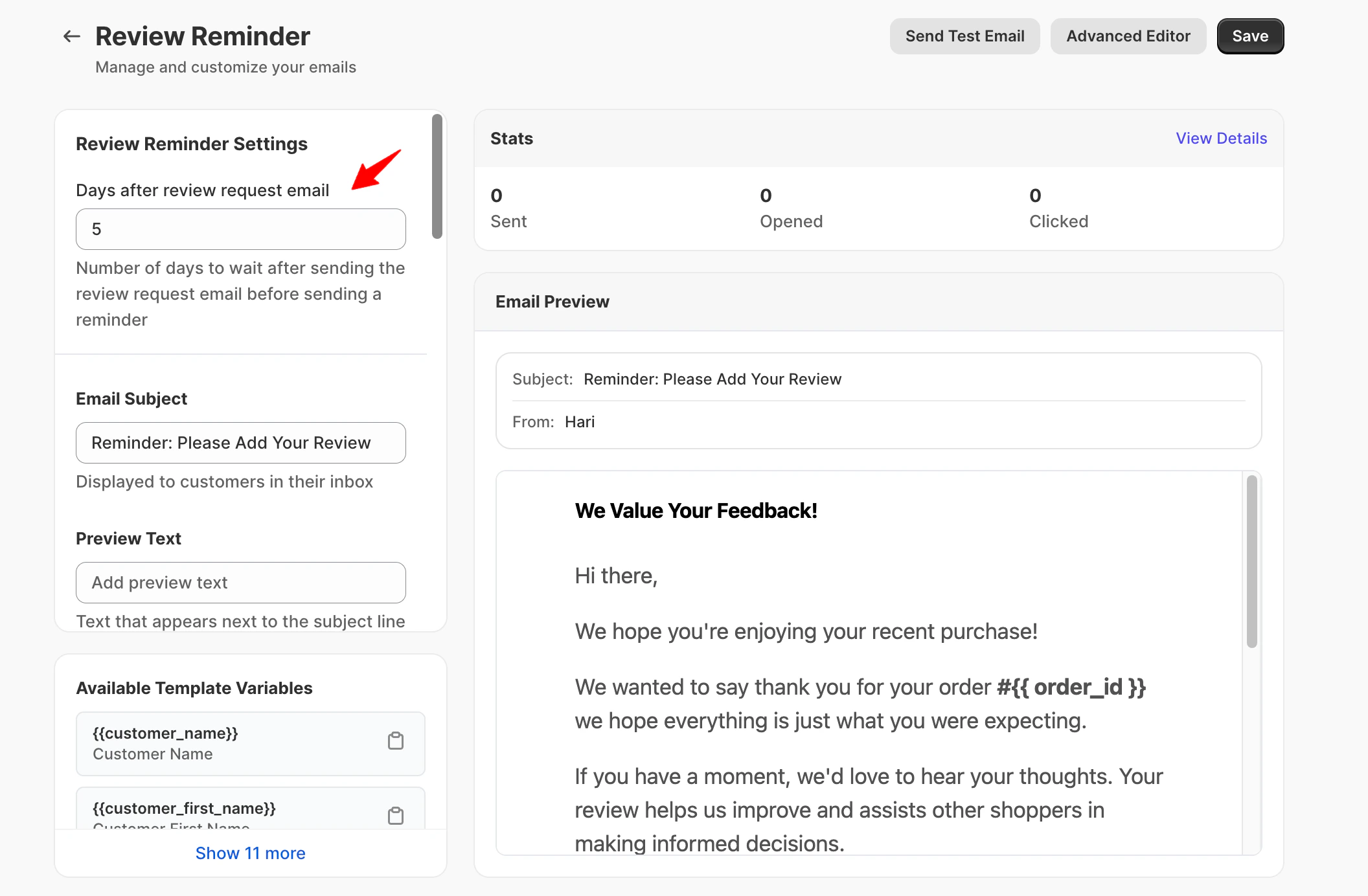
**Setting:** Delay - Days after review request email
Navigation: Yuko Dashboard → **Reviews → Emails → Review Reminder Email**
### The Automatic Process
Customer receives initial review request 5 days after order delivery (or your set delay).
Yuko automatically tracks whether customer clicked the review link or submitted a review.
**Yuko knows who responded** - only non-responders get the reminder.
For customers who didn't respond, Yuko waits your set delay (default: 5 days after first email).
**No duplicate emails** - customers who already reviewed won't get reminded.
Non-responders receive a gentle, friendly reminder with the same review link.
**One reminder only** - Yuko won't send multiple reminders (that would be spam).
The reminder jogs their memory and they write the review.
**Additional response rate:** +2-5% of customers respond to reminder.
***
**Setting:** Delay - Days after review request email
Navigation: Yuko Dashboard → **Reviews → Emails → Review Reminder Email**
 \
\
**What it controls:** Set the number of days YUKO should wait **after the review request email is sent** before sending a review reminder email.
This reminder helps gently nudge customers who may have missed or forgotten the initial review request.
**Default:** 5 days
**How to choose:**
| Delay | When to Use | Why |
| -------------------- | --------------------------------------------- | -------------------------------------------- |
| 3 days | Fast-moving products (food, consumables) | Quick reminder while experience is fresh |
| 5 days (recommended) | Most products | Good balance - not too soon, not too late |
| 7 days | Considered purchases (electronics, furniture) | Give more time before following up |
| 10+ days | Don't use | Too late - customer forgot about the product |
**Sweet spot:** 5 days is proven to work best for most stores. Not pushy, but soon enough that customers remember the product.
**Don't be pushy:** Sending reminder same day or next day after first email feels desperate. Give customers at least 3 days.
**Setting:** Email Subject
**Best practices for reminder subject lines:**
✅ **Good reminder subjects:**
* Did you get a chance to review order\_name?
* Quick reminder: share your thoughts?
* We’re still hoping to hear from you, customer\_first\_name
* One more thing about your order…
❌ **Avoid:**
* "FINAL REMINDER" (sounds threatening)
* "You forgot to review" (sounds accusatory)
* Same subject as first email (they'll think it's duplicate)
* "Last chance" or urgency tactics (not necessary)
**Key differences from first email:**
* More casual/friendly tone
* Acknowledge it's a follow-up
* No pressure or urgency
* Shorter and simpler
**Make it different:** Use a noticeably different subject than your first email so customers don't think it's a duplicate and delete it.
\*\*What it means: \*\*The short text shown next to the subject line in the inbox.
**Best practices**
* Keep it short (1 line)
* Reinforce that this is a friendly follow-up
* Avoid urgency or guilt
**Example preview texts**
* *Just a quick follow-up — your feedback helps others*
* *If you have a minute, we’d love your thoughts*
* *A friendly reminder about your recent order*
\*\*What it means: \*\*The headline shown at the top of the reminder email.
**Best practices**
* Friendly and appreciative
* No urgency
* Reinforce value of feedback
**Good examples**
* *We Value Your Feedback*
* *Your Opinion Matters*
* *Thanks for Your Recent Order*
**What makes a good reminder email**
* Shorter than the first email (2–3 sentences)
* Acknowledge it’s a follow-up
* No guilt, pressure, or urgency
* One clear action (leave a review)
**Recommended structure**
```text theme={null}
Hi {{customer_first_name}},
Just following up on our email from a few days ago.
If you have a moment, we’d love to hear your thoughts on your recent order {{order_name}}.
Your feedback helps other customers shop with confidence.
{{ product_reviews_block }}
No worries if you’re too busy — we understand!
```
**What NOT to write**
* ❌ “You haven’t reviewed yet”
* ❌ “This is your last chance”
* ❌ Repeating long explanations from the first email
* ❌ Desperate or pushy language
💡 **Pro tip:**\
Ending with “No worries if you’re too busy” reduces pressure and often increases response rates.
\*\*What it controls: \*\*The closing content of the email.
This section automatically pulls details from:\
**Settings → Organization**
(Used in both review request and reminder emails.)
**What it controls**\
The opt-out text shown at the bottom of the reminder email.
**Why this matters**
* Required by law in most countries
* Shows respect for customers’ time
* Reduces spam complaints
* Protects your sender reputation
**Best practices**
* Make unsubscribe links **clear and visible**
* Respect opt-outs immediately
* Avoid hiding or downplaying unsubscribe options
**Spam risk note:**\
Reminder emails carry a higher spam-complaint risk than the first email. A clear unsubscribe option is essential.
***
## Best Practices
**Don't send multiple reminders**
* One follow-up is friendly
* Two is annoying
* Three is spam
If customer didn't respond after reminder, let it go. They're not interested or too busy.
**Yuko automatically:** Sends only ONE reminder per order
**Tone matters**
* Friendly, not formal
* Casual, not corporate
* Helpful, not pushy
* Understanding, not demanding
**Remember:** You're asking a favor, not demanding action
**Remove friction**
* Same review link as first email (pre-filled form)
* Big, obvious button
* Mobile-friendly
* One click to review
**Don't:** Make them search for the review form or re-enter information
**Always test**
Send test to yourself:
* Check it arrives in inbox (not spam)
* Tone sounds friendly, not pushy
* Link works
* Mobile looks good
**Adjust if needed** before enabling
***
## Available Shortcodes
Same personalization tags as Review Request Email:
* `{{customer_name}}` - Full name
* `{{customer_first_name}}` - First name (use this!)
* `{{customer_last_name}}` - Last name
* `{{customer_email}}` - Email address
**Example:**
```text theme={null}
Hi {{customer_first_name}}, just checking in...
```
* `{{order_id}}` - Order number
* `{{order_name}}` - Order reference
* `{{order_date}}` - When they ordered
**Example:**
```text theme={null}
Following up about order {{order_name}}
```
* `{{product_reviews_block}}` - All products with review buttons
* Loop through products individually
```text theme={null}
{% for item in order_items %}
{{item.review_block}}
{% endfor %}
```
**Use the same product display as first email** for consistency
***
## Next Steps
Turn on the reminder email in Yuko settings.
**Time:** 1 minute **Location:** Reviews → Emails → Review Reminder Email
Set reminder to send 5 days after first review request.
**Why 5 days:** Sweet spot - not too soon, not too late
Keep it shorter and more casual than first email.
**Time:** 3 minutes **Tone:** Friendly nudge, not pushy demand
Test the reminder to make sure tone feels right.
**Check:** Not too pushy? Unsubscribe clear? Link works?
After 2-3 weeks, check how many additional reviews reminders generate.
**Expected:** +30-50% more reviews **If lower:** Try adjusting timing or adding small incentive
***
## Need Help?
**Pro tip:** The reminder email is one of the highest-ROI features. It takes 5 minutes to set up and can increase your review collection by 50%. Don't skip this one!
\
\
**What it controls:** Set the number of days YUKO should wait **after the review request email is sent** before sending a review reminder email.
This reminder helps gently nudge customers who may have missed or forgotten the initial review request.
**Default:** 5 days
**How to choose:**
| Delay | When to Use | Why |
| -------------------- | --------------------------------------------- | -------------------------------------------- |
| 3 days | Fast-moving products (food, consumables) | Quick reminder while experience is fresh |
| 5 days (recommended) | Most products | Good balance - not too soon, not too late |
| 7 days | Considered purchases (electronics, furniture) | Give more time before following up |
| 10+ days | Don't use | Too late - customer forgot about the product |
**Sweet spot:** 5 days is proven to work best for most stores. Not pushy, but soon enough that customers remember the product.
**Don't be pushy:** Sending reminder same day or next day after first email feels desperate. Give customers at least 3 days.
**Setting:** Email Subject
**Best practices for reminder subject lines:**
✅ **Good reminder subjects:**
* Did you get a chance to review order\_name?
* Quick reminder: share your thoughts?
* We’re still hoping to hear from you, customer\_first\_name
* One more thing about your order…
❌ **Avoid:**
* "FINAL REMINDER" (sounds threatening)
* "You forgot to review" (sounds accusatory)
* Same subject as first email (they'll think it's duplicate)
* "Last chance" or urgency tactics (not necessary)
**Key differences from first email:**
* More casual/friendly tone
* Acknowledge it's a follow-up
* No pressure or urgency
* Shorter and simpler
**Make it different:** Use a noticeably different subject than your first email so customers don't think it's a duplicate and delete it.
\*\*What it means: \*\*The short text shown next to the subject line in the inbox.
**Best practices**
* Keep it short (1 line)
* Reinforce that this is a friendly follow-up
* Avoid urgency or guilt
**Example preview texts**
* *Just a quick follow-up — your feedback helps others*
* *If you have a minute, we’d love your thoughts*
* *A friendly reminder about your recent order*
\*\*What it means: \*\*The headline shown at the top of the reminder email.
**Best practices**
* Friendly and appreciative
* No urgency
* Reinforce value of feedback
**Good examples**
* *We Value Your Feedback*
* *Your Opinion Matters*
* *Thanks for Your Recent Order*
**What makes a good reminder email**
* Shorter than the first email (2–3 sentences)
* Acknowledge it’s a follow-up
* No guilt, pressure, or urgency
* One clear action (leave a review)
**Recommended structure**
```text theme={null}
Hi {{customer_first_name}},
Just following up on our email from a few days ago.
If you have a moment, we’d love to hear your thoughts on your recent order {{order_name}}.
Your feedback helps other customers shop with confidence.
{{ product_reviews_block }}
No worries if you’re too busy — we understand!
```
**What NOT to write**
* ❌ “You haven’t reviewed yet”
* ❌ “This is your last chance”
* ❌ Repeating long explanations from the first email
* ❌ Desperate or pushy language
💡 **Pro tip:**\
Ending with “No worries if you’re too busy” reduces pressure and often increases response rates.
\*\*What it controls: \*\*The closing content of the email.
This section automatically pulls details from:\
**Settings → Organization**
(Used in both review request and reminder emails.)
**What it controls**\
The opt-out text shown at the bottom of the reminder email.
**Why this matters**
* Required by law in most countries
* Shows respect for customers’ time
* Reduces spam complaints
* Protects your sender reputation
**Best practices**
* Make unsubscribe links **clear and visible**
* Respect opt-outs immediately
* Avoid hiding or downplaying unsubscribe options
**Spam risk note:**\
Reminder emails carry a higher spam-complaint risk than the first email. A clear unsubscribe option is essential.
***
## Best Practices
**Don't send multiple reminders**
* One follow-up is friendly
* Two is annoying
* Three is spam
If customer didn't respond after reminder, let it go. They're not interested or too busy.
**Yuko automatically:** Sends only ONE reminder per order
**Tone matters**
* Friendly, not formal
* Casual, not corporate
* Helpful, not pushy
* Understanding, not demanding
**Remember:** You're asking a favor, not demanding action
**Remove friction**
* Same review link as first email (pre-filled form)
* Big, obvious button
* Mobile-friendly
* One click to review
**Don't:** Make them search for the review form or re-enter information
**Always test**
Send test to yourself:
* Check it arrives in inbox (not spam)
* Tone sounds friendly, not pushy
* Link works
* Mobile looks good
**Adjust if needed** before enabling
***
## Available Shortcodes
Same personalization tags as Review Request Email:
* `{{customer_name}}` - Full name
* `{{customer_first_name}}` - First name (use this!)
* `{{customer_last_name}}` - Last name
* `{{customer_email}}` - Email address
**Example:**
```text theme={null}
Hi {{customer_first_name}}, just checking in...
```
* `{{order_id}}` - Order number
* `{{order_name}}` - Order reference
* `{{order_date}}` - When they ordered
**Example:**
```text theme={null}
Following up about order {{order_name}}
```
* `{{product_reviews_block}}` - All products with review buttons
* Loop through products individually
```text theme={null}
{% for item in order_items %}
{{item.review_block}}
{% endfor %}
```
**Use the same product display as first email** for consistency
***
## Next Steps
Turn on the reminder email in Yuko settings.
**Time:** 1 minute **Location:** Reviews → Emails → Review Reminder Email
Set reminder to send 5 days after first review request.
**Why 5 days:** Sweet spot - not too soon, not too late
Keep it shorter and more casual than first email.
**Time:** 3 minutes **Tone:** Friendly nudge, not pushy demand
Test the reminder to make sure tone feels right.
**Check:** Not too pushy? Unsubscribe clear? Link works?
After 2-3 weeks, check how many additional reviews reminders generate.
**Expected:** +30-50% more reviews **If lower:** Try adjusting timing or adding small incentive
***
## Need Help?
**Pro tip:** The reminder email is one of the highest-ROI features. It takes 5 minutes to set up and can increase your review collection by 50%. Don't skip this one!