> ## Documentation Index
> Fetch the complete documentation index at: https://docs.yukoreviews.com/llms.txt
> Use this file to discover all available pages before exploring further.
> Thank customers who add reviews and offer rewards to encourage more visual feedback
# Review Reward Email Setup
## Get 2-3x More Reviews with Small Rewards
Reviews help build trust and improve conversions. Offering a small reward (10% off or \$5 credit) encourages more customers to share their experience.
**What you'll achieve:**
* Thank customers immediately for adding reviews.
* Encourage more customers to add reviews and photos (2-3x increase)
* Build customer loyalty with appreciation rewards
* Boost conversion rates with stronger social proof
**Impact:** Higher review volume | **Typical reward:** 10% off or \$5-10 credit
***
## How It Works
Yuko Dashboard → **Reviews → Emails → Reward for Review Email**
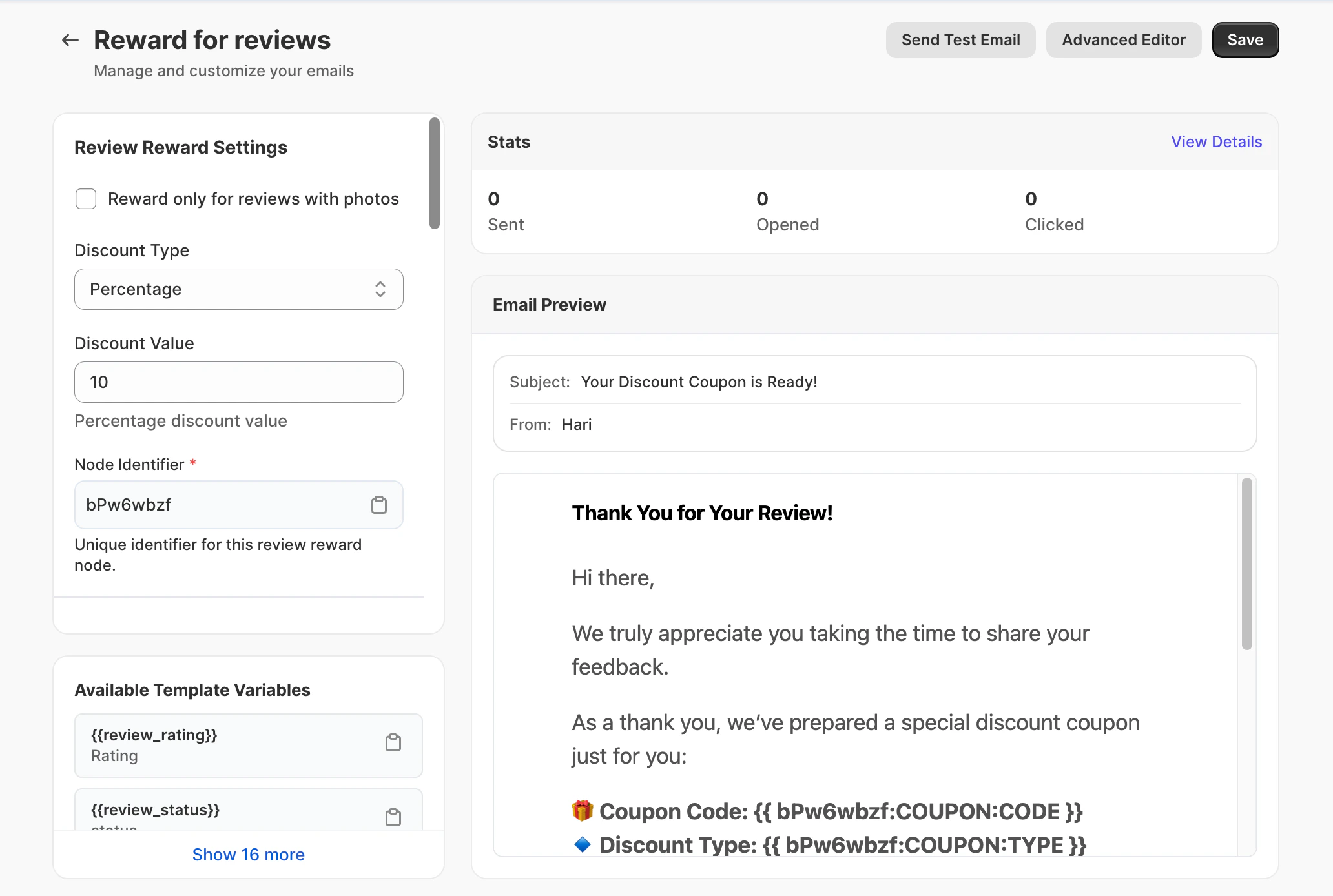 ### The Automatic Process
The customer writes a review of the product.
Yuko automatically detects the submitted review.
**Smart condition:**
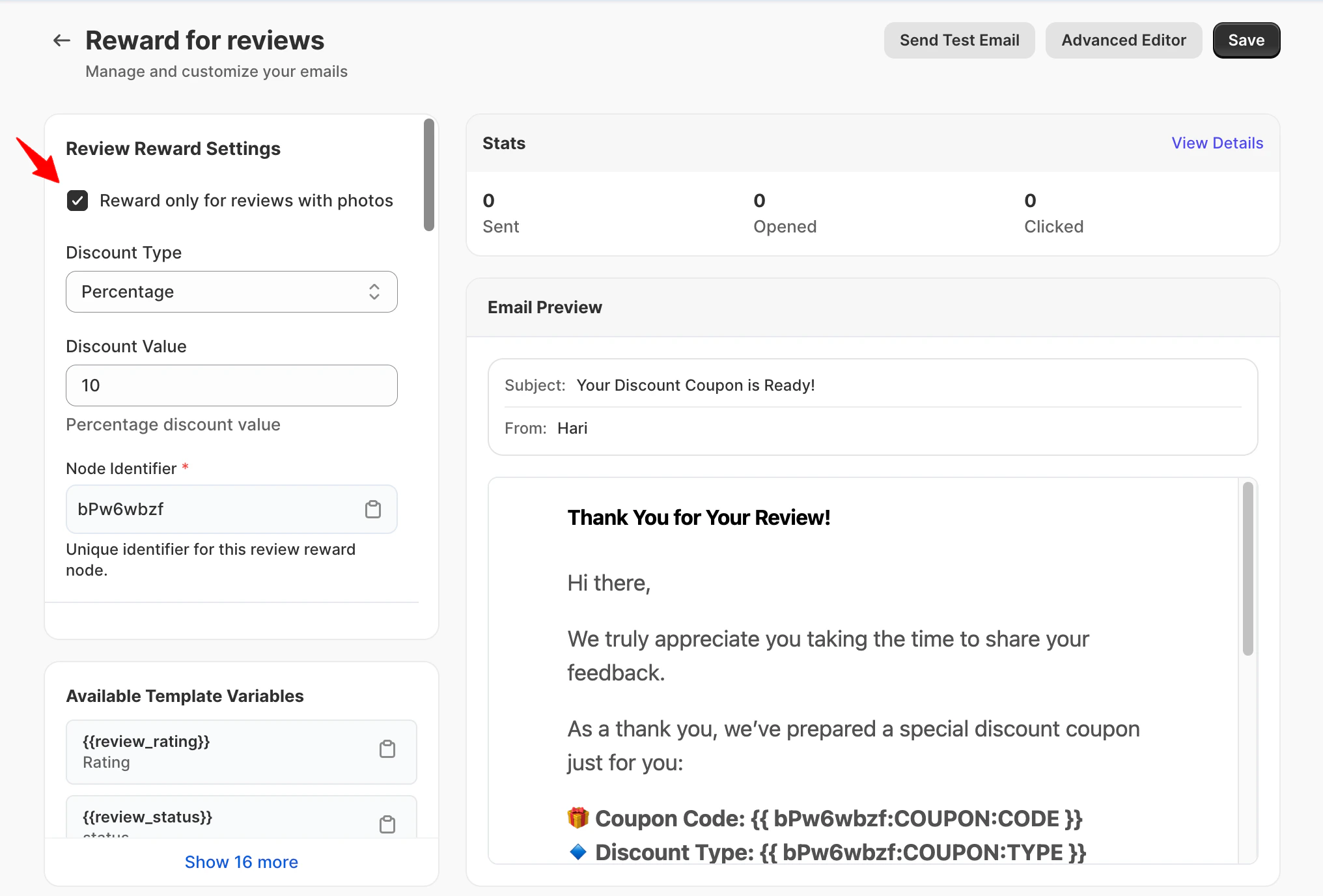
* If the "Reward\_ only for reviews with photos" check box \_is enabled, only reviews that include photos will qualify
* If disabled, all reviews (with or without photos) are eligible
### The Automatic Process
The customer writes a review of the product.
Yuko automatically detects the submitted review.
**Smart condition:**
* If the "Reward\_ only for reviews with photos" check box \_is enabled, only reviews that include photos will qualify
* If disabled, all reviews (with or without photos) are eligible
 Within minutes, the customer receives a thank-you email with their reward code.
**Timing:** Instant gratification = happier customers
The customer applies the discount code on their next purchase.
**Result:** You get more reviews + increased customer lifetime value
***
## Why Reviews Matter
**Reviews = Credibility | Photos = Authenticity**
* Text reviews share real experiences
* Photos prove real customers
* Shoppers trust photos 3x more
* Reduces "is this real?" doubts
**Impact:** Higher trust = more sales
**From Words to Visual Proof**
* Reviews explain product quality
* Photos show real-life usage, size, and fit
* Spot potential issues
* Get styling ideas
**Impact:** Better expectations = fewer returns
**Stronger Social Proof**
* Reviews improve buying confidence
* Photo reviews boost engagement
* Visual reviews answer unspoken questions
* Reduce cart abandonment
**Impact:** More sales from the same traffic
**Competitive Advantage**
* Most products have fewer than 5% photo reviews
* Your 30% photo rate = huge advantage
* Better-looking product pages
* More social proof
**Impact:** Beat competitors on the same products
***
## Reward Settings
Within minutes, the customer receives a thank-you email with their reward code.
**Timing:** Instant gratification = happier customers
The customer applies the discount code on their next purchase.
**Result:** You get more reviews + increased customer lifetime value
***
## Why Reviews Matter
**Reviews = Credibility | Photos = Authenticity**
* Text reviews share real experiences
* Photos prove real customers
* Shoppers trust photos 3x more
* Reduces "is this real?" doubts
**Impact:** Higher trust = more sales
**From Words to Visual Proof**
* Reviews explain product quality
* Photos show real-life usage, size, and fit
* Spot potential issues
* Get styling ideas
**Impact:** Better expectations = fewer returns
**Stronger Social Proof**
* Reviews improve buying confidence
* Photo reviews boost engagement
* Visual reviews answer unspoken questions
* Reduce cart abandonment
**Impact:** More sales from the same traffic
**Competitive Advantage**
* Most products have fewer than 5% photo reviews
* Your 30% photo rate = huge advantage
* Better-looking product pages
* More social proof
**Impact:** Beat competitors on the same products
***
## Reward Settings
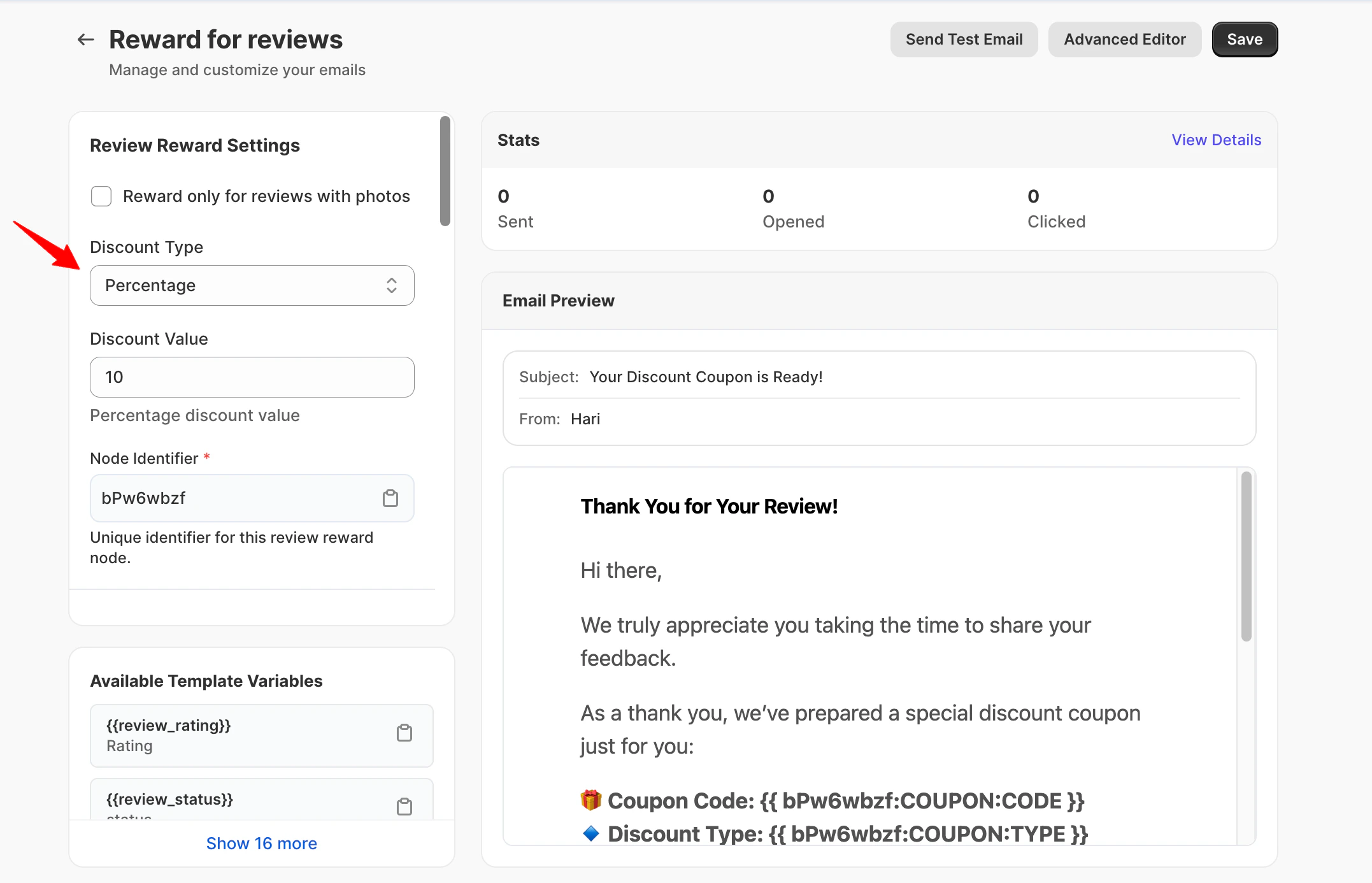
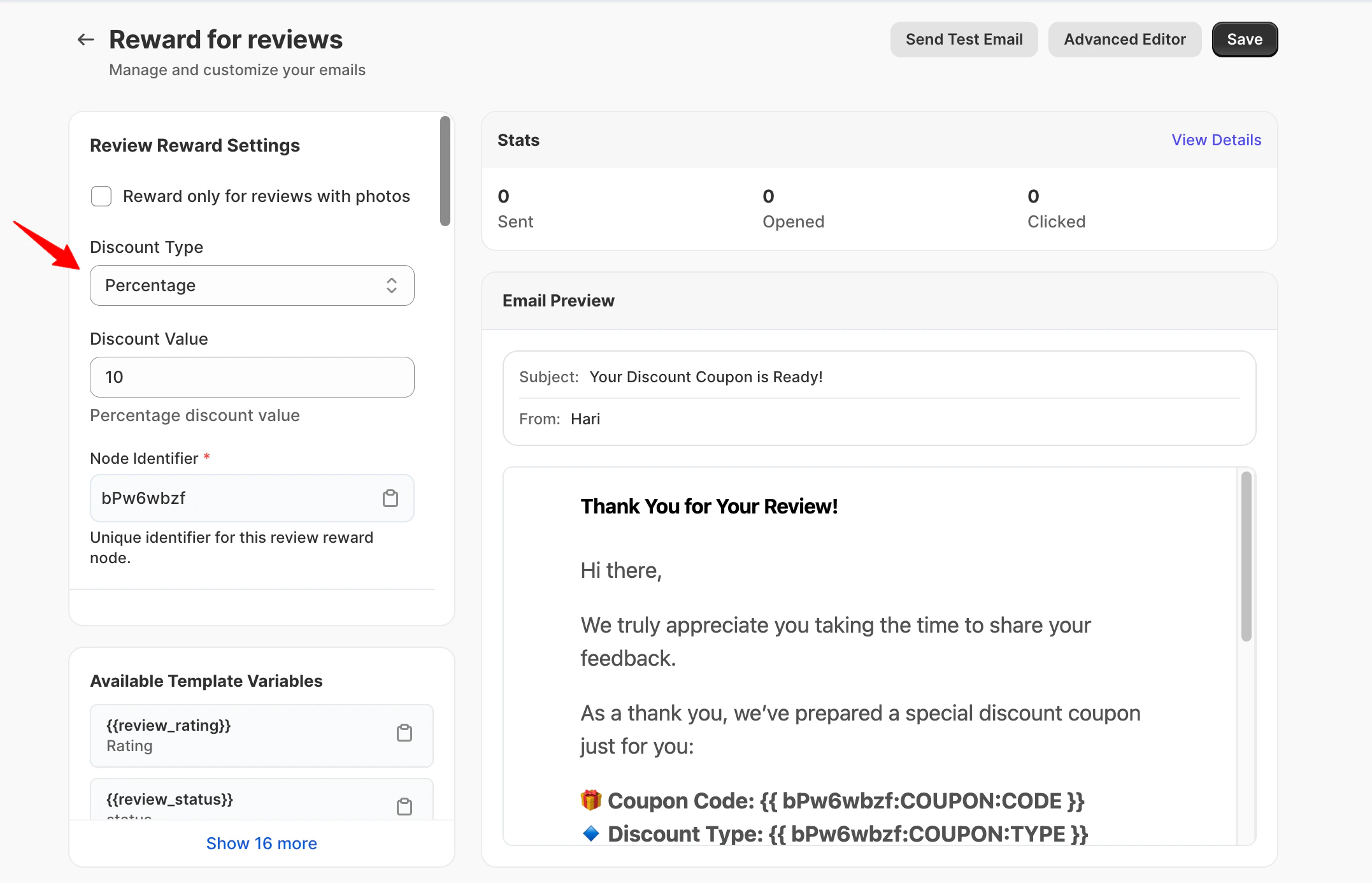 \*\*What this setting does: \*\*
Controls the type of reward customers receive after submitting a photo review.
Navigation: Yuko Dashboard → \*\*Reviews → Emails → Reward for Review Email \*\*
Available options:
* **Percentage** – A percentage discount on the next order
* **Fixed Amount** – A flat discount value (for example, ₹200 or \$10 off)
* **Free Shipping** – Free shipping on the next order
**Most effective:** 10% off next order is the sweet spot - generous enough to motivate, small enough to be profitable
**Setting:** Discount Value (for percentage or amount discounts)
**Finding the right amount:**
| Discount | Motivation Level | When to Use |
| --------- | ---------------- | ------------------------------------ |
| 5% off | Low | Established stores with many reviews |
| 10% off | Good | Sweet spot for most stores |
| 15% off | High | New stores building review base |
| 20%+ off | Very High | Rarely needed, cuts into margins |
| \$5 off | Medium | Products under \$50 |
| \$10 off | High | Products \$50-100 |
| \$15+ off | Very High | Expensive products \$100+ |
**General guidelines:**
* **New store:** Start with 15% to build momentum
* **Established store:** 10% is plenty
* **High-margin products:** Can afford 15-20%
* **Low-margin products:** Stick to 10% or free shipping
**Don't go too high:** 25%+ discounts train customers to only buy with coupons. You'll lose money long-term.
### What this setting does
Defines the subject line shown in the customer’s inbox.
### Best practices for reward subject lines
Subject lines should highlight appreciation and rewards without sounding transactional.
#### ✅ Recommended examples
* *Thanks for reviewing — here’s a reward*
* \_Your photo review for \_
* *A thank-you for your photo review*
* \_We appreciate your review on \_
#### ❌ Avoid
* “Guaranteed reward”
* Urgency language (“Act now”, “Final chance”)
* Overly promotional wording
### What this setting does
Controls the short text displayed next to the subject line in inboxes.
### Best practices
* Reinforce appreciation
* Keep it calm and neutral
* No urgency
**Examples**
* *Thanks for sharing your experience*
* *A small thank-you for your photo review*
* *Your feedback helps other shoppers*
### What this setting does
Sets the heading displayed at the top of the email.
### Best practices
* Appreciation-focused
* No commands or pressure
**Examples**
* *Thanks for Your Photo Review*
* *We Appreciate Your Feedback*
* *Your Review Matters*
### What makes a good reward email
* Confirms the review was received
* Acknowledges the extra effort of adding a photo
* Clearly explains that a reward is included
* Short and respectful
***
### Example message structure (shortcode-safe)
```text theme={null}
Hi {{review_author_name}},
Thank you for submitting your photo review for {{review_product_name}}!
Your feedback helps other customers see the product in real life and shop with confidence.
As a thank-you, we’ve added a reward you can use on your next order.
{{review_block}}
```
***
### Supported review elements
You can optionally include:
* – Display the rating
* – Show the review text
* – Review submission date
* – Product image
* – Product page link
* – Direct link to the review
***
### What to avoid
* Asking for another review
* Making rewards feel conditional
* Long explanations or legal language
* Multiple calls to action
**Pro tip:**\
\
Reward emails should **thank**, not **ask**. The review has already been submitted.
***
## Available Shortcodes
**Information about their review:**
* `{{review_rating}}` - Star rating (1-5)
* `{{review_author_name}}` - Customer's name
* `{{review_content}}` - Their review text
* `{{review_product_name}}` - Product they reviewed
* `{{review_product_url}}` - Link to product page
* `{{review_link}}` - Link to their review
* `{{review_created}}` - When they submitted
**Example:**
```text theme={null}
Thanks for your review of {{review_product_name}}!
```
**Discount code information:**
* `{{YOUR_IDENTIFIER:COUPON:CODE}}` - The coupon code
* `{{YOUR_IDENTIFIER:COUPON:TYPE}}` - Discount type (percentage/amount/shipping)
* `{{YOUR_IDENTIFIER:COUPON:VALUE}}` - Value (10%, \$5, etc.)
* `{{YOUR_IDENTIFIER:COUPON:EXPIRY}}` - Expiration date
**Example:**
```text theme={null}
Use code {{PHOTO10:COUPON:CODE}} for {{PHOTO10:COUPON:VALUE}} off!
Valid until {{PHOTO10:COUPON:EXPIRY}}
```
**Note:** Replace `YOUR_IDENTIFIER` with your custom coupon identifier (e.g., PHOTO10, PHOTOREWARD, etc.)
**Their purchase details:**
* `{{order_id}}` - Order number
* `{{order_name}}` - Order reference
**Example:**
```text theme={null}
From your order {{order_name}}
```
**Show their review in email:**
* `{{review_block}}` - Formatted review display with product image and text
**Use this to:** Show what they wrote in the thank-you email (makes it personal)
***
## Next Steps
Decide on reward type and amount.
**Recommended:** 10% off next order **Location:** Reviews → Emails → Reward for Review Email
Configure expiration date for reward codes.
**Why:** Creates urgency without pressure
Submit test review with photo and verify reward email sends correctly.
**Check:**
* Email arrives quickly
* Code works at checkout
* Discount applies correctly
* Expiry date is accurate
Turn on photo rewards and watch the photo submission rate increase.
**Expected:** Photo rate increases from 10% to 30-40% within 30 days
***
## Need Help?
Talk to our team for personalized setup help
**Time:** 30 minutes
Reach our team at yukoreviews.com/support
**Response time:** Within 24 hours
Browse detailed guides for every feature
Connect Yuko with other tools
**Pro tip:** Photo rewards have the highest ROI of any review feature. Stores see 2-3x more photo reviews with rewards, and those photos increase conversion rates by 20%. This feature pays for itself many times over.
\*\*What this setting does: \*\*
Controls the type of reward customers receive after submitting a photo review.
Navigation: Yuko Dashboard → \*\*Reviews → Emails → Reward for Review Email \*\*
Available options:
* **Percentage** – A percentage discount on the next order
* **Fixed Amount** – A flat discount value (for example, ₹200 or \$10 off)
* **Free Shipping** – Free shipping on the next order
**Most effective:** 10% off next order is the sweet spot - generous enough to motivate, small enough to be profitable
**Setting:** Discount Value (for percentage or amount discounts)
**Finding the right amount:**
| Discount | Motivation Level | When to Use |
| --------- | ---------------- | ------------------------------------ |
| 5% off | Low | Established stores with many reviews |
| 10% off | Good | Sweet spot for most stores |
| 15% off | High | New stores building review base |
| 20%+ off | Very High | Rarely needed, cuts into margins |
| \$5 off | Medium | Products under \$50 |
| \$10 off | High | Products \$50-100 |
| \$15+ off | Very High | Expensive products \$100+ |
**General guidelines:**
* **New store:** Start with 15% to build momentum
* **Established store:** 10% is plenty
* **High-margin products:** Can afford 15-20%
* **Low-margin products:** Stick to 10% or free shipping
**Don't go too high:** 25%+ discounts train customers to only buy with coupons. You'll lose money long-term.
### What this setting does
Defines the subject line shown in the customer’s inbox.
### Best practices for reward subject lines
Subject lines should highlight appreciation and rewards without sounding transactional.
#### ✅ Recommended examples
* *Thanks for reviewing — here’s a reward*
* \_Your photo review for \_
* *A thank-you for your photo review*
* \_We appreciate your review on \_
#### ❌ Avoid
* “Guaranteed reward”
* Urgency language (“Act now”, “Final chance”)
* Overly promotional wording
### What this setting does
Controls the short text displayed next to the subject line in inboxes.
### Best practices
* Reinforce appreciation
* Keep it calm and neutral
* No urgency
**Examples**
* *Thanks for sharing your experience*
* *A small thank-you for your photo review*
* *Your feedback helps other shoppers*
### What this setting does
Sets the heading displayed at the top of the email.
### Best practices
* Appreciation-focused
* No commands or pressure
**Examples**
* *Thanks for Your Photo Review*
* *We Appreciate Your Feedback*
* *Your Review Matters*
### What makes a good reward email
* Confirms the review was received
* Acknowledges the extra effort of adding a photo
* Clearly explains that a reward is included
* Short and respectful
***
### Example message structure (shortcode-safe)
```text theme={null}
Hi {{review_author_name}},
Thank you for submitting your photo review for {{review_product_name}}!
Your feedback helps other customers see the product in real life and shop with confidence.
As a thank-you, we’ve added a reward you can use on your next order.
{{review_block}}
```
***
### Supported review elements
You can optionally include:
* – Display the rating
* – Show the review text
* – Review submission date
* – Product image
* – Product page link
* – Direct link to the review
***
### What to avoid
* Asking for another review
* Making rewards feel conditional
* Long explanations or legal language
* Multiple calls to action
**Pro tip:**\
\
Reward emails should **thank**, not **ask**. The review has already been submitted.
***
## Available Shortcodes
**Information about their review:**
* `{{review_rating}}` - Star rating (1-5)
* `{{review_author_name}}` - Customer's name
* `{{review_content}}` - Their review text
* `{{review_product_name}}` - Product they reviewed
* `{{review_product_url}}` - Link to product page
* `{{review_link}}` - Link to their review
* `{{review_created}}` - When they submitted
**Example:**
```text theme={null}
Thanks for your review of {{review_product_name}}!
```
**Discount code information:**
* `{{YOUR_IDENTIFIER:COUPON:CODE}}` - The coupon code
* `{{YOUR_IDENTIFIER:COUPON:TYPE}}` - Discount type (percentage/amount/shipping)
* `{{YOUR_IDENTIFIER:COUPON:VALUE}}` - Value (10%, \$5, etc.)
* `{{YOUR_IDENTIFIER:COUPON:EXPIRY}}` - Expiration date
**Example:**
```text theme={null}
Use code {{PHOTO10:COUPON:CODE}} for {{PHOTO10:COUPON:VALUE}} off!
Valid until {{PHOTO10:COUPON:EXPIRY}}
```
**Note:** Replace `YOUR_IDENTIFIER` with your custom coupon identifier (e.g., PHOTO10, PHOTOREWARD, etc.)
**Their purchase details:**
* `{{order_id}}` - Order number
* `{{order_name}}` - Order reference
**Example:**
```text theme={null}
From your order {{order_name}}
```
**Show their review in email:**
* `{{review_block}}` - Formatted review display with product image and text
**Use this to:** Show what they wrote in the thank-you email (makes it personal)
***
## Next Steps
Decide on reward type and amount.
**Recommended:** 10% off next order **Location:** Reviews → Emails → Reward for Review Email
Configure expiration date for reward codes.
**Why:** Creates urgency without pressure
Submit test review with photo and verify reward email sends correctly.
**Check:**
* Email arrives quickly
* Code works at checkout
* Discount applies correctly
* Expiry date is accurate
Turn on photo rewards and watch the photo submission rate increase.
**Expected:** Photo rate increases from 10% to 30-40% within 30 days
***
## Need Help?
Talk to our team for personalized setup help
**Time:** 30 minutes
Reach our team at yukoreviews.com/support
**Response time:** Within 24 hours
Browse detailed guides for every feature
Connect Yuko with other tools
**Pro tip:** Photo rewards have the highest ROI of any review feature. Stores see 2-3x more photo reviews with rewards, and those photos increase conversion rates by 20%. This feature pays for itself many times over.