> ## Documentation Index
> Fetch the complete documentation index at: https://docs.yukoreviews.com/llms.txt
> Use this file to discover all available pages before exploring further.
> Gently remind customers who left text reviews to add photos and increase visual social proof
# Photo Review Reminder Email Setup
## Turn 15-25% of Text Reviews into Photo Reviews
Customers who already took the time to write a review are much more likely to add photos when asked. A gentle reminder 3-7 days after their text review can convert 15-25% into valuable photo reviews without being pushy.
**What you'll achieve:**
* Convert text reviews into photo reviews
* Increase visual social proof by 30-50%
* Build more authentic-looking review sections
* Boost product page conversions with real customer images
**Impact:** 15-25% of text reviewers add photos when reminded | **Time to set up:** 5 minutes
***
## How It Works
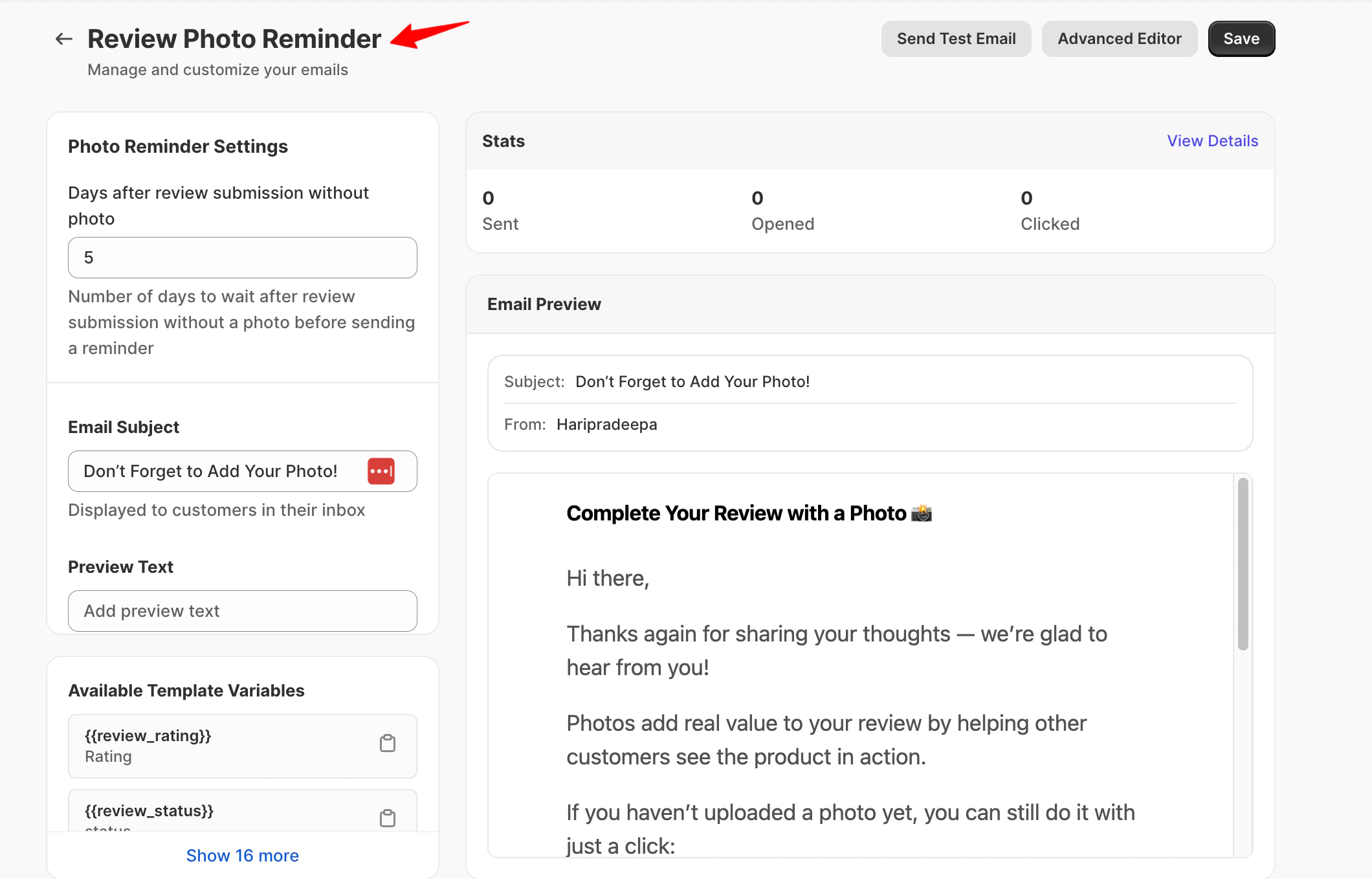
Yuko Dashboard → **Reviews → Emails → Photo Review Reminder Email**
 **The Automatic Process**
Customer writes a helpful review but doesn't include any photos.
**Why they skip photos:** Too busy, on mobile, didn't think it was important, forgot.
Yuko automatically detects that the review was submitted without photos.
**Smart tracking:** Only text-only reviews trigger this email (customers who already added photos won't get reminded).
Yuko waits your set delay (default: 5 days after review submission without photo).
**Why wait:** Gives customer time to receive and use product more, increasing chance they'll have photos ready.
Customer receives friendly email thanking them for the review and asking if they'd like to add photos.
**Tone:** Appreciative and optional, never demanding.
Customer clicks link, uploads photos to their existing review.
**Success rate:** 15-25% of reminded customers add photos.
***
## Why This Works
**These customers already reviewed**
* Took time to write feedback
* Had positive experience (most likely)
* Trust your brand enough to engage
* More likely to help again
**Result:** Higher response than cold outreach
**It's an optional follow-up**
* Not asking for a new review
* Just adding to existing effort
* Quick task (upload photos only)
* Shows you appreciate their feedback
**Result:** Feels helpful, not demanding
**5-7 days later means more photos**
* Used product more by now
* May have taken photos since review
* Fresh experience to capture
* Product still top-of-mind
**Result:** Better quality photos
**Visual reviews convert better**
* 20% higher conversion on pages with photos
* Reduces returns (see actual product)
* Answers sizing/color/fit questions
* Builds authentic trust
**Result:** Worth the extra effort
***
## Email Settings
**Setting:** Delay (days)
**What it means:** How many days after the text review was submitted should the photo reminder send?
**Default:** 5 days
**How to choose:**
| Delay | When to Use | Why |
| -------------------- | --------------------------------------------- | ----------------------------------------------------- |
| 3 days | Fast-moving products (food, consumables) | Quick reminder while product is still in use |
| 5 days (recommended) | Most products | Customers had more time to use and photograph product |
| 7 days | Considered purchases (electronics, furniture) | More time to fully experience and document |
| 10+ days | Don't use | Too late - customer moved on mentally |
**Sweet spot:** 5 days gives customers time to take natural photos during regular use, without forgetting they left a review.
**Don't rush:** Sending reminder next day feels pushy. Give customers at least 3 days to use the product and take authentic photos.
**Setting:** Email Subject
**Best practices for photo reminder subjects:**
✅ **Good photo reminder subjects:**
* "Thanks for your review! Mind adding a photo?"
* "One more thing about your \[Product] review\..."
* "Quick question about your review, \[First Name]"
* "Would you share a photo of your \[Product]?"
❌ **Avoid:**
* "Your review is incomplete" (sounds critical)
* "We need photos" (sounds demanding)
* "Photo required for review" (sounds mandatory)
* Same subject as original review request (confusing)
**Key differences from other emails:**
* Thank them first (they already helped!)
* Frame as optional request, not requirement
* Mention their specific product
* Keep it short and friendly
**Psychology:** Start with gratitude. "Thanks for your review + would you add photos?" works better than "Your review needs photos."
**Setting:** Message Body
**What makes a good photo reminder email:**
**Always thank them first:**
* Start with genuine appreciation for their review
* Acknowledge their time and effort
* Make photo request feel optional
* Keep it brief (2-3 sentences)
**Example structure:**
```text theme={null}
Hi {{review_author_name}},
Thank you so much for your review of {{review_product_name}}! We really appreciate you taking the time to share your thoughts.
If you have a moment, would you mind adding a photo or two? Visual reviews help other customers see the product in real life and make more confident decisions.
[Upload Photos Button]
No worries if you don't have photos - your written review is already incredibly helpful!
```
**What NOT to write:**
* ❌ "Your review is missing photos" (sounds critical)
* ❌ "We require photos" (sounds demanding)
* ❌ "You forgot to upload photos" (sounds accusatory)
* ❌ Long explanations about why photos matter (they're busy)
**Pro tip:** End with "No worries if you don't have photos - your review already helps!" This removes pressure and actually increases compliance because customers feel respected.
**Should you offer a reward for adding photos?**
**Two approaches:**
### Option 1: No Incentive (Recommended for reminders)
**Just ask nicely**
**Pros:**
* More authentic responses
* Lower cost
* Customers feel helpful, not transactional
* Works for customers who wanted to add photos anyway
**Expected rate:** 15-20% add photos when asked politely
***
### Option 2: Small Incentive
**Offer small reward for adding photos**
**Pros:**
* Higher response rate (20-25%)
* Shows you value their extra effort
* Brings customers back to your store
* Increased lifetime value
**Cons:**
* Costs money (discount or credit)
* May feel transactional
* Could cannibalize photo reward email (if you use both)
**Typical incentive:** 5% off or \$3-5 store credit (smaller than photo reward email since they already reviewed)
**Don't overlap:** If you already use Photo Review Reward Email (for customers who submit photos with original review), keep this reminder incentive smaller or skip it entirely. Otherwise customers learn to skip photos initially and wait for the reminder offer.
***
## Available Shortcodes
**Information about their review:**
* `{{review_rating}}` - Star rating they gave (1-5)
* `{{review_author_name}}` - Customer's name
* `{{review_content}}` - Their review text
* `{{review_product_name}}` - Product they reviewed
* `{{review_product_url}}` - Link to product page
* `{{review_block}}` - Formatted display of their review
**Example:**
```text theme={null}
Thanks for your {{review_rating}}-star review of {{review_product_name}}!
```
**Their purchase details:**
* `{{order_id}}` - Order number
* `{{order_name}}` - Order reference
**Example:**
```text theme={null}
From your order {{order_name}}
```
**If offering incentive for adding photos:**
* `{{YOUR_IDENTIFIER:COUPON:CODE}}` - The coupon code
* `{{YOUR_IDENTIFIER:COUPON:VALUE}}` - Value (5%, \$3, etc.)
**Example:**
```text theme={null}
Add photos and we'll send you {{PHOTO5:COUPON:CODE}} for {{PHOTO5:COUPON:VALUE}} off your next order!
```
**Note:** Replace `YOUR_IDENTIFIER` with your custom coupon identifier
**Show their review in the email:**
* `{{review_block}}` - Formatted review display with product image and their text
**Use this to:** Remind them what they wrote, making it personal and showing you read their feedback
***
## Best Practices
**Always thank them first before asking**
**Do this:**
1. Start with "Thank you for your review!"
2. Acknowledge their specific feedback
3. Then (and only then) ask about photos
4. Make photo request feel optional
**Why it works:**
* Shows you appreciate what they already did
* Reduces feeling of "you're never satisfied"
* Makes request feel like collaboration, not demand
* Increases goodwill and compliance
**Frame it right:** "Your written review already helps - photos would be the cherry on top!" vs "Your review needs photos."
**Never send multiple photo reminders**
**The rule:**
* Customer left text review
* Send ONE photo reminder
* If they don't respond, let it go
* Never send second photo reminder
**Why:**
* They got the message the first time
* Not responding = don't have photos or don't want to
* Second reminder feels nagging
* Risk of unsubscribe or spam complaint
**What about photo reward email?**
* Photo Reward Email = for customers who submit photos WITH initial review
* Photo Reminder Email = for customers who submit text-only reviews
* These are different audiences, no overlap
**Respect their choice:** If customer doesn't add photos after reminder, they either don't have photos or don't want to share. Respect that and move on.
**Remove all friction from photo upload**
**Technical must-haves:**
* Direct link to photo upload (not just review page)
* Mobile-friendly upload (most photos are on phones)
* Accept multiple formats (JPG, PNG, HEIC)
* Allow multiple photos at once
* Show upload progress
**User experience:**
* One-click to upload page
* Clear instructions ("Upload photos from your phone")
* No login required (link should authenticate automatically)
* Confirm upload success
**Test on mobile:** Most customers will open this email on their phone where their photos are. Make sure mobile upload is smooth.
**Tell them what kind of photos help most**
**Include guidance like:**
* "Clear photos showing the product in use"
* "Front and back views helpful"
* "Photos in natural lighting work best"
* "Show size/fit/scale if relevant"
**What NOT to require:**
* Professional quality photos (authentic > polished)
* Specific angles or backgrounds
* Face must be visible (many customers prefer privacy)
* Minimum number of photos
**Why it helps:**
* Reduces "I don't know what photos to take" barrier
* Improves photo quality
* Manages expectations
* Increases completion rate
**Keep it simple:** "Any clear photos of the product are helpful!" is enough guidance for most customers.
***
## Common Questions
**Expected response rates:**
**Without reminder:**
* 10-15% of reviews include photos naturally
* 85-90% are text-only
**With polite reminder (no incentive):**
* 15-20% of text-only reviewers add photos when asked
* Total photo rate increases to 25-30%
**With reminder + small incentive (\$3-5 credit):**
* 20-25% of text-only reviewers add photos
* Total photo rate increases to 30-35%
**Math example:**
* 100 reviews collected
* 15 naturally include photos (15%)
* 85 are text-only
* Send reminder to 85 text-only reviewers
* 17 add photos (20% response rate)
* **New total: 32 photo reviews (32%) instead of 15 (15%)**
**Impact:** Photo reminder can double your photo review count with minimal effort.
**Understanding the difference:**
**Photo Review Reward Email:**
* Sends when customer submits review WITH photos
* Thanks them and offers reward (10% off)
* Encourages future customers to include photos upfront
**Photo Review Reminder Email:**
* Sends when customer submits review WITHOUT photos
* Asks them to add photos to existing review
* Converts text reviews into photo reviews
**Can you use both? Yes!**
**Recommended strategy:**
1. Enable Photo Reward Email with 10% off (encourages upfront photos)
2. Enable Photo Reminder Email with NO incentive or smaller incentive (5% off or \$3 credit)
3. Customers who submit photos initially get better reward
4. Customers who submit text-only get gentle reminder
**Why this works:**
* Incentivizes photos upfront (better)
* Still captures photos from text-only reviewers
* Doesn't train customers to skip photos and wait for reminder
* Fair tiered approach (more effort = better reward)
**Keep reward smaller:** If Photo Reward gives 10% off, Photo Reminder should give 5% off or less. Otherwise customers learn to skip photos initially.
**This shouldn't happen - here's why:**
**How Yuko prevents duplicates:**
* Photo Reward Email triggers when review submitted WITH photos
* Photo Reminder Email triggers when review submitted WITHOUT photos
* Same review can't be both "with photos" and "without photos"
* Therefore, no customer gets both emails for same review
**Edge case scenarios:**
**Scenario 1: Customer adds photos later (before reminder)**
* Customer submits text review
* Photo Reminder scheduled for 5 days later
* Customer adds photos on day 3 (before reminder)
* **Yuko detects photos added, cancels scheduled reminder**
* Customer receives Photo Reward Email instead (if enabled)
**Scenario 2: Multiple products in order**
* Customer reviews Product A with photos (gets Photo Reward)
* Customer reviews Product B without photos (gets Photo Reminder)
* **This is correct:** Different products, different emails
**Smart system:** Yuko automatically prevents duplicate or conflicting emails through intelligent tracking.
**Don't worry - this is normal and okay**
**Common reasons customers don't have photos:**
* Product not photogenic (consumables, digital products)
* Customer privacy concerns
* Genuinely too busy
* Already disposed of product
* Neutral experience (works fine, nothing special to show)
**How to handle:**
* Send ONE polite reminder
* Make it clear photos are optional
* Thank them for written review regardless
* If they don't respond, accept it and move on
* Never send second reminder
**What NOT to do:**
* Don't make photos mandatory
* Don't penalize text-only reviews
* Don't remove/hide text reviews without photos
* Don't keep asking repeatedly
**Reality check:** Even with reminders and incentives, 70-75% of reviews will remain text-only. That's normal and acceptable.
**Text reviews are valuable too:** Don't dismiss or devalue text-only reviews. They still build trust and help customers make decisions.
**Your choice - depends on your risk tolerance:**
**Auto-publish photos (recommended):**
**Pros:**
* Photos appear immediately (better user experience)
* Less work for you
* Shows trust in customers
* Faster social proof accumulation
**Cons:**
* Inappropriate photos go live instantly
* Can't prevent low-quality images
**Best for:** Stores with good customer base, non-controversial products
***
**Manual approval:**
**Pros:**
* Control over what appears
* Filter inappropriate/low-quality photos
* Prevent competitor products showing
* Quality control
**Cons:**
* Daily review work required
* Photos appear slowly
* Customer may not see their photos for days
**Best for:** Fashion/beauty (where photos might be revealing), new stores, products where wrong photos could confuse (tech products)
**Start with auto-publish:** You can always switch to manual approval if you see issues. But most stores never have problems with inappropriate photos (less than 1% of submissions).
**Yes, and they should be able to**
**Why allow photo removal:**
* Customer privacy concerns (changed their mind)
* Uploaded wrong photos by mistake
* Product changed and photos no longer accurate
* Personal reasons (moving, privacy, etc.)
**How it works in Yuko:**
* Customer can edit their review anytime
* Can add or remove photos from their review
* Changes reflect immediately (or after approval if manual)
* Email notifications work as expected
**What if customer removes photos after getting reward?**
**Two approaches:**
**Option 1: Let them keep reward** (recommended)
* Customer already got discount code
* Taking it back creates bad experience
* Cost is minimal (\$5-10)
* Maintains goodwill
**Option 2: Track and invalidate reward**
* More complex to manage
* Risks looking petty
* Customer frustration
* Not worth the effort for most stores
**Be generous:** If customer removes photos after getting reward, let them keep it. The goodwill is worth more than the \$5 discount.
***
## Next Steps
Choose whether to offer reward for adding photos or just ask politely.
**Recommendation:** Start with no incentive (works for 15-20% of customers) **Location:** Reviews → Emails → Photo Review Reminder Email
Configure reminder to send 5 days after text review submission.
**Why 5 days:** Customers had more time to use product and take photos naturally
Start with gratitude, then make optional photo request.
**Time:** 3 minutes **Tone:** Thankful first, then gentle request
Send test email and verify photo upload process is smooth.
**Check:**
* Link works on mobile
* Upload is easy
* Photos appear correctly
Turn on photo reminders and track how many text reviews convert to photo reviews.
**Expected:** 15-25% of text-only reviewers add photos when reminded **Monitor:** After 30 days, check photo review percentage increase
***
## Need Help?
**Pro tip:** If you use Photo Review Reward Email (for reviews submitted with photos), keep this Photo Reminder incentive smaller or skip it entirely. You want to encourage photos upfront, not train customers to wait for the reminder.
**The Automatic Process**
Customer writes a helpful review but doesn't include any photos.
**Why they skip photos:** Too busy, on mobile, didn't think it was important, forgot.
Yuko automatically detects that the review was submitted without photos.
**Smart tracking:** Only text-only reviews trigger this email (customers who already added photos won't get reminded).
Yuko waits your set delay (default: 5 days after review submission without photo).
**Why wait:** Gives customer time to receive and use product more, increasing chance they'll have photos ready.
Customer receives friendly email thanking them for the review and asking if they'd like to add photos.
**Tone:** Appreciative and optional, never demanding.
Customer clicks link, uploads photos to their existing review.
**Success rate:** 15-25% of reminded customers add photos.
***
## Why This Works
**These customers already reviewed**
* Took time to write feedback
* Had positive experience (most likely)
* Trust your brand enough to engage
* More likely to help again
**Result:** Higher response than cold outreach
**It's an optional follow-up**
* Not asking for a new review
* Just adding to existing effort
* Quick task (upload photos only)
* Shows you appreciate their feedback
**Result:** Feels helpful, not demanding
**5-7 days later means more photos**
* Used product more by now
* May have taken photos since review
* Fresh experience to capture
* Product still top-of-mind
**Result:** Better quality photos
**Visual reviews convert better**
* 20% higher conversion on pages with photos
* Reduces returns (see actual product)
* Answers sizing/color/fit questions
* Builds authentic trust
**Result:** Worth the extra effort
***
## Email Settings
**Setting:** Delay (days)
**What it means:** How many days after the text review was submitted should the photo reminder send?
**Default:** 5 days
**How to choose:**
| Delay | When to Use | Why |
| -------------------- | --------------------------------------------- | ----------------------------------------------------- |
| 3 days | Fast-moving products (food, consumables) | Quick reminder while product is still in use |
| 5 days (recommended) | Most products | Customers had more time to use and photograph product |
| 7 days | Considered purchases (electronics, furniture) | More time to fully experience and document |
| 10+ days | Don't use | Too late - customer moved on mentally |
**Sweet spot:** 5 days gives customers time to take natural photos during regular use, without forgetting they left a review.
**Don't rush:** Sending reminder next day feels pushy. Give customers at least 3 days to use the product and take authentic photos.
**Setting:** Email Subject
**Best practices for photo reminder subjects:**
✅ **Good photo reminder subjects:**
* "Thanks for your review! Mind adding a photo?"
* "One more thing about your \[Product] review\..."
* "Quick question about your review, \[First Name]"
* "Would you share a photo of your \[Product]?"
❌ **Avoid:**
* "Your review is incomplete" (sounds critical)
* "We need photos" (sounds demanding)
* "Photo required for review" (sounds mandatory)
* Same subject as original review request (confusing)
**Key differences from other emails:**
* Thank them first (they already helped!)
* Frame as optional request, not requirement
* Mention their specific product
* Keep it short and friendly
**Psychology:** Start with gratitude. "Thanks for your review + would you add photos?" works better than "Your review needs photos."
**Setting:** Message Body
**What makes a good photo reminder email:**
**Always thank them first:**
* Start with genuine appreciation for their review
* Acknowledge their time and effort
* Make photo request feel optional
* Keep it brief (2-3 sentences)
**Example structure:**
```text theme={null}
Hi {{review_author_name}},
Thank you so much for your review of {{review_product_name}}! We really appreciate you taking the time to share your thoughts.
If you have a moment, would you mind adding a photo or two? Visual reviews help other customers see the product in real life and make more confident decisions.
[Upload Photos Button]
No worries if you don't have photos - your written review is already incredibly helpful!
```
**What NOT to write:**
* ❌ "Your review is missing photos" (sounds critical)
* ❌ "We require photos" (sounds demanding)
* ❌ "You forgot to upload photos" (sounds accusatory)
* ❌ Long explanations about why photos matter (they're busy)
**Pro tip:** End with "No worries if you don't have photos - your review already helps!" This removes pressure and actually increases compliance because customers feel respected.
**Should you offer a reward for adding photos?**
**Two approaches:**
### Option 1: No Incentive (Recommended for reminders)
**Just ask nicely**
**Pros:**
* More authentic responses
* Lower cost
* Customers feel helpful, not transactional
* Works for customers who wanted to add photos anyway
**Expected rate:** 15-20% add photos when asked politely
***
### Option 2: Small Incentive
**Offer small reward for adding photos**
**Pros:**
* Higher response rate (20-25%)
* Shows you value their extra effort
* Brings customers back to your store
* Increased lifetime value
**Cons:**
* Costs money (discount or credit)
* May feel transactional
* Could cannibalize photo reward email (if you use both)
**Typical incentive:** 5% off or \$3-5 store credit (smaller than photo reward email since they already reviewed)
**Don't overlap:** If you already use Photo Review Reward Email (for customers who submit photos with original review), keep this reminder incentive smaller or skip it entirely. Otherwise customers learn to skip photos initially and wait for the reminder offer.
***
## Available Shortcodes
**Information about their review:**
* `{{review_rating}}` - Star rating they gave (1-5)
* `{{review_author_name}}` - Customer's name
* `{{review_content}}` - Their review text
* `{{review_product_name}}` - Product they reviewed
* `{{review_product_url}}` - Link to product page
* `{{review_block}}` - Formatted display of their review
**Example:**
```text theme={null}
Thanks for your {{review_rating}}-star review of {{review_product_name}}!
```
**Their purchase details:**
* `{{order_id}}` - Order number
* `{{order_name}}` - Order reference
**Example:**
```text theme={null}
From your order {{order_name}}
```
**If offering incentive for adding photos:**
* `{{YOUR_IDENTIFIER:COUPON:CODE}}` - The coupon code
* `{{YOUR_IDENTIFIER:COUPON:VALUE}}` - Value (5%, \$3, etc.)
**Example:**
```text theme={null}
Add photos and we'll send you {{PHOTO5:COUPON:CODE}} for {{PHOTO5:COUPON:VALUE}} off your next order!
```
**Note:** Replace `YOUR_IDENTIFIER` with your custom coupon identifier
**Show their review in the email:**
* `{{review_block}}` - Formatted review display with product image and their text
**Use this to:** Remind them what they wrote, making it personal and showing you read their feedback
***
## Best Practices
**Always thank them first before asking**
**Do this:**
1. Start with "Thank you for your review!"
2. Acknowledge their specific feedback
3. Then (and only then) ask about photos
4. Make photo request feel optional
**Why it works:**
* Shows you appreciate what they already did
* Reduces feeling of "you're never satisfied"
* Makes request feel like collaboration, not demand
* Increases goodwill and compliance
**Frame it right:** "Your written review already helps - photos would be the cherry on top!" vs "Your review needs photos."
**Never send multiple photo reminders**
**The rule:**
* Customer left text review
* Send ONE photo reminder
* If they don't respond, let it go
* Never send second photo reminder
**Why:**
* They got the message the first time
* Not responding = don't have photos or don't want to
* Second reminder feels nagging
* Risk of unsubscribe or spam complaint
**What about photo reward email?**
* Photo Reward Email = for customers who submit photos WITH initial review
* Photo Reminder Email = for customers who submit text-only reviews
* These are different audiences, no overlap
**Respect their choice:** If customer doesn't add photos after reminder, they either don't have photos or don't want to share. Respect that and move on.
**Remove all friction from photo upload**
**Technical must-haves:**
* Direct link to photo upload (not just review page)
* Mobile-friendly upload (most photos are on phones)
* Accept multiple formats (JPG, PNG, HEIC)
* Allow multiple photos at once
* Show upload progress
**User experience:**
* One-click to upload page
* Clear instructions ("Upload photos from your phone")
* No login required (link should authenticate automatically)
* Confirm upload success
**Test on mobile:** Most customers will open this email on their phone where their photos are. Make sure mobile upload is smooth.
**Tell them what kind of photos help most**
**Include guidance like:**
* "Clear photos showing the product in use"
* "Front and back views helpful"
* "Photos in natural lighting work best"
* "Show size/fit/scale if relevant"
**What NOT to require:**
* Professional quality photos (authentic > polished)
* Specific angles or backgrounds
* Face must be visible (many customers prefer privacy)
* Minimum number of photos
**Why it helps:**
* Reduces "I don't know what photos to take" barrier
* Improves photo quality
* Manages expectations
* Increases completion rate
**Keep it simple:** "Any clear photos of the product are helpful!" is enough guidance for most customers.
***
## Common Questions
**Expected response rates:**
**Without reminder:**
* 10-15% of reviews include photos naturally
* 85-90% are text-only
**With polite reminder (no incentive):**
* 15-20% of text-only reviewers add photos when asked
* Total photo rate increases to 25-30%
**With reminder + small incentive (\$3-5 credit):**
* 20-25% of text-only reviewers add photos
* Total photo rate increases to 30-35%
**Math example:**
* 100 reviews collected
* 15 naturally include photos (15%)
* 85 are text-only
* Send reminder to 85 text-only reviewers
* 17 add photos (20% response rate)
* **New total: 32 photo reviews (32%) instead of 15 (15%)**
**Impact:** Photo reminder can double your photo review count with minimal effort.
**Understanding the difference:**
**Photo Review Reward Email:**
* Sends when customer submits review WITH photos
* Thanks them and offers reward (10% off)
* Encourages future customers to include photos upfront
**Photo Review Reminder Email:**
* Sends when customer submits review WITHOUT photos
* Asks them to add photos to existing review
* Converts text reviews into photo reviews
**Can you use both? Yes!**
**Recommended strategy:**
1. Enable Photo Reward Email with 10% off (encourages upfront photos)
2. Enable Photo Reminder Email with NO incentive or smaller incentive (5% off or \$3 credit)
3. Customers who submit photos initially get better reward
4. Customers who submit text-only get gentle reminder
**Why this works:**
* Incentivizes photos upfront (better)
* Still captures photos from text-only reviewers
* Doesn't train customers to skip photos and wait for reminder
* Fair tiered approach (more effort = better reward)
**Keep reward smaller:** If Photo Reward gives 10% off, Photo Reminder should give 5% off or less. Otherwise customers learn to skip photos initially.
**This shouldn't happen - here's why:**
**How Yuko prevents duplicates:**
* Photo Reward Email triggers when review submitted WITH photos
* Photo Reminder Email triggers when review submitted WITHOUT photos
* Same review can't be both "with photos" and "without photos"
* Therefore, no customer gets both emails for same review
**Edge case scenarios:**
**Scenario 1: Customer adds photos later (before reminder)**
* Customer submits text review
* Photo Reminder scheduled for 5 days later
* Customer adds photos on day 3 (before reminder)
* **Yuko detects photos added, cancels scheduled reminder**
* Customer receives Photo Reward Email instead (if enabled)
**Scenario 2: Multiple products in order**
* Customer reviews Product A with photos (gets Photo Reward)
* Customer reviews Product B without photos (gets Photo Reminder)
* **This is correct:** Different products, different emails
**Smart system:** Yuko automatically prevents duplicate or conflicting emails through intelligent tracking.
**Don't worry - this is normal and okay**
**Common reasons customers don't have photos:**
* Product not photogenic (consumables, digital products)
* Customer privacy concerns
* Genuinely too busy
* Already disposed of product
* Neutral experience (works fine, nothing special to show)
**How to handle:**
* Send ONE polite reminder
* Make it clear photos are optional
* Thank them for written review regardless
* If they don't respond, accept it and move on
* Never send second reminder
**What NOT to do:**
* Don't make photos mandatory
* Don't penalize text-only reviews
* Don't remove/hide text reviews without photos
* Don't keep asking repeatedly
**Reality check:** Even with reminders and incentives, 70-75% of reviews will remain text-only. That's normal and acceptable.
**Text reviews are valuable too:** Don't dismiss or devalue text-only reviews. They still build trust and help customers make decisions.
**Your choice - depends on your risk tolerance:**
**Auto-publish photos (recommended):**
**Pros:**
* Photos appear immediately (better user experience)
* Less work for you
* Shows trust in customers
* Faster social proof accumulation
**Cons:**
* Inappropriate photos go live instantly
* Can't prevent low-quality images
**Best for:** Stores with good customer base, non-controversial products
***
**Manual approval:**
**Pros:**
* Control over what appears
* Filter inappropriate/low-quality photos
* Prevent competitor products showing
* Quality control
**Cons:**
* Daily review work required
* Photos appear slowly
* Customer may not see their photos for days
**Best for:** Fashion/beauty (where photos might be revealing), new stores, products where wrong photos could confuse (tech products)
**Start with auto-publish:** You can always switch to manual approval if you see issues. But most stores never have problems with inappropriate photos (less than 1% of submissions).
**Yes, and they should be able to**
**Why allow photo removal:**
* Customer privacy concerns (changed their mind)
* Uploaded wrong photos by mistake
* Product changed and photos no longer accurate
* Personal reasons (moving, privacy, etc.)
**How it works in Yuko:**
* Customer can edit their review anytime
* Can add or remove photos from their review
* Changes reflect immediately (or after approval if manual)
* Email notifications work as expected
**What if customer removes photos after getting reward?**
**Two approaches:**
**Option 1: Let them keep reward** (recommended)
* Customer already got discount code
* Taking it back creates bad experience
* Cost is minimal (\$5-10)
* Maintains goodwill
**Option 2: Track and invalidate reward**
* More complex to manage
* Risks looking petty
* Customer frustration
* Not worth the effort for most stores
**Be generous:** If customer removes photos after getting reward, let them keep it. The goodwill is worth more than the \$5 discount.
***
## Next Steps
Choose whether to offer reward for adding photos or just ask politely.
**Recommendation:** Start with no incentive (works for 15-20% of customers) **Location:** Reviews → Emails → Photo Review Reminder Email
Configure reminder to send 5 days after text review submission.
**Why 5 days:** Customers had more time to use product and take photos naturally
Start with gratitude, then make optional photo request.
**Time:** 3 minutes **Tone:** Thankful first, then gentle request
Send test email and verify photo upload process is smooth.
**Check:**
* Link works on mobile
* Upload is easy
* Photos appear correctly
Turn on photo reminders and track how many text reviews convert to photo reviews.
**Expected:** 15-25% of text-only reviewers add photos when reminded **Monitor:** After 30 days, check photo review percentage increase
***
## Need Help?
**Pro tip:** If you use Photo Review Reward Email (for reviews submitted with photos), keep this Photo Reminder incentive smaller or skip it entirely. You want to encourage photos upfront, not train customers to wait for the reminder.