> ## Documentation Index
> Fetch the complete documentation index at: https://docs.yukoreviews.com/llms.txt
> Use this file to discover all available pages before exploring further.
# Collecting Store Reviews
> Collect overall shop and site reviews to showcase customer trust in your brand
## Build Trust with Overall Shopping Experience Reviews
Shop reviews (also called Site Reviews or Store Reviews) let customers rate their entire shopping experience — not just individual products. These testimonials showcase your customer service, shipping speed, checkout experience, and overall brand quality.
**What you'll achieve:**
* Collect testimonials about overall shopping experience
* Showcase service quality and reliability
* Build trust with first-time visitors
* Highlight shipping, support, and brand values
* Display store-wide social proof on homepage
**Impact:** Stores with shop reviews see 15-25% higher trust scores and convert 12% more first-time visitors
***
## Store Reviews vs Product Reviews
Understanding the difference helps you collect the right feedback at the right time:
**About specific items purchased**
* Rating for individual products
* Focus on product quality, fit, features
* "This shirt fits perfectly"
* Appear on product pages
* Best asked 7-10 days after delivery
**Goal:** Help shoppers decide on specific products
**About overall store experience**
* Rating for entire shopping journey
* Focus on service, shipping, checkout
* "Great customer service and fast shipping"
* Appear on homepage/testimonial sections
* Best asked after multiple purchases
**Goal:** Build overall brand trust and credibility
**Important:** Don't ask for shop reviews in first purchase emails. Wait until customers have 2-3 orders or a great service interaction. Shop reviews work best from loyal customers who know your brand.
***
## How to Set Up Store Review Collection
Navigation: Yuko Dashboard → **Reviews → Widgets → Review Collection Form**
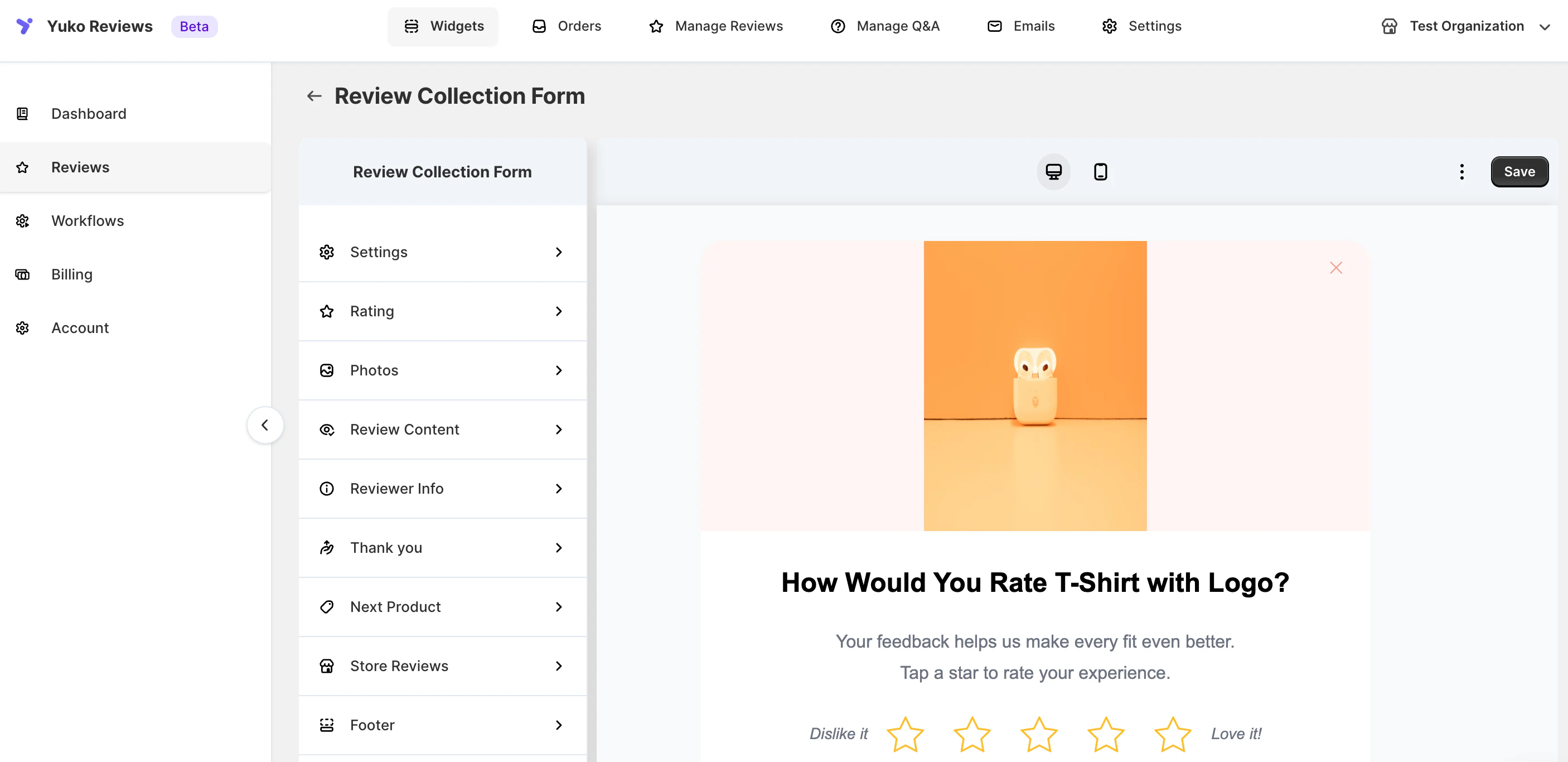 Navigate to the Review Collection Form settings and enable **Store Reviews** as a collection option.
This feature is available in Growth Plan
Navigate to the Review Collection Form settings and enable **Store Reviews** as a collection option.
This feature is available in Growth Plan
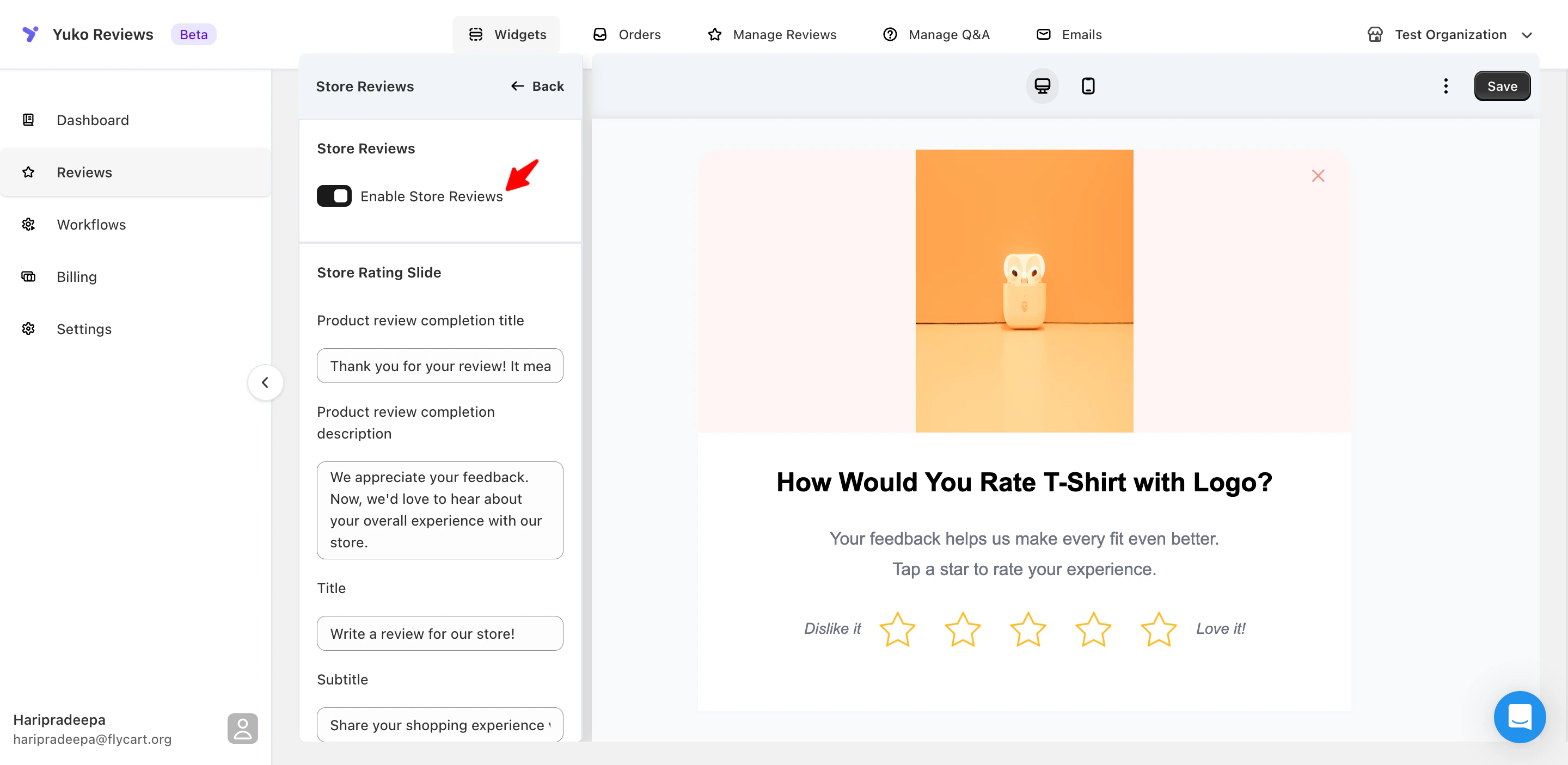 **What this does:**
* Adds "Write a review for our store" option to your site
* Creates dedicated shop review submission form
* Allows customers to review overall experience
* Separate from product review forms
You can customise the text shown at each step of the store review flow. All options below come with default text, which you can edit to match your brand voice.
* **Store Rating Slide**
Customise the message shown after a customer completes a product review and is prompted to leave a store review. You can edit the **completion title** and **description**.
* **Store Review Introduction**
Change the **title** and **subtitle** shown at the start of the store review form to better reflect your store’s tone.
* **Photos Slide (Optional)**
Enable or disable photo uploads for store reviews. When enabled, you can customise the **title**, **description**, **upload button text**, and **image upload helper text**.
* **Review Content**
Edit the **title**, **subtitle**, and **placeholder text** for the main review input to guide customers on what feedback to share.
* Review Title & Anonymous Option
Customise the **review title placeholder** and the **anonymous review label** shown to customers.
**Tip**: Focus on overall rating and open-ended experience question.
## Need Help?
Talk to our team for personalized setup help
**Time:** 30 minutes
Reach our team at yukoreviews.com/support
**Response time:** Within 24 hours
Browse detailed guides for every feature
Connect Yuko with other tools
**Pro tip:** Don't try to collect shop reviews from everyone. Focus on customers who have ordered 2-3 times or had exceptional service interactions. These customers know your brand well enough to give meaningful testimonials.
**What this does:**
* Adds "Write a review for our store" option to your site
* Creates dedicated shop review submission form
* Allows customers to review overall experience
* Separate from product review forms
You can customise the text shown at each step of the store review flow. All options below come with default text, which you can edit to match your brand voice.
* **Store Rating Slide**
Customise the message shown after a customer completes a product review and is prompted to leave a store review. You can edit the **completion title** and **description**.
* **Store Review Introduction**
Change the **title** and **subtitle** shown at the start of the store review form to better reflect your store’s tone.
* **Photos Slide (Optional)**
Enable or disable photo uploads for store reviews. When enabled, you can customise the **title**, **description**, **upload button text**, and **image upload helper text**.
* **Review Content**
Edit the **title**, **subtitle**, and **placeholder text** for the main review input to guide customers on what feedback to share.
* Review Title & Anonymous Option
Customise the **review title placeholder** and the **anonymous review label** shown to customers.
**Tip**: Focus on overall rating and open-ended experience question.
## Need Help?
Talk to our team for personalized setup help
**Time:** 30 minutes
Reach our team at yukoreviews.com/support
**Response time:** Within 24 hours
Browse detailed guides for every feature
Connect Yuko with other tools
**Pro tip:** Don't try to collect shop reviews from everyone. Focus on customers who have ordered 2-3 times or had exceptional service interactions. These customers know your brand well enough to give meaningful testimonials.